VectorStyler
    • Categories
    • Unread
    • Recent
    • Tags
    • Popular
    • Register
    • Login

    Each new object is placed inside of the first layer.

    Scheduled Pinned Locked Moved Questions and Support
    5 Posts 2 Posters 5.2k Views
    Loading More Posts
    • Oldest to Newest
    • Newest to Oldest
    • Most Votes
    Reply
    • Reply as topic
    Log in to reply
    This topic has been deleted. Only users with topic management privileges can see it.
    • encartE Offline
      encart
      last edited by encart

      How to draw a new object in a new layer? I'm not sure if missed something or it's a bug. No matter how many new layers I create, result is the same.
      Should I go into isolation mode?

      https://recordit.co/JJuTeMMaUb

      MacBook Air M4 24Gb, Tahoe 26.2

      VectorStylerV 1 Reply Last reply Reply Quote 0
      • VectorStylerV Offline
        VectorStyler @encart
        last edited by

        @encart Looks like a bug with some layers panel option.
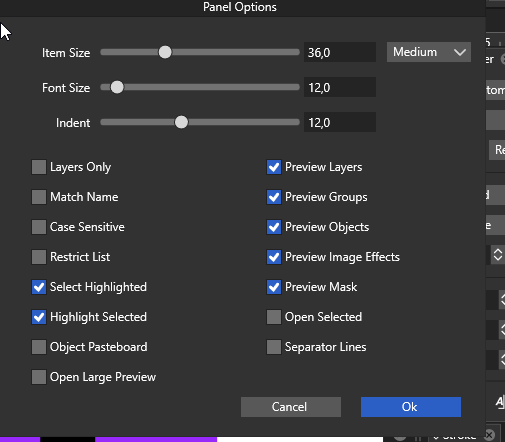
        Can you send a screenshot of the options selected Layers panel menu -> Panel Options?

        1 Reply Last reply Reply Quote 0
        • encartE Offline
          encart
          last edited by

          0_1636196522845_screenshot_20211106_120143.png

          Isolation mode does not help. If I isolate an empty layer the new objects lands in Layer 1.

          +Still can not rename objects/layers by double click.

          MacBook Air M4 24Gb, Tahoe 26.2

          VectorStylerV 1 Reply Last reply Reply Quote 0
          • VectorStylerV Offline
            VectorStyler @encart
            last edited by

            @encart Turn off Select Highlighted and Highlight Selected.
            It looks like there is a bug when these are active.

            encartE 1 Reply Last reply Reply Quote 0
            • encartE Offline
              encart @VectorStyler
              last edited by encart

              @vectoradmin Thank you! Now it's fine.
              Edit:

              Deselecting these two fixed the problem with renaming as well.

              MacBook Air M4 24Gb, Tahoe 26.2

              1 Reply Last reply Reply Quote 1
              • First post
                Last post