New Member/Helpful Beginner Tips Section
-
I have started sending new members in the forum a few helpful starting tips to make their use of the forum easier via private message. I mention things like adding your operating system and computer setup in to your profile, downloading and using a screen capture like "recordit", turning on the history panel during screen videos, turning on the "store history" in the new document window, etc.
Below this paragraph is what i commonly send. I didn't edit this, just typed it out as I was thinking of it, but I was wanting to see if there were other things you would add to it. Maye we could make it a pinned post at the top for new users to review?"Hello! Glad to see you in the VS forum. It's great that you are trying out VS and asking questions. We are all here to help each other. I wanted to share a couple helpful tips that make it easier to help faster. First, if you are willing, go into your profile and add any relevant info about your operating system and set up. That helps others know what you are working on and if the issue might be PC based, Mac based, etc.
The other helpful thing is to use a screen record app like "Recordit" https://recordit.co/
it is free and gives you an immediate link with which you can paste into the forum and people can see what you are dealing with. Typically if I run into an issue, I go back and turn on recordit and re-do what caused the issue and then send that on the forum.I like to turn on the History panel as well when I do screen recordings so people can see the steps listed out in "real time" as I make the recording. That history panel is found under "Panels>Editing>History
Finally, you can go in and tell VS to keep a record within the file itself of your steps. This is helpful if you run into an issue, you can save the file where you're at in the process and send it in to the developer and he can access the stored info to better solve the problem.
That setting is found in File>New Document Setup>Store History
You can upload VS files right to the forum if they are not too big, or email them to the developer directly if privacy is an issue or it's too large to upload on the forum" -
@Boldline Good advice.

I would also make sure I'm notified via email when there's a new reply in a topic I started or posted to:
To do this, click your User icon in the upper right corner, go to Settings and enable 'Email' or 'Notification & Email' here under Notifications & Sounds:
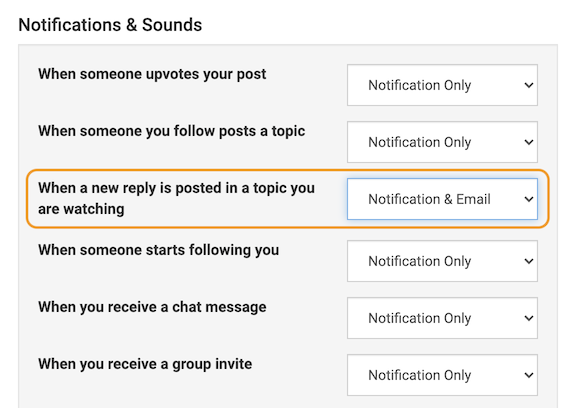
…
Or @vectoradmin could enable this option by default (I know it wasn't enabled when I first registered on the forum). -
@b77 Great addition idea to the newbie section. I'm the opposite of you in that I don't want to be notified for every upvote or new post or reply, etc. What if it was listed as one of the options to point new users to to decide if they want it on or not, while leaving it in the off position by default?
-
@Boldline I'm focusing only on a new reply to a thread I started/posted to, not upvote notifications. I prefer to find that a new reply was posted as soon as possible.
Trouble is some new users post a question on the forum, they get an unexpectedly fast reply/solution (as usual), but I see no interaction on their part for hours, so I guess they expect a notification by email and since they didn't get it, they forget to check the thread they started until hours after.
@vectoradmin Or maybe I'm wrong and it's enabled now by default?
-
Anyway… if not enabled by default, I think the option to enable email notifications for new posts could be mentioned in a short form along with the other tips you mentioned.
-
Hi, I'm still fairly new to the forum. Can someone briefly explain what 'upvoting' is? I occasional get emails through saying a post has been upvoted. Many thanks.
-
@Jono Upvoting is "liking" or "approving" of a post or answer in a thread of a topic. It's similar to the "like" button on Facebook. If someone provides helpful information or you like what they had to say, or you approve of a topic or idea they shared, upvoting is a way to express that. It can also be a way to notice important posts or comments - if they have a lot of upvotes, it's probably a comment worth reading.
You can upvote anyone else's post (besides your own) by clicking on the up arrow symbol on the far right side of any comment post. I hope that helps!

-
That's great, thanks

