VectorStyler
    • Categories
    • Unread
    • Recent
    • Tags
    • Popular
    • Register
    • Login

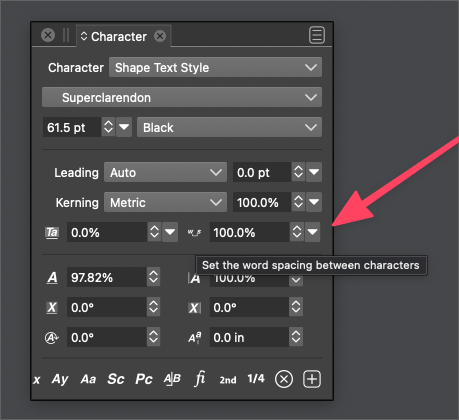
    Keyboard shortcut for word spacing between characters
    Scheduled Pinned Locked Moved Questions and Support
    12 Posts 3 Posters 17.6k Views 2 Watching
    Loading More Posts
    • Oldest to Newest
    • Newest to Oldest
    • Most Votes
    Reply
    • Reply as topic
    Log in to reply
    This topic has been deleted. Only users with topic management privileges can see it.
    • b77B Offline
      b77 @VectorStyler
      last edited by b77

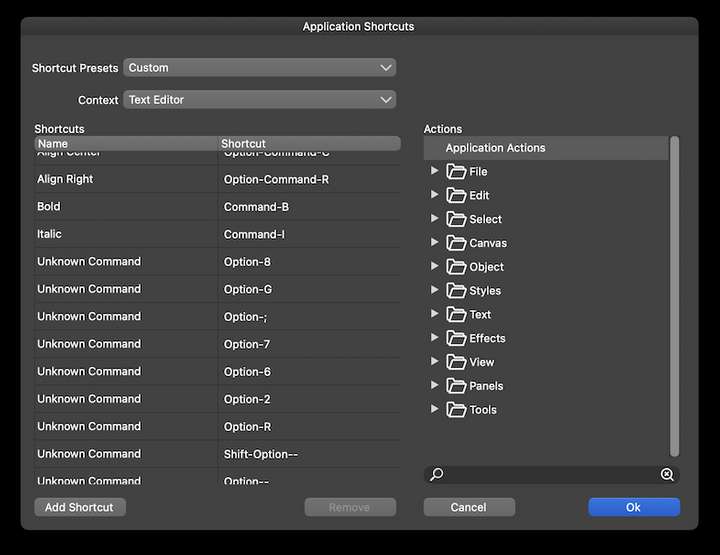
      @vectoradmin Btw, there's a bunch of 'Unknown Commands' here under 'Text Editor' shortcuts:
      0_1640332492280_gt.png

      MacBook Pro (Intel) running Monterey 12.6.4

      VectorStylerV 1 Reply Last reply Reply Quote 0
      • VectorStylerV Offline
        VectorStyler @b77
        last edited by

        @b77 said in Keyboard shortcut for word spacing between characters:

        @vectoradmin Btw, there's a bunch of 'Unknown Commands' here under 'Text Editor' shortcuts:

        Looks like some resource bug. Will get fixed.

        1 Reply Last reply Reply Quote 1
        • BoldlineB Offline
          Boldline
          last edited by

          @VectorStyler were you able to assign a keyboard shortcut for controlling the spacing between words in VS live text? I went looking for it today and was unable to find it in the Application shortcuts text editor section. Would it be somewhere else?

          🍎 macOS Tahoe 26.2, Mac mini (M1, 2020), Chip Apple M1, Memory 16 GB
          Cintiq 27QHD Display and LG Ultra HD Display

          VectorStylerV 1 Reply Last reply Reply Quote 0
          • VectorStylerV Offline
            VectorStyler @Boldline
            last edited by

            @Boldline Should be Control+Option+Left/Right arrow keys.

            BoldlineB 1 Reply Last reply Reply Quote 1
            • BoldlineB Offline
              Boldline @VectorStyler
              last edited by

              @VectorStyler ok yes that works thanks. Where would I find this in the keyboard shortcuts area?

              🍎 macOS Tahoe 26.2, Mac mini (M1, 2020), Chip Apple M1, Memory 16 GB
              Cintiq 27QHD Display and LG Ultra HD Display

              VectorStylerV 1 Reply Last reply Reply Quote 0
              • VectorStylerV Offline
                VectorStyler @Boldline
                last edited by

                @Boldline Should be Increment/Decrement Word Spacing in the shortcut list.

                BoldlineB 1 Reply Last reply Reply Quote 0
                • BoldlineB Offline
                  Boldline @VectorStyler
                  last edited by

                  @VectorStyler Forgive me if I'm missing it, but I don't see it listed as an option under the text editor settings. I was looking around in other areas for it without seeing it either. Can you confirm it's where it's supposed to be? thanks

                  🍎 macOS Tahoe 26.2, Mac mini (M1, 2020), Chip Apple M1, Memory 16 GB
                  Cintiq 27QHD Display and LG Ultra HD Display

                  VectorStylerV 1 Reply Last reply Reply Quote 0
                  • VectorStylerV Offline
                    VectorStyler @Boldline
                    last edited by

                    @Boldline There is no preferences or settings for this, only a shortcut, that changes the spacing by 10%.
                    Should there be a settings?

                    b77B 1 Reply Last reply Reply Quote 0
                    • b77B Offline
                      b77 @VectorStyler
                      last edited by b77

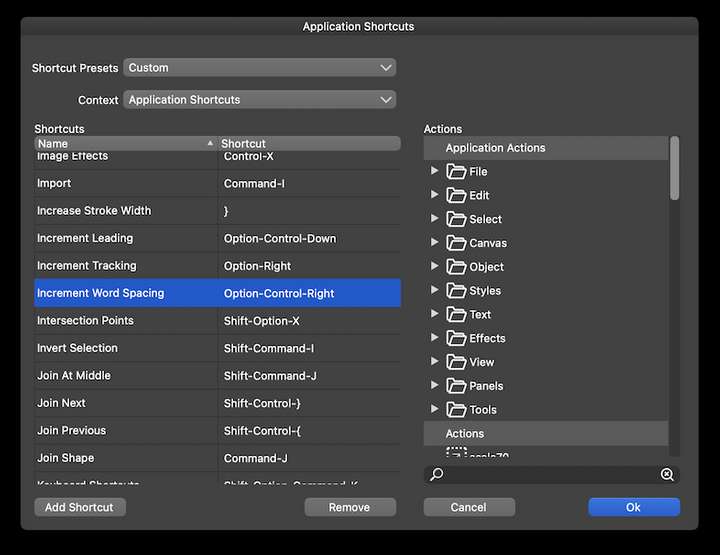
                      @VectorStyler Boldline says it's not in the Keyboard Shortcuts window when 'Text Editor' is the selected Context.

                      @Boldline It's found in the general 'Application Shortcuts' context:
                      0_1652719795690_Screenshot 2022-05-16 at 19.49.12.png

                      I guess it's not under 'Text Editor' because you don't have to switch to the Text tool first for it to work.

                      MacBook Pro (Intel) running Monterey 12.6.4

                      BoldlineB 1 Reply Last reply Reply Quote 2
                      • BoldlineB Offline
                        Boldline @b77
                        last edited by

                        @VectorStyler sorry for the confusion. @b77 thanks for helping get that sorted out.

                        🍎 macOS Tahoe 26.2, Mac mini (M1, 2020), Chip Apple M1, Memory 16 GB
                        Cintiq 27QHD Display and LG Ultra HD Display

                        1 Reply Last reply Reply Quote 1
                        • First post
                          Last post
