Gradient on selection of objects
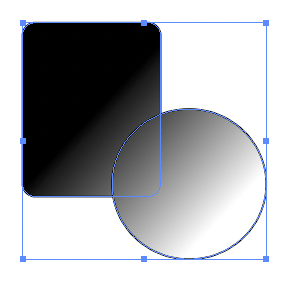
-
@b77 Yes, but this is for scenarios where you do not work with composite shapes.

-
@Ingolf Can be considered a workaround, and I think it's really quick to Option-click the Union button.
Another thing I worry is that some users could consider this a bug.
Anyway, if the developer implements this (assigning a gradient to selected shapes without them being a composite), would it be a problem if the app would make a composite object automatically from the shapes?
-
@b77 said in Gradient on selection of objects:
@Ingolf Can be considered a workaround, and I think it's really quick to Option-click the Union button.
Another thing I worry is that some users could consider this a bug.
Anyway, if the developer implements this (assigning a gradient to selected shapes without them being a composite), would it be a problem if the app would make a composite object automatically from the shapes?
I have used this feature for years in other programs and never heard about issues, so I am not worried. I actually believe people (the young generation of users) expect software to work like this today - seamless and fast. Not Illustrator heavy. It's really quick to Option-click the Union button. It takes months to memorize all these tricks for new users and I forget them myself as I migrate to modern software and return to manual based software.
Yes, it would be a problem, because it is just a fast method for applying a gradient to several objects you do not want to link or group. Sometimes you will adjust them individually afterwards. It has many uses - the essence of it is it enables you to work fast.
-
@Ingolf Aside from Amadine, where are you seeing this feature? Affinity?
-
@Ingolf Aside from Amadine, where are you seeing this feature? Affinity?
As I said, it is a common feature. From what I know of (and all own/have)
- CorelDRAW
- Inkscape
- Affinity
- Amadine
Working with gradient in these programs is fast fast and fun. Working with gradients in Illustrator, however, is slow, clumsy, archaic and painful and probably the main reason why I never use Illustrator anymore - although I have the latest version of all Adobe Creative Cloud programs on my work machine. And that is why it came as no suprise that when I just booted that work machine and tried... Illustrator CC did not support it!
As I have mentioned here a dozen times one of the main reasons why Affinity got so many customers - even current users and customers of Adobe Illustrator - was that they removed exactly all that pain from several workflows and made them intuitive and fast. When I return to Illustrators work like a machine workflows I wonder who would buy it today if it was a newcomer.
-
@Ingolf I'm not opposed to new ways of doing things and I'm all for efficiency and ease... and I agree that Illustrator is old-school - bloated and overly compartmentalized.
Stuff like this example reminds me more of what people do who want simple fast graphics. VS is not a simple and light UI (though the VS code is 10 times smaller than Designer! ) but it's also not overly compartmentalized either. There are surface level options for most things and then the option to go deeper in any area if you so choose.
I like the feature you shared - but I wonder if it needs a little more structure to be understood. For example, what if you selected the multiple shapes and then grabbed the gradient and dragged it over all the shapes - it would automatically make them a compound shape and offer that solution?
-
I don't think it needs more complexity - and I never used it in a scenario where a compound shape would make sense - because then I would have made it one in the first place.
It is simply for uses cases where a gradient across several independent objects makes sense. In many type of works many artists do not use the classic add, subtract, split, join workflow at all but simply use the tools creatively as well to get the appearance you are looking for. Following the old cook book from Illustrator to achive simple things is to slow things down. Probably also sales.
I don't need it desperately - I just think it is silly it is not there. When a user selects several objects, it is expected that they will be affected by the active tool. If you need less objects to be affected, select less objects.
As now that this is how it works in every program except clumsy Illustrator I just consider it missing in VS.
-
@Ingolf Interesting feature. I add it to the feature list (usually prioritized after the bugs).
VS has a related feature: fill and mask regions. But in this case the gradient will be linked to a region defined by a third object.
It is a bit more complicated:- setup an object for the region.
- set an object name, and add the "Fill and Mask Region" object role.
- select the object(s) with the gradient.
- select the "Fill" content in Appearance panel.
- in the panel menu select the Fill Region
- IMPORTANT: once the gradient has a fill region, other gradients may "inherit" this, so in some cases one may need to select the "None" fill region, to get rid of it.
Here is a recording: https://recordit.co/RaGtWcwkts
EDIT: attached the resulting file also:
0_1640937292844_gradientarea2.vstyler -
@vectoradmin said in Gradient on selection of objects:
@Ingolf Interesting feature. I add it to the feature list (usually prioritized after the bugs).
VS has a related feature: fill and mask regions. But in this case the gradient will be linked to a region defined by a third object.
It is a bit more complicated:- setup an object for the region.
- set an object name, and add the "Fill and Mask Region" object role.
- select the object(s) with the gradient.
- select the "Fill" content in Appearance panel.
- in the panel menu select the Fill Region
- IMPORTANT: once the gradient has a fill region, other gradients may "inherit" this, so in some cases one may need to select the "None" fill region, to get rid of it.
Here is a recording: https://recordit.co/RaGtWcwkts
EDIT: attached the resulting file also:
0_1640937292844_gradientarea2.vstylerThank you for the instructions
-
Example where I just used this in Affinity: several windows on a building, several floors. Many individual window glasses in several windows marked as a group and instantly colorized as a whole with a single gradient. Boom. Easy, fast, natural, efficient.
-
@Ingolf If the objects are grouped, then add a fill using the Appearance panel (first + icon at the bottom).
Click on the fill color, and select Gradient mode, and select a gradient preset.(not working with the gradient tool, will try to fix that).


