VectorStyler
    • Categories
    • Unread
    • Recent
    • Tags
    • Popular
    • Register
    • Login

    Mesh gradient editor
    Scheduled Pinned Locked Moved Resolved Issues
    28 Posts 7 Posters 47.3k Views 7 Watching
    Loading More Posts
    • Oldest to Newest
    • Newest to Oldest
    • Most Votes
    Reply
    • Reply as topic
    Log in to reply
    This topic has been deleted. Only users with topic management privileges can see it.
    • VectorStylerV Offline
      VectorStyler @freggern
      last edited by

      @freggern After the mesh is created (initially it has only one internal node), the node must be selected and a color selected for that node.

      Exporting to SVG: there seems to be a bug here (replicated), it should be the same as the document.
      Also: in SVG the mesh is flattened to an image for now.

      1 Reply Last reply Reply Quote 0
      • F Offline
        freggern
        last edited by

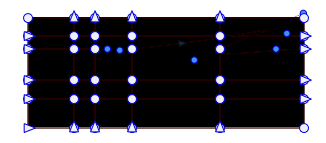
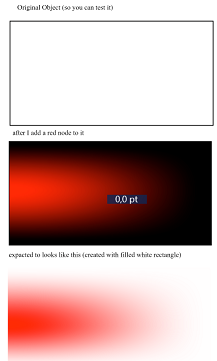
        Make some investigation. The problem is when there is a "alpha channel". When I start with a ractangle not filled (so transparent and with an alpha channel) and select the ractangle with the Mesh gradient editor the alpha channel looks like is not supported and rendered as black color in VS?

        alt text

        VectorStylerV 1 Reply Last reply Reply Quote 0
        • F Offline
          freggern
          last edited by freggern

          Also with no filling the mash gradient editor doesn't detect when I click inside the element to create a new node (only on the border see above animation). With filling it create a node (second click on black).

          Edit: To make it clear
          alt text

          VectorStylerV 1 Reply Last reply Reply Quote 0
          • VectorStylerV Offline
            VectorStyler @freggern
            last edited by

            @freggern Selection with the no fill problem can be replicated. This looks like a bug

            1 Reply Last reply Reply Quote 0
            • VectorStylerV Offline
              VectorStyler @freggern
              last edited by

              @freggern Alpha channels are supported in VS (assign opacity for a mesh node).
              I need some help replicating this issue. Can you send me (email csraba at vectorstyler.com or upload here) a file where this alpha channel is not rendered? Thanks!
              Maybe it is some other issue.

              1 Reply Last reply Reply Quote 0
              • F Offline
                freggern
                last edited by

                You can found the file here: https://www.dropbox.com/s/zycyrqmp33v5t04/Mesh gradient editor.vstyler?dl=0
                File looks like:
                0_1641472479548_node.png

                VectorStylerV 1 Reply Last reply Reply Quote 1
                • F Offline
                  freggern
                  last edited by

                  Another bug is when I use after the "Mesh gradiet editor" the "Gradient editor". The element I edit change position (but setting for mesh and shape lines are on the expected position)
                  alt text

                  VectorStylerV 1 Reply Last reply Reply Quote 0
                  • VectorStylerV Offline
                    VectorStyler @freggern
                    last edited by

                    @freggern I will try to replicate these.

                    1 Reply Last reply Reply Quote 0
                    • VectorStylerV Offline
                      VectorStyler @freggern
                      last edited by

                      @freggern said in Mesh gradient editor:

                      You can found the file here: https://www.dropbox.com/s/zycyrqmp33v5t04/Mesh gradient editor.vstyler?dl=0

                      Understand the problem now. I will try to fix it.

                      VectorStylerV 1 Reply Last reply Reply Quote 0
                      • VectorStylerV Offline
                        VectorStyler @VectorStyler
                        last edited by

                        @vectoradmin These problems should be fixed in build 1.1.008

                        1 Reply Last reply Reply Quote 0
                        • F Offline
                          freggern
                          last edited by

                          thx, tested!

                          1 Reply Last reply Reply Quote 1
                          • Devil DinosaurD Offline
                            Devil Dinosaur
                            last edited by Devil Dinosaur

                            Hi Everyone,
                            I'm giving a try to this promising software, testing different tools. I try to use the Mesh Gradient but every time it erases the shape I just created, either when I'm using the tool from the toolbox or the styles menu.
                            I followed the documentation, checked several times the opacity but the shape is deleted when I click to create the mesh (I cannot see it, even in outline view). The mesh Transparency mask works fine.
                            1.1.014 on Mac, Sierra

                            Edit : I just noticed that the gradient panel makes the software crash every time. The gradient tool from the Toolbox seems OK but when I want to change the settings, it freezes then crashes.

                            Fred.
                            MacBook Pro (M1) - MacOs Sonoma 14

                            b77B VectorStylerV 2 Replies Last reply Reply Quote 0
                            • b77B Offline
                              b77 @Devil Dinosaur
                              last edited by

                              @Devil-Dinosaur Can confirm the issue here.

                              MacBook Pro (Intel) running Monterey 12.6.4

                              1 Reply Last reply Reply Quote 0
                              • G Offline
                                Gremriel
                                last edited by

                                Happens on Windows as well.

                                WIndows 11

                                1 Reply Last reply Reply Quote 0
                                • VectorStylerV Offline
                                  VectorStyler @Devil Dinosaur
                                  last edited by

                                  @Devil-Dinosaur yes, can be replicated here, must be a recent regression. Will get fixed ASAP.

                                  1 Reply Last reply Reply Quote 0
                                  • Devil DinosaurD Offline
                                    Devil Dinosaur
                                    last edited by Devil Dinosaur

                                    Thank you.
                                    If it can help I noticed that, after trying to apply the gradient mesh, the object turns into an "empty object" in the layer panel. But it's the only trace of it.
                                    Edit 1 : Mesh gradient works on 1.1.020. But... the following shapes I created after applying mesh gradient to the first one have a gradient mesh by default. (?)

                                    Edit 2 : I still have the problem with the gradient panel and options.
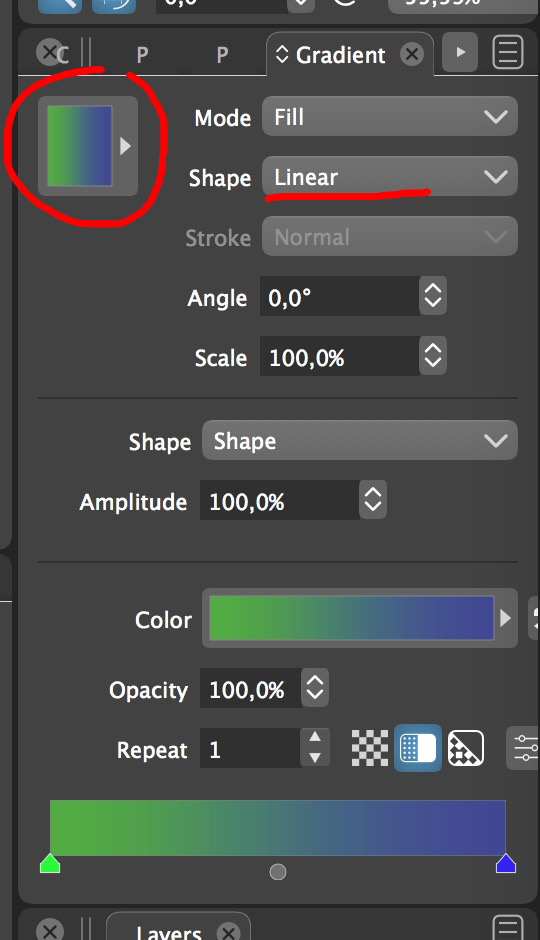
                                    Clicking the preview window to gain access to the presets make a crash. On the presets, conical makes freeze and crash, as well as some as the presets shapes. I haven't tried them all (it's a long list and I have to restart every time...), but the conclusion is : some work, some don't.
                                    alt text

                                    Fred.
                                    MacBook Pro (M1) - MacOs Sonoma 14

                                    VectorStylerV 1 Reply Last reply Reply Quote 0
                                    • Devil DinosaurD Offline
                                      Devil Dinosaur
                                      last edited by

                                      Hi Everyone,
                                      This time I will try to sound less like a burden... 😅
                                      I also had problems with some of the blur effects (freeze then crash). So I changed the performance settings in the preferences from open CL open GL to software (x2) and... conical gradient works, gradient presets seem to work, blur effects work. So I guess it may have something to do with my graphic card (NVIDIA GeForce GT 750M). Unfortunately, I cannot test on other card/computers. But there may be something to dig there... 🤔

                                      Fred.
                                      MacBook Pro (M1) - MacOs Sonoma 14

                                      VectorStylerV 1 Reply Last reply Reply Quote 0
                                      • VectorStylerV Offline
                                        VectorStyler @Devil Dinosaur
                                        last edited by

                                        @Devil-Dinosaur

                                        Are you using VS on Windows or Mac? It seems that it could be some GPU config issue with the crashes.

                                        About the gradients:

                                        I tried to replicate the shape drawing after mesh gradient issue. At least in my case, after creating mesh gradients, new shapes are drawn with a solid fill.

                                        As for the gradient crashes: try various options in the Preferences -> Performance -> Compute Engine.

                                        1 Reply Last reply Reply Quote 0
                                        • VectorStylerV Offline
                                          VectorStyler @Devil Dinosaur
                                          last edited by

                                          @Devil-Dinosaur No such thing as burden 🙂

                                          Great! this seems to identify the issue.
                                          If you use Windows (?), you should also have the option for CUDA in the compute list.

                                          And: some OpenCL drivers may have issues, try to check if there is a driver update for the specific GPU.

                                          b77B 1 Reply Last reply Reply Quote 0
                                          • b77B Offline
                                            b77 @VectorStyler
                                            last edited by b77

                                            @vectoradmin DD wrote in his first post that he uses a Mac with Sierra.

                                            @Devil-Dinosaur You could include your computer's configuration in your signature (click your forum's icon in the upper right corner and choose 'Edit Profile'), so it's easier to figure out next time. 👍

                                            MacBook Pro (Intel) running Monterey 12.6.4

                                            VectorStylerV 1 Reply Last reply Reply Quote 0
                                            • First post
                                              Last post
