Simultaneously modify multiple nodes of a stroke with Stroke Width Tool
-
Would it be possible to add the ability to simultaneously modify multiple points of a stroke width with the Stroke Width tool? I was testing this out and realized I could not select more than one node at a time with this tool
Right now only one node can be selected at a time and it only affects that one specific area. (Nothing wrong with this ability as it is) but it would be nice to offer two other "modes" of edit if you will, one where you can select multiple nodes on the stroke at the same time and all of them get the same treatment based on how you modify the width, the other, is a residual affect, where the when three or more nodes are selected, there is a tapering off of the width edit affecting the selected nodes.
Thinking more on it - I know that if you have fewer nodes, there's already a tapering of the effect across the length of the stroke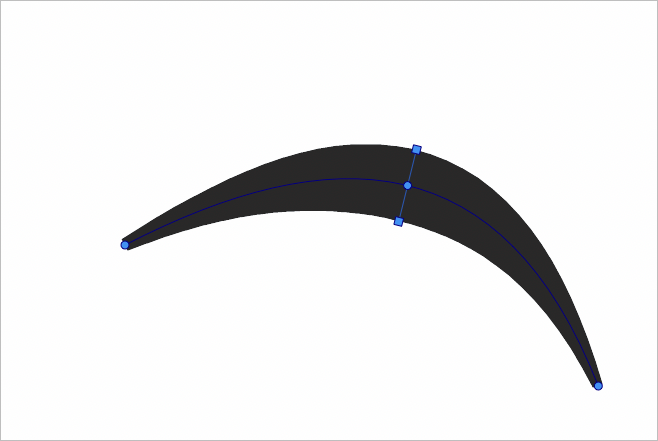
So I don't know if the better answer is to just remove extra nodes to get that same tapering effect? Regardless I'd still think the ability to select multiple nodes with the stroke width tool could be an asset -
@Boldline I add this to the backlog.
-
@vectoradmin - I was looking into the Stroke Panel more - would it make sense to also have this panel open when you double click on the stroke width toolbar icon? Or is that not consistent with other tools? Are the panels that open when double clicking on the toolbar a simpler panel and the official panels in the panel menu more advanced?
My earlier post in this thread I was talking about being able to select multiple width nodes for editing at the same time. I noticed there's a button in the stroke width panel that partially allows for this (it seems to allow selection of all width nodes at one time on selected paths). I noticed that I can only edit both width nodes at the same time if I am using the panel itself to do so. Putting the cursor on one node and modifying it directly does not alter the other at this point. Would still love the original request option to select certain nodes and not all.
I know this is already logged in the backlog but was just adding some things I noticed in using the stroke width panel.
Nice to see the multiple width node editing is already in part there!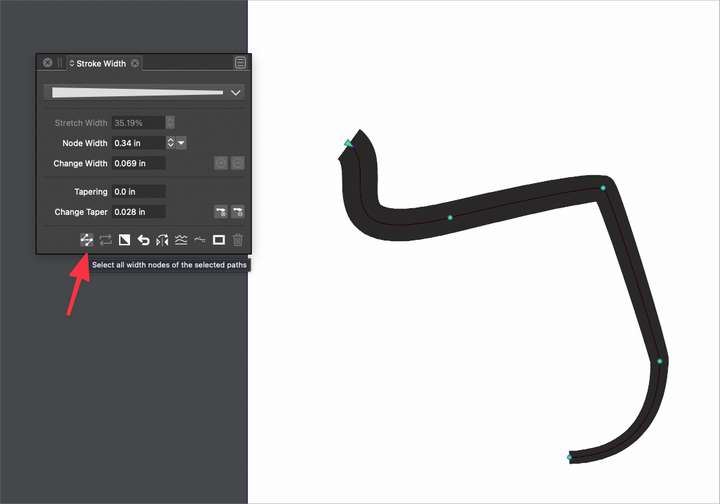
🍎 macOS Tahoe 26.2, Mac mini (M1, 2020), Chip Apple M1, Memory 16 GB
Cintiq 27QHD Display and LG Ultra HD Display -
@Boldline Yes, multiple nodes can be selected. But there is some conflict with modifiers.
-
@Boldline This feature has been added in build 1.1.008

