VectorStyler
    • Categories
    • Unread
    • Recent
    • Tags
    • Popular
    • Register
    • Login

    best way to edit stroke width of individual line but not have it applied to active pen tool line?
    Scheduled Pinned Locked Moved Questions and Support
    7 Posts 3 Posters 7.0k Views 2 Watching
    Loading More Posts
    • Oldest to Newest
    • Newest to Oldest
    • Most Votes
    Reply
    • Reply as topic
    Log in to reply
    This topic has been deleted. Only users with topic management privileges can see it.
    • BoldlineB Offline
      Boldline
      last edited by

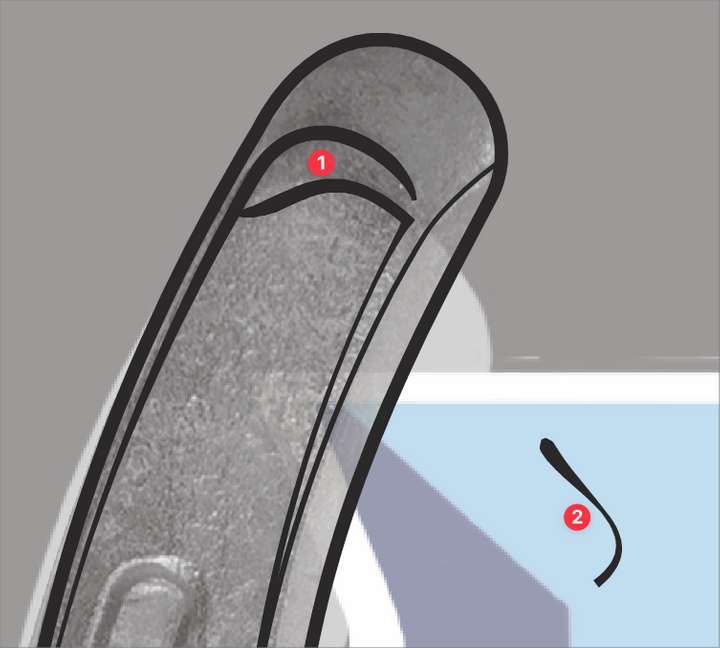
      As I am adding strokes with the pen tool, sometimes I go in and edit the line with the stroke width tool before continuing to use the pen tool to make more strokes afterward (#1). However, those new strokes maintain the edited width properties I gave the earlier stroke (#2).
      I think this is a great feature and I often use it, but other times I want to return to the pen tool setting s I was using prior to that stroke width edit. Is there a fast way to do that?
      0_1641923230053_083c3b80-8fca-43bd-9d28-e72c88c744c5-BLD 2022-01-11 at 12.43.40.png

      🍎 macOS Tahoe 26.2, Mac mini (M1, 2020), Chip Apple M1, Memory 16 GB
      Cintiq 27QHD Display and LG Ultra HD Display

      VectorStylerV 1 Reply Last reply Reply Quote 0
      • VectorStylerV Offline
        VectorStyler @Boldline
        last edited by

        @Boldline The only way for now is to select a solid Profile in the Stroke panel.

        1 Reply Last reply Reply Quote 0
        • S Offline
          Subpath
          last edited by

          @Boldline

          Dont know if am right.
          But, is it not possible to use the history Panel function
          in VS, which you often mention, to switch between the
          two desired states?

          Win 11
          CPU: AMD Ryzen 5 9600X, 6-core.
          GPU: Nvidia Geforce RTX 5070.

          VectorStylerV 1 Reply Last reply Reply Quote 0
          • VectorStylerV Offline
            VectorStyler @Subpath
            last edited by

            @Subpath The History panel will undo the previous width profile changes.

            S 1 Reply Last reply Reply Quote 1
            • S Offline
              Subpath @VectorStyler
              last edited by

              @vectoradmin

              ok, then it was a wrong guess from me.

              Win 11
              CPU: AMD Ryzen 5 9600X, 6-core.
              GPU: Nvidia Geforce RTX 5070.

              BoldlineB 1 Reply Last reply Reply Quote 0
              • BoldlineB Offline
                Boldline @Subpath
                last edited by

                @Subpath It's never a bad thing to ask questions and throw ideas out there. We're all learning things in VS

                🍎 macOS Tahoe 26.2, Mac mini (M1, 2020), Chip Apple M1, Memory 16 GB
                Cintiq 27QHD Display and LG Ultra HD Display

                S 1 Reply Last reply Reply Quote 1
                • S Offline
                  Subpath @Boldline
                  last edited by

                  @Boldline

                  thats right 🙂

                  Win 11
                  CPU: AMD Ryzen 5 9600X, 6-core.
                  GPU: Nvidia Geforce RTX 5070.

                  1 Reply Last reply Reply Quote 0
                  • First post
                    Last post
