VectorStyler
    • Categories
    • Unread
    • Recent
    • Tags
    • Popular
    • Register
    • Login

    Improving layer color indicators aesthetically

    Scheduled Pinned Locked Moved Features and Ideas
    6 Posts 3 Posters 5.9k Views 2 Watching
    Loading More Posts
    • Oldest to Newest
    • Newest to Oldest
    • Most Votes
    Reply
    • Reply as topic
    Log in to reply
    This topic has been deleted. Only users with topic management privileges can see it.
    • BoldlineB Offline
      Boldline
      last edited by Boldline

      This is lower or the priority list, but could the layer color indicators fill most of the vertical height of the layer tab and align with the preview box? I feel like it would help with the aesthetics. the current small squares seem to get lost easily to the eye
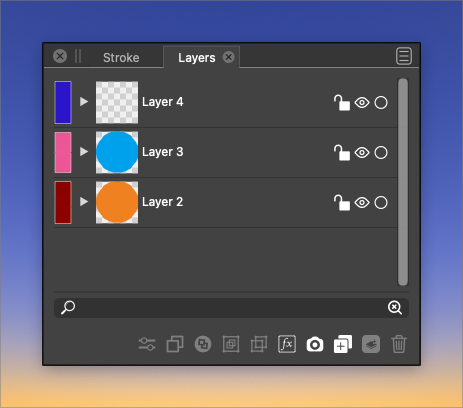
      0_1642602999552_layer colors.png

      🍎 macOS Tahoe 26.2, Mac mini (M1, 2020), Chip Apple M1, Memory 16 GB
      Cintiq 27QHD Display and LG Ultra HD Display

      BoldlineB VectorStylerV 2 Replies Last reply Reply Quote 1
      • BoldlineB Offline
        Boldline @Boldline
        last edited by

        @vectoradmin I realized when I was testing things on a different computer, that I had edited the layer settings and made the layers larger and that was why the square seemed small to me.

        When I look at it with regular settings, the square seems fine. Is there an option to change the size of the rectangle/square based on editing the settings of the layer?
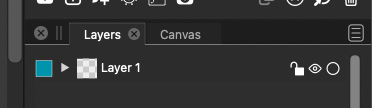
        0_1642604676621_layer .png

        🍎 macOS Tahoe 26.2, Mac mini (M1, 2020), Chip Apple M1, Memory 16 GB
        Cintiq 27QHD Display and LG Ultra HD Display

        VectorStylerV 1 Reply Last reply Reply Quote 0
        • IngolfI Offline
          Ingolf
          last edited by

          I think the height of the two should just be identical at all times - a preference would not make much sense.

          🍏 macOS Sequoia Apple Silicon

          BoldlineB 1 Reply Last reply Reply Quote 1
          • BoldlineB Offline
            Boldline @Ingolf
            last edited by

            @Ingolf I agree, that's essentially what I was asking for. Not that I'm a developer, but tying the size of the vertical height of the color box to the layer art preview box would seem do-able to me

            🍎 macOS Tahoe 26.2, Mac mini (M1, 2020), Chip Apple M1, Memory 16 GB
            Cintiq 27QHD Display and LG Ultra HD Display

            1 Reply Last reply Reply Quote 0
            • VectorStylerV Offline
              VectorStyler @Boldline
              last edited by

              @Boldline I added this to the backlog.

              1 Reply Last reply Reply Quote 1
              • VectorStylerV Offline
                VectorStyler @Boldline
                last edited by

                @Boldline This should be available in build 1.1.024

                1 Reply Last reply Reply Quote 0
                • First post
                  Last post
