VectorStyler
    • Categories
    • Unread
    • Recent
    • Tags
    • Popular
    • Register
    • Login

    Shortcut Finder

    Scheduled Pinned Locked Moved Features and Ideas
    15 Posts 4 Posters 14.2k Views 3 Watching
    Loading More Posts
    • Oldest to Newest
    • Newest to Oldest
    • Most Votes
    Reply
    • Reply as topic
    Log in to reply
    This topic has been deleted. Only users with topic management privileges can see it.
    • IngolfI Offline
      Ingolf
      last edited by Ingolf

      The ideal solution would be that it was a part of Vectorstyler itself.

      Advantages:

      • Added custom shortcuts included
      • Customized Vectorstyler shortcuts included (defaults changed to something else by user)
      • No need to display both macOS and Windows shortcuts

      🍏 macOS Sequoia Apple Silicon

      BoldlineB 1 Reply Last reply Reply Quote 3
      • BoldlineB Offline
        Boldline @Ingolf
        last edited by

        I agree that ideally, the interactive search option for keyboard shortcuts should be built into VS.
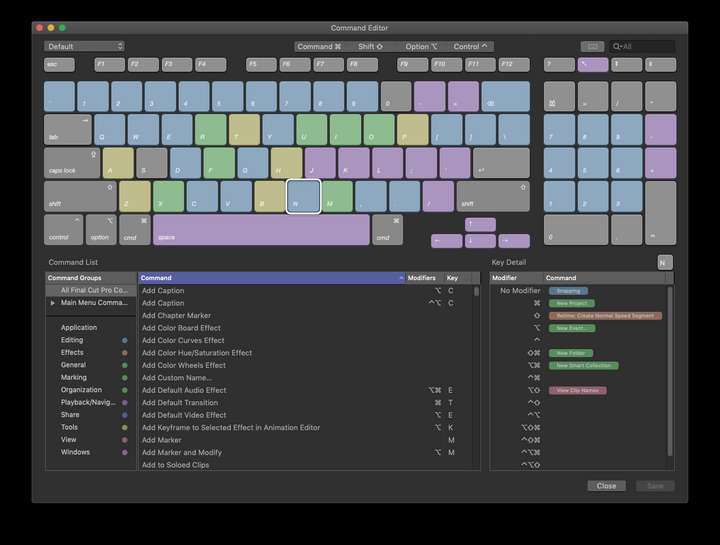
        Final Cut Pro has a keyboard image that shows a virtual keyboard in the panel. Clicking on a key shows the shortcuts assigned to it with each combination of modifiers. This might be overkill - even just if you selected a keyboard shortcut from the interactive list, the keys used in that modifier would be highlighted in the keyboard
        0_1643573800057_a382ed13-9006-4d71-967d-219e080ee49e-image.png

        🍎 macOS Tahoe 26.2, Mac mini (M1, 2020), Chip Apple M1, Memory 16 GB
        Cintiq 27QHD Display and LG Ultra HD Display

        b77B 1 Reply Last reply Reply Quote 1
        • b77B Offline
          b77 @Boldline
          last edited by b77

          @Subpath It's not the same as a list included in the app, but I made a sortable HTML file that does this for the Mac shortcuts.
          Just click any of the headers to sort by Command, Shortcut or Menu/Context.

          https://www.dropbox.com/s/dy3joqh0y57ldb3/Sortable_shortcuts_WIP.html?dl=0

          Trouble is I don't have Windows here, so I'm not sure how to do a version for Windows. Just replace Cmd with Ctrl?

          MacBook Pro (Intel) running Monterey 12.6.4

          S 1 Reply Last reply Reply Quote 2
          • S Offline
            Subpath @b77
            last edited by Subpath

            @b77

            ... Trouble is I don't have Windows here, so I'm not sure how to do a version for Windows ...

            big thanks for the file
            don't worry, i figure it out

            As far as i know:

            Mac ------ Pc (german)
            Cmd ------ Ctrl (STRG)
            Shift ------ Shift
            Option/ALT ------ ALT

            Win 11
            CPU: AMD Ryzen 5 9600X, 6-core.
            GPU: Nvidia Geforce RTX 5070.

            b77B 1 Reply Last reply Reply Quote 0
            • S Offline
              Subpath
              last edited by Subpath

              I also vote for a Shortcut Finder in VS
              and like @Boldlines "Final Cut Pro virtual keyboard" the most

              i dreamed about a shortcut search function.
              where I get a List whats with Ctrl connected, or key combinations.

              Win 11
              CPU: AMD Ryzen 5 9600X, 6-core.
              GPU: Nvidia Geforce RTX 5070.

              1 Reply Last reply Reply Quote 1
              • b77B Offline
                b77 @Subpath
                last edited by b77

                @Subpath Mac keyboards have the Control and the Command key, so for the Mac version these two can be used in the same shortcut.

                Since Windows is different (the Windows key cannot be used in shortcuts AFAIK), I'm not sure how to change these.

                But if somebody can send me the Windows shortcuts as a .CSV or Excel file (description, shortcut and menu/context), I can use that to make a sortable HTML table.

                MacBook Pro (Intel) running Monterey 12.6.4

                S 1 Reply Last reply Reply Quote 1
                • S Offline
                  Subpath @b77
                  last edited by

                  @b77

                  usual Ctrl, Shift, Alt will be used as Shortcut Keys on Windows
                  and combinations

                  i think the Windows-key is used for Windows OS commands only
                  like bring the Windows Start Menu up

                  Win 11
                  CPU: AMD Ryzen 5 9600X, 6-core.
                  GPU: Nvidia Geforce RTX 5070.

                  1 Reply Last reply Reply Quote 0
                  • S Offline
                    Subpath
                    last edited by Subpath

                    Hi

                    For Windows users. I sorted the standard VS shortcuts by command keys. Posting this as Text so you can copy and paste them.

                    They are sorted as follows:

                    Single Key

                    Ctrl Key

                    Shift Key
                    Shift+Ctrl Key
                    Shift+Alt Key
                    Shift+Alt+Ctrl Key

                    Alt Key
                    Alt+Ctrl Key
                    .
                    .
                    .
                    Single Key

                    Blend Tool : W
                    Brush Tool : B
                    Clear Isolation : Esc
                    Collider Tool : C
                    Contour Tool : Q
                    Decrease Stroke Width : {
                    Delete : Delete
                    Delete : Back
                    Ellipse : E
                    Gradient Editor : G
                    Increase Stroke Width : }
                    Knife Tool : K
                    Lasso Selection : Y
                    Line Drawing : \
                    Magic Wand : M
                    Mesh Gradient Editor : U
                    Move Down : Down
                    Move Left : Left
                    Move Right : Right
                    Move Up : Up
                    Next Artboard : PgDown
                    Pan View Tool : H
                    Path Sketch : L
                    Pattern Tool : S
                    Pen Tool : P
                    Pencil : F
                    Previous Artboard : PgUp
                    Rectangle : J
                    Reflection Tool : O
                    Revert : F12
                    Rotate View Tool : R
                    Shape Editor : A
                    Split Preview : ,
                    Style Picker : I
                    Swap Fill Mode : X
                    Text Tool : T
                    Transform Tool : V
                    Vertical Split : /
                    Zoom View Tool : Z
                    action.action.deeptransformtool : D
                    action.action.transformtool : N
                    .
                    .
                    .
                    Ctrl

                    Actual Size : Ctrl-1
                    Break Apart : Ctrl-K
                    Bring Forward : Ctrl-Up
                    Character : Ctrl-T
                    Close View : Ctrl-W
                    Combine : Ctrl-8
                    Copy : Ctrl-C
                    Create Layer : Ctrl-L
                    Cut : Ctrl-X
                    Document Styles : Ctrl-U
                    Duplicate : Ctrl-D
                    Export : Ctrl-E
                    Find/Replace : Ctrl-F
                    Group : Ctrl-G
                    History : Ctrl-H
                    Import : Ctrl-I
                    Join Shape : Ctrl-J
                    Magic Wand : Ctrl-M
                    New Document : Ctrl-N
                    Next Canvas : Ctrl-PgDown
                    Next Document View : Ctrl-`
                    Next Document View : Ctrl-Tab
                    Next Document View : Ctrl-~
                    Next Document View : Ctrl-F6
                    Open Document : Ctrl-O
                    Outline Preview : Ctrl-Y
                    Paste : Ctrl-V
                    Paste Below : Ctrl-B
                    Preferences : Ctrl-,
                    Previous Canvas : Ctrl-PgUp
                    Print : Ctrl-P
                    Refresh : Ctrl-R
                    Reselect : Ctrl-6
                    Rotate Clockwise : Ctrl-Right
                    Rotate Counter Clockwise : Ctrl-Left
                    Rotate to 0° : Ctrl-3
                    Save : Ctrl-S
                    Select All : Ctrl-A
                    Select Next : Ctrl-}
                    Select Previous : Ctrl-{
                    Send Backward : Ctrl-Down
                    Show Guidelines : Ctrl-;
                    Snap to Grid : Ctrl
                    Snap to Guidelines : Ctrl-/
                    Snap to Objects : Ctrl-.
                    Undo : Ctrl-Z
                    Zoom In : Ctrl-=
                    Zoom In : Ctrl-+
                    Zoom In : Ctrl-Num-+
                    Zoom Out : Ctrl--
                    Zoom to All Objects : Ctrl-2
                    Zoom to Artboard : Ctrl-0
                    Zoom to Selection : Ctrl-4
                    .
                    .
                    .

                    Shift

                    4-Point Distortion : Shift-F
                    Anchor Point Tool : Shift-C
                    Artboard Editor : Shift-O
                    Character Tool : Shift-T
                    Divide : Shift-D
                    Elastic Warp Distortion : Shift-A
                    Envelope Distortion : Shift-G
                    Eraser Tool : Shift-E
                    Liquify Tool : Shift-W
                    Merge : Shift-M
                    Move 10 Down : Shift-Down
                    Move 10 Left : Shift-Left
                    Move 10 Right : Shift-Right
                    Move 10 Up : Shift-Up
                    Path Brush Tool : Shift-B
                    Rotate Tool : Shift-R
                    Stroke Width Tool : Shift-P
                    Swap Fill / Stroke Styles : Shift-X
                    Union : Shift-U
                    .
                    .
                    .
                    Shift-Ctrl

                    Clone : Shift-Ctrl-D
                    Copy Appearance : Shift-Ctrl-C
                    Cut Content : Shift-Ctrl-X
                    Deselect : Shift-Ctrl-A
                    Document Setup : Shift-Ctrl-P
                    Export Again : Shift-Ctrl-E
                    Invert Selection : Shift-Ctrl-I
                    Join At Middle : Shift-Ctrl-J
                    Join Next : Shift-Ctrl-}
                    Join Previous : Shift-Ctrl-{
                    Layer Options : Shift-Ctrl-L
                    Locate Selection : Shift-Ctrl-K
                    Member Canvas : Shift-Ctrl-PgDown
                    Move One 10th Down : Shift-Ctrl-Down
                    Move One 10th Left : Shift-Ctrl-Left
                    Move One 10th Right : Shift-Ctrl-Right
                    Move One 10th Up : Shift-Ctrl-Up
                    New From Clipboard : Shift-Ctrl-N
                    Object Options : Shift-Ctrl-O
                    Object Styles : Shift-Ctrl-U
                    Paragraph : Shift-Ctrl-T
                    Parent Canvas : Shift-Ctrl-PgUp
                    Paste Inside : Shift-Ctrl-V
                    Paste in Place : Shift-Ctrl-B
                    Previous Document View : Shift-Ctrl-`
                    Previous Document View : Shift-Ctrl-Tab
                    Previous Document View : Shift-Ctrl-~
                    Previous Document View : Shift-Ctrl-F6
                    Redo : Shift-Ctrl-Z
                    Repeat Last : Shift-Ctrl-R
                    Save As : Shift-Ctrl-S
                    Select All Found : Shift-Ctrl-F
                    Ungroup : Shift-Ctrl-G
                    .
                    .
                    .

                    Shift-Alt

                    Bring to Front : Shift-Alt-Up
                    Convert to Curves : Shift-Alt-O
                    Intersection Points : Shift-Alt-X
                    Move : Shift-Alt-M
                    Move Inside Last : Shift-Alt-Right
                    Move Outside Container : Shift-Alt-Left
                    New View : Shift-Alt-N
                    Release Guides : Shift-Alt-G
                    Rotate : Shift-Alt-R
                    Scale : Shift-Alt-S
                    Send to Back : Shift-Alt-Down
                    Transform : Shift-Alt-T
                    .
                    .
                    .
                    Shift-Alt-Ctrl

                    Capture Selection : Shift-Alt-Ctrl-Down
                    Keyboard Shortcuts : Shift-Alt-Ctrl-K
                    Redo Selection : Shift-Alt-Ctrl-Right
                    Undo Selection : Shift-Alt-Ctrl-Left
                    .
                    .
                    .
                    Alt

                    Brush Presets : Alt-Q
                    Brushes : Alt-B
                    Canvas & Artboard : Alt-A
                    Color : Alt-C
                    Color Palette : Alt-H
                    Color Variations : Alt-I
                    Corner : Alt-F
                    Decrement Tracking : Alt-Left
                    Find Next : Alt-N
                    Find Previous : Alt-E
                    Gradients : Alt-J
                    Increment Tracking : Alt-Right
                    Layers : Alt-L
                    Make Guides : Alt-G
                    Noise Fill : Alt-U
                    Overrides : Alt-O
                    Path : Alt-P
                    Patterns : Alt-K
                    Quit VectorStyler : Alt-F4
                    Remove Segments : Alt-Delete
                    Remove Segments : Alt-Back
                    Repeater : Alt-R
                    Scale Down Vertically : Alt-Down
                    Scale Up Vertically : Alt-Up
                    Shape : Alt-S
                    Styles : Alt-V
                    Stroke : Alt-W
                    Symbols : Alt-X
                    Transform : Alt-T
                    Transparency : Alt-M
                    .
                    .
                    .
                    Alt-Ctrl

                    Canvas Styles : Alt-Ctrl-U
                    Close Document : Alt-Ctrl-W
                    Create Blend : Alt-Ctrl-B
                    Edit Image Effects : Alt-Ctrl-X
                    Edit Shape Effects : Alt-Ctrl-Y
                    Hide Object : Alt-Ctrl-H
                    Link File : Alt-Ctrl-I
                    Lock Guidelines : Alt-Ctrl-;
                    Lock Object : Alt-Ctrl-L
                    New Document Setup : Alt-Ctrl-N
                    Paste Above : Alt-Ctrl-V
                    Presets : Alt-Ctrl-T
                    Print Again : Alt-Ctrl-P
                    Reference : Alt-Ctrl-D
                    Reverse Order : Alt-Ctrl-R
                    Rotate View By -5° : Alt-Ctrl-}
                    Rotate View By 5° : Alt-Ctrl-{
                    Save A Copy : Alt-Ctrl-S
                    Scale Down Horizontally : Alt-Ctrl-Left
                    Scale Up Horizontally : Alt-Ctrl-Right
                    Select All on Artboard : Alt-Ctrl-A
                    Show Artboard Frame : Alt-Ctrl-F
                    Zoom to All Artboards : Alt-Ctrl-0
                    .
                    .
                    .
                    End

                    Win 11
                    CPU: AMD Ryzen 5 9600X, 6-core.
                    GPU: Nvidia Geforce RTX 5070.

                    b77B 1 Reply Last reply Reply Quote 1
                    • b77B Offline
                      b77 @Subpath
                      last edited by b77

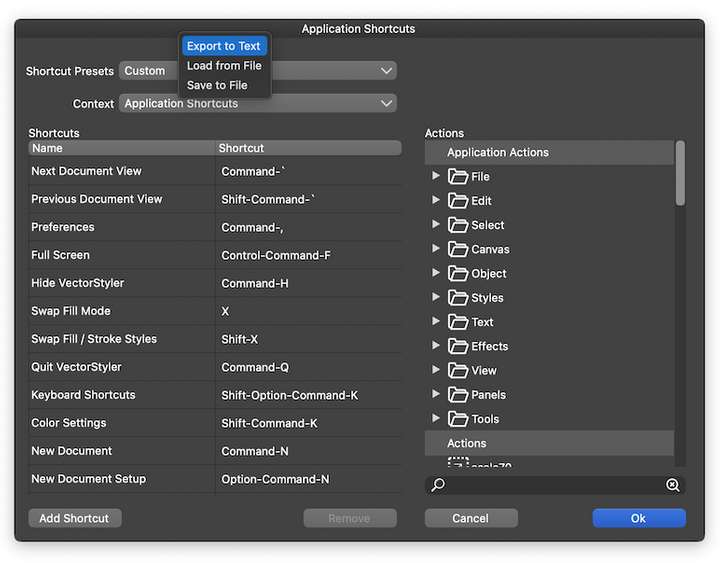
                      @Subpath On the Mac version I can export the shortcuts as a .txt file from Keyboard Shortcuts > Shortcut Presets:
                      0_1655461724436_Shortcuts_Export-as-Text.png

                      Can you do the same from Windows and send me the file? Just to make sure we didn't miss any of the shortcuts.

                      MacBook Pro (Intel) running Monterey 12.6.4

                      S 1 Reply Last reply Reply Quote 0
                      • S Offline
                        Subpath @b77
                        last edited by Subpath

                        @b77

                        I did not create this sorting from the text of your file.
                        If that is your assumption.

                        I created this sorting on basis of the original Standard VS Shortcut
                        Text file. Which I can export on Windows exactly the same way as
                        you can export it on the Mac.

                        But I can also send you my Standard VS Shortcuts as a Text file,
                        if you give me an email address.

                        Btw. nice new Profil Pic

                        Win 11
                        CPU: AMD Ryzen 5 9600X, 6-core.
                        GPU: Nvidia Geforce RTX 5070.

                        b77B 1 Reply Last reply Reply Quote 0
                        • b77B Offline
                          b77 @Subpath
                          last edited by b77

                          @Subpath That's what I mean — send me the .txt file. I don't have access to a PC.

                          Btw. nice new Profil Pic

                          Made in VS, thanks!

                          MacBook Pro (Intel) running Monterey 12.6.4

                          1 Reply Last reply Reply Quote 1
                          • First post
                            Last post