VectorStyler
    • Categories
    • Unread
    • Recent
    • Tags
    • Popular
    • Register
    • Login

    Convert any Shape in a Transform cage

    Scheduled Pinned Locked Moved Features and Ideas
    3 Posts 2 Posters 4.9k Views 2 Watching
    Loading More Posts
    • Oldest to Newest
    • Newest to Oldest
    • Most Votes
    Reply
    • Reply as topic
    Log in to reply
    This topic has been deleted. Only users with topic management privileges can see it.
    • S Offline
      Subpath
      last edited by Subpath

      i apologize 🙂
      there so many Transform cages in VS but there is still one that i miss.

      Is it possible to convert a shape in a into a Transform cage?
      So that I can have Shape Forms as a Transform cage without
      having to recreate them from scratch.
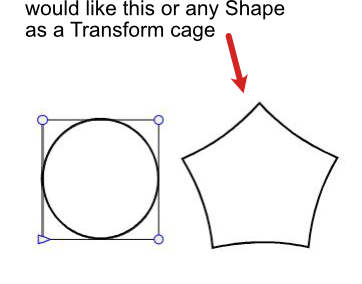
      0_1643369118799_VS Transform cage.png

      Magix Graphics Designer (formerly known as Xara)
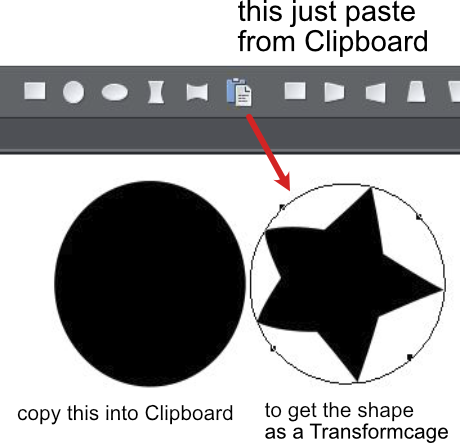
      has such an possibility. You could copy a Shape
      into the Clipboard and paste it as a Transform cage.

      Here a Pic
      0_1643368827335_Graphics Designer.png

      Win 11
      CPU: AMD Ryzen 5 9600X, 6-core.
      GPU: Nvidia Geforce RTX 5070.

      VectorStylerV 1 Reply Last reply Reply Quote 0
      • VectorStylerV Offline
        VectorStyler @Subpath
        last edited by

        @Subpath If this refers to the "Envelope" shape effect, then yes, it is possible:

        • open the Shape Effects panel.
        • select the object to be distorted and add an Envelope effect (+ icon in panel -> Mesh -> Envelope).
        • select both the object (with the envelope) and the shape to be used.
        • highlight the "Envelope" effect in the panel.
        • select the "Pick Shape" command from the panel menu.

        There are other options to do this also (using shape styles / presets, or object roles).

        I will add a copy/paste shape also!

        S 1 Reply Last reply Reply Quote 3
        • S Offline
          Subpath @VectorStyler
          last edited by

          @vectoradmin

          Yes, it refers to the "Envelope" shape Transform cage.
          I try the way you have described.

          And thanks for adding the copy/paste Shape 👍

          Win 11
          CPU: AMD Ryzen 5 9600X, 6-core.
          GPU: Nvidia Geforce RTX 5070.

          1 Reply Last reply Reply Quote 0
          • First post
            Last post