VectorStyler
    • Categories
    • Unread
    • Recent
    • Tags
    • Popular
    • Register
    • Login

    Is there a way to set the negative gap space amount between text lines?

    Scheduled Pinned Locked Moved Questions and Support
    10 Posts 4 Posters 10.4k Views 3 Watching
    Loading More Posts
    • Oldest to Newest
    • Newest to Oldest
    • Most Votes
    Reply
    • Reply as topic
    Log in to reply
    This topic has been deleted. Only users with topic management privileges can see it.
    • BoldlineB Offline
      Boldline
      last edited by

      This is probably already in VS, but I am looking to be able to set the gap space between independent lines of live text. If I have several sets of rows of text for example, setting them to a certain gap in between. Usually I just have one long list of names for example, but other times I have segmented lists divided into groups.
      I know I could gather all the names in a single list and set the gap for all at one time and then moved around as needed, but I'm sure there's a better way

      🍎 macOS Tahoe 26.2, Mac mini (M1, 2020), Chip Apple M1, Memory 16 GB
      Cintiq 27QHD Display and LG Ultra HD Display

      VectorStylerV 1 Reply Last reply Reply Quote 0
      • VectorStylerV Offline
        VectorStyler @Boldline
        last edited by

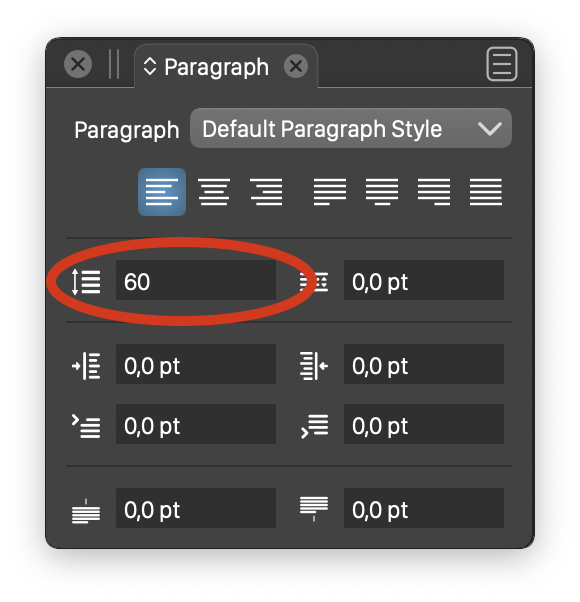
        @Boldline If that is a multiple line text (in a single point or frame text), then in the Paragraph panel, the Leading can be set to less than 100%
        0_1643636494773_paragraph.png

        BoldlineB 1 Reply Last reply Reply Quote 0
        • BoldlineB Offline
          Boldline @VectorStyler
          last edited by

          @vectoradmin That makes sense. But in this specific case, I'm dealing with multiple single lines of text with vector shapes interspersed - so that would not work here.

          0_1643637430523_821a690c-e8fe-42b9-877e-5d27006967d9-BLD 2022-01-31 at 08.56.24.png

          🍎 macOS Tahoe 26.2, Mac mini (M1, 2020), Chip Apple M1, Memory 16 GB
          Cintiq 27QHD Display and LG Ultra HD Display

          b77B 1 Reply Last reply Reply Quote 0
          • b77B Offline
            b77 @Boldline
            last edited by b77

            @Boldline You can move the last text line away from the rest, then select all text objects and use Distribute to move them at equal distance from each other.

            But this works only if the objects are stacked correctly in the Layers panel — not the first line being the third one in the middle of the eight text objects for instance.

            MacBook Pro (Intel) running Monterey 12.6.4

            BoldlineB 1 Reply Last reply Reply Quote 1
            • BoldlineB Offline
              Boldline @b77
              last edited by

              @b77 yes this is true - and most likely what I will end up doing. I was just thinking about a way to set the gap after that point without having to collect all the rows of text first...
              Giving it more thought , I'm thinking of it backward. what I may be actually requesting, is a way to specifically set the spacing between vector objects/text lines.
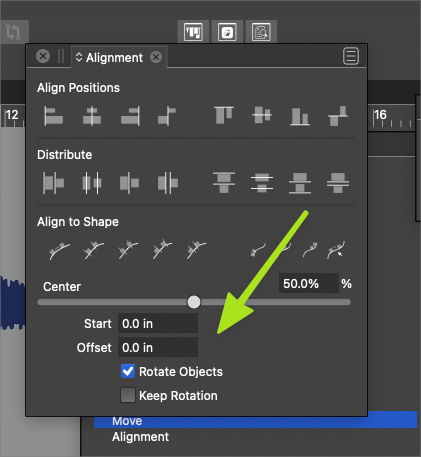
              I have not spent enough time to fully understand all the options in the alignment panel yet, but for the distribute section - an option could be added to set a specific amount of distribution between selected objects. A numerical input box where I could set the exact amount of distributed space.
              0_1643640349178_3a03e090-07f3-4b8c-8aec-ae58043a35e2-BLD 2022-01-31 at 09.45.33.png

              🍎 macOS Tahoe 26.2, Mac mini (M1, 2020), Chip Apple M1, Memory 16 GB
              Cintiq 27QHD Display and LG Ultra HD Display

              VectorStylerV BoldlineB 2 Replies Last reply Reply Quote 0
              • VectorStylerV Offline
                VectorStyler @Boldline
                last edited by

                @Boldline There is such an option https://recordit.co/WfG9RWpXrl 🙂

                S BoldlineB 2 Replies Last reply Reply Quote 4
                • S Offline
                  Subpath @VectorStyler
                  last edited by

                  @vectoradmin

                  Just watched the video and must say again found something helpful 🙂

                  Win 11
                  CPU: AMD Ryzen 5 9600X, 6-core.
                  GPU: Nvidia Geforce RTX 5070.

                  1 Reply Last reply Reply Quote 1
                  • BoldlineB Offline
                    Boldline @VectorStyler
                    last edited by Boldline

                    @vectoradmin Haha nice! Thank you for showing me. Anytime I suggest an improvement, I instinctively know there's a high percentage chance you've already added it!

                    🍎 macOS Tahoe 26.2, Mac mini (M1, 2020), Chip Apple M1, Memory 16 GB
                    Cintiq 27QHD Display and LG Ultra HD Display

                    1 Reply Last reply Reply Quote 2
                    • BoldlineB Offline
                      Boldline @Boldline
                      last edited by

                      @vectoradmin
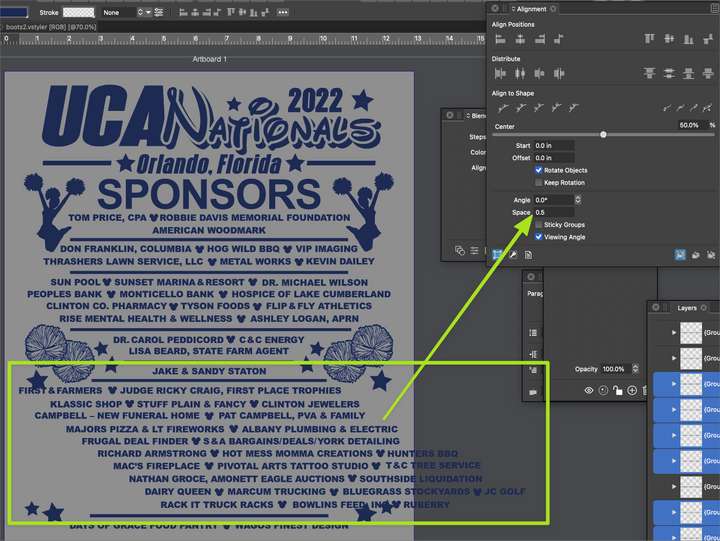
                      is there a setting I am missing? When I select several lines to space with this method, it works, but the centered column of text spreads out and I have to reset it back to centered
                      0_1643645396954_ddc90d27-10e7-4f67-bc52-4f3bc9754567-BLD 2022-01-31 at 11.07.58.png

                      🍎 macOS Tahoe 26.2, Mac mini (M1, 2020), Chip Apple M1, Memory 16 GB
                      Cintiq 27QHD Display and LG Ultra HD Display

                      VectorStylerV 1 Reply Last reply Reply Quote 0
                      • VectorStylerV Offline
                        VectorStyler @Boldline
                        last edited by

                        @Boldline After you enter the number in the Space field, do not press Enter. Just click on the top-right alignment icon.

                        Confirming the Space with enter will apply the last alignment mode, or the default (left) alignment.


                        1 Reply Last reply Reply Quote 1
                        • First post
                          Last post