VectorStyler
    • Categories
    • Unread
    • Recent
    • Tags
    • Popular
    • Register
    • Login

    Background blur effect

    Scheduled Pinned Locked Moved Features and Ideas
    9 Posts 3 Posters 8.5k Views 3 Watching
    Loading More Posts
    • Oldest to Newest
    • Newest to Oldest
    • Most Votes
    Reply
    • Reply as topic
    Log in to reply
    This topic has been deleted. Only users with topic management privileges can see it.
    • J Offline
      Jayanta Das
      last edited by

      It would be a nice feature to have background blurr in an object in VS. It will make icon design and UI design easier.

      Mac Mini M4 Pro | 24Gb
      WIndows 11 | Intel i5 11Gen
      Wacom Intuos Pro

      VectorStylerV 1 Reply Last reply Reply Quote 0
      • VectorStylerV Offline
        VectorStyler @Jayanta Das
        last edited by

        @Jayanta-Das I added this to the backlog.

        J 1 Reply Last reply Reply Quote 1
        • J Offline
          Jayanta Das @VectorStyler
          last edited by

          @vectoradmin Thank you.

          Mac Mini M4 Pro | 24Gb
          WIndows 11 | Intel i5 11Gen
          Wacom Intuos Pro

          1 Reply Last reply Reply Quote 0
          • IngolfI Offline
            Ingolf
            last edited by

            Curious - example? Just want to visualize it. 🙂

            🍏 macOS Sequoia Apple Silicon

            VectorStylerV J 2 Replies Last reply Reply Quote 0
            • VectorStylerV Offline
              VectorStyler @Ingolf
              last edited by VectorStyler

              @Ingolf @Jayanta-Das I think this is already doable: apply a Drop Shadow image effect, set the Size to zero and maybe increase the Blur a bit.

              EDIT: maybe not exactly the same as originally asked, but close 🙂

              J 1 Reply Last reply Reply Quote 0
              • J Offline
                Jayanta Das @Ingolf
                last edited by

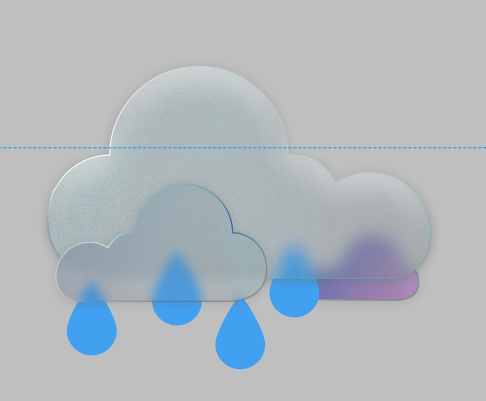
                @Ingolf 0_1643959174218_Screenshot 2022-02-04 124915.png
                I make this weather icon in figma

                Mac Mini M4 Pro | 24Gb
                WIndows 11 | Intel i5 11Gen
                Wacom Intuos Pro

                IngolfI 1 Reply Last reply Reply Quote 1
                • J Offline
                  Jayanta Das @VectorStyler
                  last edited by Jayanta Das

                  In background blur effect any object put behind that object blurred. Like if an object is position in a way that it is half behind, the half portion behind the object (which has background blur effect applied) get blurred. In the picture I posted the large cloud has background blur effect applied, So only the portion of smaller purple cloud is blurred, which the large cloud covered.

                  Mac Mini M4 Pro | 24Gb
                  WIndows 11 | Intel i5 11Gen
                  Wacom Intuos Pro

                  1 Reply Last reply Reply Quote 1
                  • IngolfI Offline
                    Ingolf @Jayanta Das
                    last edited by Ingolf

                    @Jayanta-Das said in Background blur effect:

                    @Ingolf 0_1643959174218_Screenshot 2022-02-04 124915.png
                    I make this weather icon in figma

                    Thanks! Very usable in many scenarios! (I make a lot of drawings with windows and glass in general).

                    🍏 macOS Sequoia Apple Silicon

                    J 1 Reply Last reply Reply Quote 1
                    • J Offline
                      Jayanta Das @Ingolf
                      last edited by

                      @Ingolf Ya it will be useful in giving a frosty glass effects

                      Mac Mini M4 Pro | 24Gb
                      WIndows 11 | Intel i5 11Gen
                      Wacom Intuos Pro

                      1 Reply Last reply Reply Quote 2
                      • First post
                        Last post