Panels >Arrange Views Needs Clarification IMHO
-
Several times I have been confused into thinking the Panels>Arrange Views is referring to the tool panels instead of the artboard panels. Is there a way we can change the wording some or give it a subcategory called "Artboard Views" Whatever we do (if anything) to clarify this for easily confused people like myself, the future addition of tool panel layout must be also considered. I know tool and feature panel arrangement options are in the backlog for a future time. (being able to set the tool panels in a saved arrangement and go back later and reset them into that same arrangement/clear all non-saved panels from the UI, etc. )
Could that also eventually go under the "Panels" menu with applicable options in a similar format to the current "arrange views>___" options?
If there is the added function of saving your own preferences for tool panel display arrangements - would that work there as well? or is that more a preferences folder thing?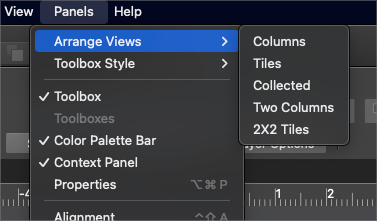
🍎 macOS Tahoe 26.2, Mac mini (M1, 2020), Chip Apple M1, Memory 16 GB
Cintiq 27QHD Display and LG Ultra HD Display -
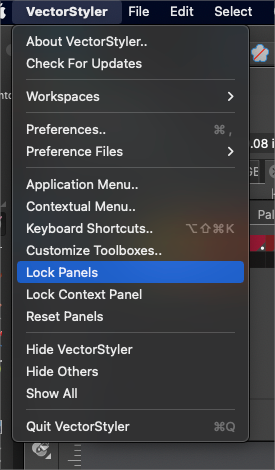
UPDATE: There's also the panel options under the main VS menu to consider. Perhaps a suggestion to update the name under the Panels menu to clarify it's for artboards there and then add the other future option to a category under the main VS menu? There's already a "workspaces" section, would that be applicable for this?
On a side note, the current panels options listed here, under the VS main menu are confusing as well since "reset panels" is not instant and obvious
-
@Boldline I will add this to the backlog.

