VectorStyler
    • Categories
    • Unread
    • Recent
    • Tags
    • Popular
    • Register
    • Login

    Convert symbol set to regular objects (finalize)

    Scheduled Pinned Locked Moved Questions and Support
    9 Posts 6 Posters 8.1k Views 5 Watching
    Loading More Posts
    • Oldest to Newest
    • Newest to Oldest
    • Most Votes
    Reply
    • Reply as topic
    Log in to reply
    This topic has been deleted. Only users with topic management privileges can see it.
    • IngolfI Offline
      Ingolf
      last edited by Ingolf

      I used the symbol brush and now want to convert the symbol set layer to regular objects. How?

      The only visible options I get is expand appearance and expand stroke - that does not do anything.

      🍏 macOS Sequoia Apple Silicon

      1 Reply Last reply Reply Quote 0
      • encartE Offline
        encart
        last edited by encart

        Try here: Styles > Expand Stroke

        Edit:

        Works here
        https://recordit.co/tl2FrNp2Ed

        MacBook Air M4 24Gb, Tahoe 26.2

        VectorStylerV J 2 Replies Last reply Reply Quote 0
        • VectorStylerV Offline
          VectorStyler @encart
          last edited by

          @encart In case of symbol sets, the Styles -> Repeater -> Expand Repeater should work.

          The Expand Stroke works for vector brushes.

          IngolfI 1 Reply Last reply Reply Quote 1
          • IngolfI Offline
            Ingolf @VectorStyler
            last edited by

            @vectoradmin said in Convert symbol set to regular objects (finalize):

            @encart In case of symbol sets, the Styles -> Repeater -> Expand Repeater should work.

            Styles -> Repeater -> Expand Repeater worked, thanks!

            And another example of how hard the local expand commands are to find and use. On top of that expand appearance and stroke was selectable but did nothing making it hard to figure out what to do.

            It is worth considering some contect sensitive solution to (scenarios like) this in the right click menu, context toolbar or something else so expand/convert has a permanent home in the UI and so that it offers the right expand/convert depending on the selected object so the users don't have to consider what feature is used and then use a roadmap to find the right expand command. 🙂

            🍏 macOS Sequoia Apple Silicon

            VectorStylerV BoldlineB 2 Replies Last reply Reply Quote 2
            • VectorStylerV Offline
              VectorStyler @Ingolf
              last edited by

              @Ingolf I will add repeater expansion to Expand Appearance.

              1 Reply Last reply Reply Quote 0
              • BoldlineB Offline
                Boldline @Ingolf
                last edited by

                @Ingolf said in Convert symbol set to regular objects (finalize):

                It is worth considering some contect sensitive solution to (scenarios like) this in the right click menu, context toolbar or something else so expand/convert has a permanent home in the UI and so that it offers the right expand/convert depending on the selected object so the users don't have to consider what feature is used and then use a roadmap to find the right expand command.

                Adding expand to the contextual menu bar when possible is a great solution. As far as moving the main options for things like convert to curves and expand to the same location, I disagree with that because as @vectoradmin said earlier on, they are tied to their different functions

                🍎 macOS Tahoe 26.2, Mac mini (M1, 2020), Chip Apple M1, Memory 16 GB
                Cintiq 27QHD Display and LG Ultra HD Display

                1 Reply Last reply Reply Quote 0
                • J Offline
                  Jayanta Das @encart
                  last edited by Jayanta Das

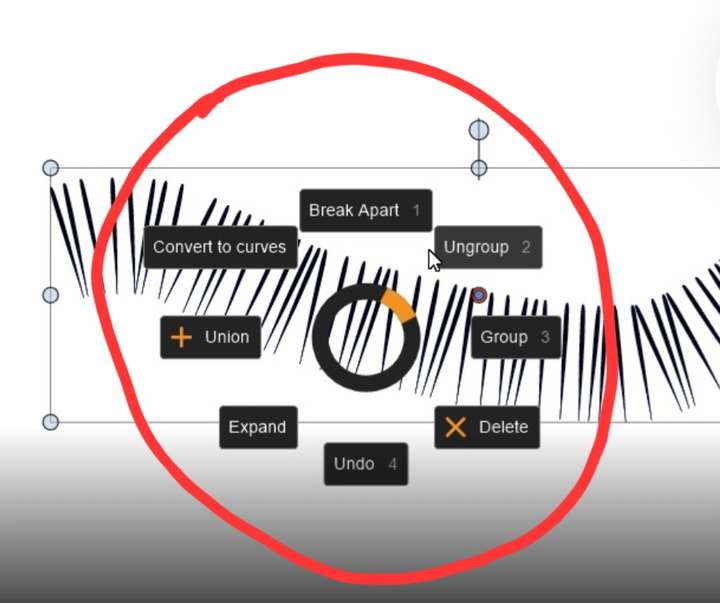
                  @encart Sorry off topic. Is the dial a VS feature or some graphic tablet shortcut.
                  0_1644354561496_Screenshot_20220209-023246_Chrome.jpg

                  Mac Mini M4 Pro | 24Gb
                  WIndows 11 | Intel i5 11Gen
                  Wacom Intuos Pro

                  b77B 1 Reply Last reply Reply Quote 0
                  • b77B Offline
                    b77 @Jayanta Das
                    last edited by b77

                    @Jayanta-Das I think @encart uses AutoHotPie:

                    There was a discussion here:
                    https://www.vectorstyler.com/forum/topic/375/personalized-popup-menu-with-shortcuts-and-macros

                    MacBook Pro (Intel) running Monterey 12.6.4

                    J 1 Reply Last reply Reply Quote 1
                    • J Offline
                      Jayanta Das @b77
                      last edited by

                      @b77 Thank you.

                      Mac Mini M4 Pro | 24Gb
                      WIndows 11 | Intel i5 11Gen
                      Wacom Intuos Pro

                      1 Reply Last reply Reply Quote 0
                      • First post
                        Last post
