Cusp node second click idea
-
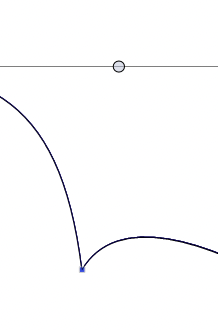
When I convert a smooth node into a cusp node VS keeps the curve almost identical to before the change.
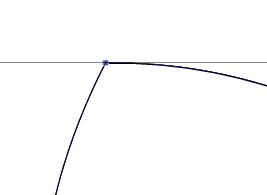
Affinity behaves like this when I turn a node into a cusp node:

This fits right into my needs and expectations when I am converting a smooth node to a cusp node when hand tracing, adjusting the cusp node to a sharp cusp node manually is a bit annoying in the long run (adjusting many nodes), but I do understand that this may not be popular. So my request/question is that a second toolbar click/keyboard shortcut activation triggers this behavior ie turns the cusp node into say a 45 degree angle cusp node. That shouldn't interfere with anything.
So in short activating cusp toolbar button or shotcut on a node already cusp turns in into sharp cusp node. Like this: L Respecing the angle the node and curve had before, of course.
PSST: This makes the corner tool much more fun to work with BTW.
Unless ya all surprisingly want it as default behavior.

🍏 macOS Sequoia Apple Silicon
-
@Ingolf I'm not familiar with AD, but in VS changing a node type is separated from changing a segment from curved to straight:
- clicking the Cusp Node button (shortcut: L) doesn't affect the adjacent segments;
- clicking the Straight Segment button (shortcut: 1) changes the node type to cusp and changes the segment leading to it to a straight segment. Or you can just single-click the segment to select it and press 1.
Does that help?
MacBook Pro (Intel) running Monterey 12.6.4
-
@Ingolf I think in AD the extra step is that it retracts the control points.
These are separate actions in VS, they are available in the context panel. -
@b77 said in Cusp node second click idea:
@Ingolf I'm not familiar with AD, but in VS changing a node type is separated from changing a segment from curved to straight:
- clicking the Cusp Node button (shortcut: L) doesn't affect the adjacent segments;
- clicking the Straight Segment button (shortcut: 1) changes the node type to cusp and changes the segment leading to it to a straight segment. Or you can just single-click the segment to select it and press 1.
Does that help?
Yes, 1 does help. Easy to remember as well.
I am not nesasseraly looking for straight lines. More often just looking for the sharp corner that you will find in many handdrawn or painted drawings/paintings but with curved lines going out from it. When I handtrace a lot I accidentially make a lot of smooth corner nodes that I change later not to interupt the flow of tracing. I assume manually processing vectorized art also requires some node adjustments.
Turning it into a sharp node like in Affinity goes super fast and with the corner tool you can smoothen it to your liking.
I have mentioned it before. Smooth fast workflows makes it infinitely faster to work with complex documents.
Me, I think I am good to go with 1 in VS though.
-
I can understand you wanting that simplicity to it. Figuring out that balance is hard. Affinity has a solid focus on keeping things simple for sure
From what I have been learning over time using VS the last couple of years and through the communication on the forum during that time - other vector programs like Illustrator and Affinity (I know these two, but I'm sure others do as well) simplify tasks by sacrificing other options.
In VS, I once advocated for the cusp tool in VS to act like Affinity's cusp tool does, but that limits what options can be done with it. In Affinity it makes the sharp point with straight lines on both sides of the node. This made it harder to edit only one side of the node and pull a smooth stroke from one side while leaving the sharp corner and other side straight. I realized after more use, I was glad it was not like Affinity in this case. I now prefer to have more control over the nodes and the way VS has them now allows for that.
There is also the awesome option to double-click a node handle to create a cusp side and the keyboard shortcut "1" as well as the keyboard combo "Shift-c" which does what Affinity's cusp tool does. Clicking Shift-C gives you a tool that when clicked on a node, converts it to cusp and creates a sharp point. I used that Shift-C option all the time when I used illustrator and I use it a lot in VSAnother example where I see a vector program sacrificing options and power for simplicity and ease is Illustrator's eyedropper rules when copying a style or fill and stroke color arrangement from one example and adding it to another. When attributes are copied in Illustrator, the new shape is forced to accept the old shape's color arrangement, stroke size, fill color or pattern, etc all together as one package deal. If I wanted a new shape to have the same fill color as the stroke of another object, I would have to go get it from the swatches panel, because if I eyedropper on the original shape stroke color, it would add a stroke of that color. In VS, I can have a fill selected and go click on a stroke color elsewhere and the fill takes on that stroke color like I wanted.
Of course, I also struggle with finding ways to keep the VS selection simple. Sometimes I just want to copy a color and I have not taken the time to figure out if I need to shift-click to get it, or regular click or what. I've been wanting to experiment more with that before posting more on thatLike you agreed that the "1" shortcut would work for you @Ingolf, I think as long as VS allows for simple solutions, we can get the best of both worlds. We can have all the tools and power VS offers and still be able to have options to do simple tasks
@Ingolf said in Cusp node second click idea:
Turning it into a sharp node like in Affinity goes super fast and with the corner tool you can smoothen it to your liking.
@Ingolf - In Affinity how do you "commit" that smooth corner tool effect? I tried it and liked it, but the vector maintains that original node with curve edit)
I like VS's corner tool and I also like Affinity's corner tool. they both seem to have pros that I wish could be combined in VS -
@Boldline said in Cusp node second click idea:
Turning it into a sharp node like in Affinity goes super fast and with the corner tool you can smoothen it to your liking.
@Ingolf - In Affinity how do you "commit" that smooth corner tool effect? I tried it and liked it, but the vector maintains that original node with curve edit)
I like VS's corner tool and I also like Affinity's corner tool. they both seem to have pros that I wish could be combined in VSCommit? Bake apperance. Does what convert to curves does but only affects corners rounded with the corner tool. It is a lame Serif code hack. The button is always active even though there is nothing to bake. So, this is for you, Serif.

I like the corner tools in both Illustrator (!) and Affinity the most but find them all useful.
-
-
@Ingolf This should be available in build 1.1.024
-
@vectoradmin Confirmed (Win), thx



