VectorStyler
    • Categories
    • Unread
    • Recent
    • Tags
    • Popular
    • Register
    • Login

    Is there a way to re-select just the base shape that was used to clip to?
    Scheduled Pinned Locked Moved Questions and Support
    14 Posts 3 Posters 11.7k Views 2 Watching
    Loading More Posts
    • Oldest to Newest
    • Newest to Oldest
    • Most Votes
    Reply
    • Reply as topic
    Log in to reply
    This topic has been deleted. Only users with topic management privileges can see it.
    • BoldlineB Online
      Boldline
      last edited by

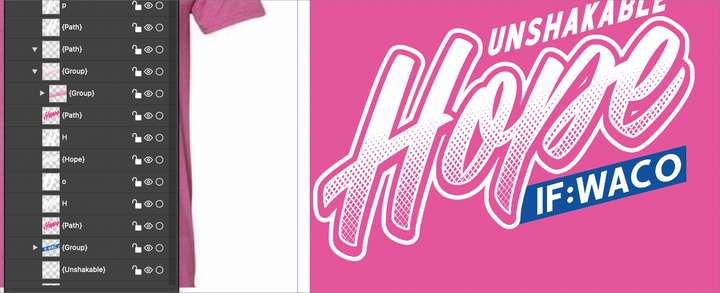
      Is there a way I can re-select and use the base shape that I clipped a special effect vector to? In this case I made the letters and merged them and then clipped the halftone pattern into it. I then needed another copy of the original shape to convert to a stroke to create the thin white border of the letters overtop. I know I can make a copy of the shape ahead of time or I could copy the clipped path group and then paste it and remove the special effect clipped inside and use that - but it would also be nice to be able to click on it in the layer and extract that shape directly
      0_1644873930897_343ce1ef-c72c-45e5-a1a7-4617096be75f-BLD 2022-02-14 at 16.20.56.png

      🍎 macOS Tahoe 26.2, Mac mini (M1, 2020), Chip Apple M1, Memory 16 GB
      Cintiq 27QHD Display and LG Ultra HD Display

      b77B VectorStylerV 3 Replies Last reply Reply Quote 0
      • b77B Offline
        b77 @Boldline
        last edited by

        @Boldline You could select all the nodes, copy them, then pasting will create a new object.

        MacBook Pro (Intel) running Monterey 12.6.4

        1 Reply Last reply Reply Quote 0
        • VectorStylerV Offline
          VectorStyler @Boldline
          last edited by

          @Boldline Copy / Paste Shape (Edit -> Attributes) should work on groups also:

          • draw a new shape (any shape will do).
          • select the group and then Edit -> Attributes -> Copy Shape.
          • select the new shape and then Edit -> Attributes -> Paste Shape.

          And another trick:

          • select the group on the canvas.
          • in the Layers panel: select the new shape (will show with different highlight).
          • Select the "Shape From Selection" in the Layers panel menu.

          Also: shapes can be saved as presets or styles (Shape panel).

          b77B 1 Reply Last reply Reply Quote 1
          • b77B Offline
            b77 @VectorStyler
            last edited by

            @vectoradmin Is the second step-by-step correct? I can't make it work here.

            MacBook Pro (Intel) running Monterey 12.6.4

            VectorStylerV 1 Reply Last reply Reply Quote 0
            • VectorStylerV Offline
              VectorStyler @b77
              last edited by

              @b77 https://recordit.co/4uSyXMAImc

              b77B 1 Reply Last reply Reply Quote 0
              • b77B Offline
                b77 @VectorStyler
                last edited by

                @vectoradmin Yep, that works, thanks. I thought I needed to select the new shape by clicking the round button in the Layers panel.

                Anyway, I think all this is difficult to discover on your own.

                What if the command would be named 'Shape from Previous Selection' or 'Pick Shape from Previous Selection' and it would work also if you pick it on the canvas, not just in the Layers panel, which is difficult to do if you have lots of objects.

                MacBook Pro (Intel) running Monterey 12.6.4

                VectorStylerV 1 Reply Last reply Reply Quote 1
                • VectorStylerV Offline
                  VectorStyler @b77
                  last edited by

                  @b77 said in Is there a way to re-select just the base shape that was used to clip to?:

                  What if the command would be named 'Shape from Previous Selection' or 'Pick Shape from Previous Selection' and it would work also if you pick it on the canvas.

                  I think this could be a separate action (canvas only), but instead of referring to a previous selection, why not select two objects and copy the shape from the first to the second?

                  b77B 1 Reply Last reply Reply Quote 0
                  • b77B Offline
                    b77 @VectorStyler
                    last edited by b77

                    @vectoradmin From the first selected object out of the two? Yes, but then change the name of the command to 'Shape from First Selected', I guess.

                    MacBook Pro (Intel) running Monterey 12.6.4

                    1 Reply Last reply Reply Quote 1
                    • BoldlineB Online
                      Boldline
                      last edited by

                      In the same way we can use the selection tools to dig in and select clipping path items, could not one of these also be used to select the base shape?
                      0_1644945405585_7cecd9de-5013-4ebe-bfe1-ff77683d20cf-image.png

                      🍎 macOS Tahoe 26.2, Mac mini (M1, 2020), Chip Apple M1, Memory 16 GB
                      Cintiq 27QHD Display and LG Ultra HD Display

                      VectorStylerV 1 Reply Last reply Reply Quote 0
                      • VectorStylerV Offline
                        VectorStyler @Boldline
                        last edited by

                        @Boldline Actually, when the group is selected, the clipping shape is also selected (it is the shape of the group object). So selection itself would not be an issue.

                        BoldlineB 1 Reply Last reply Reply Quote 0
                        • BoldlineB Online
                          Boldline @VectorStyler
                          last edited by

                          @vectoradmin forgive my slow understanding. I know I can use that selection mode to click on the clipping interior piece - I can also click and grab the interior clipped part by selecting it in the layer panel itself. Is there a way to use one of those selection options to select JUST the containment shape Because then I could copy it and paste in place.
                          Your solution works and I love that function to be able to convert one shape into another shape - but the only issue in this specific situation i want to use it is it's not going to be in the same placement as I need it

                          🍎 macOS Tahoe 26.2, Mac mini (M1, 2020), Chip Apple M1, Memory 16 GB
                          Cintiq 27QHD Display and LG Ultra HD Display

                          VectorStylerV 1 Reply Last reply Reply Quote 1
                          • VectorStylerV Offline
                            VectorStyler @Boldline
                            last edited by

                            @Boldline Here is how I copy / paste the shape from a group (and can be to a group also):
                            https://recordit.co/TrWguip3IY

                            Here, the first (default) pointer mode is used. When clicking on the group, it just selects the group object. No need for the other modes.

                            When the group is selected (in the basic mode), its containment shape is also selected.

                            Could be that I missed something from the question 🙂

                            Here is the file in the recording: 0_1644953498106_clippedgroup1.vstyler

                            And here is how to paste a shape onto a group, as a containment shape (ignore the fill, and the numbers in the layers panel): https://recordit.co/VthStLxgeG

                            BoldlineB 1 Reply Last reply Reply Quote 1
                            • BoldlineB Online
                              Boldline @VectorStyler
                              last edited by

                              @vectoradmin I will test that out as soon as I get the chance. thanks!

                              🍎 macOS Tahoe 26.2, Mac mini (M1, 2020), Chip Apple M1, Memory 16 GB
                              Cintiq 27QHD Display and LG Ultra HD Display

                              1 Reply Last reply Reply Quote 0
                              • VectorStylerV Offline
                                VectorStyler @Boldline
                                last edited by

                                @Boldline There is now a new shape selection action: Object -> Shape -> Select Shape. It will select the shape from the first selected object on the other selected objects.

                                1 Reply Last reply Reply Quote 0
                                • First post
                                  Last post
