Locking individual and sets of tool panels
-
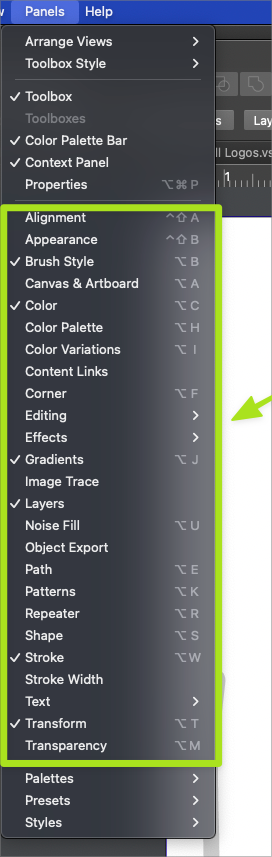
Would it make sense to add the option to lock current open tool panels? (I'm referring to to panels all available under the main panels menu such as Two ways to do that - adding the option to "lock/unlock all currently active panels" to the view menu
second way is to add a lock icon to the tool panel bar that allows that panel itself, or if it's in a connected stack or multiple tabs - affect all related panels? Closing the panel completely with the "x" or from the panel menu would also effectively disengage the lock, as would clicking the lock on the panel tab itself.All of these panels shown below are the ones I am referring to by the term "panels" in this case
🍎 macOS Tahoe 26.2, Mac mini (M1, 2020), Chip Apple M1, Memory 16 GB
Cintiq 27QHD Display and LG Ultra HD Display -
@Boldline Explaining why this is needed/useful can help motivate the developer, I think.

MacBook Pro (Intel) running Monterey 12.6.4
-
@b77 @vectoradmin Off the top of my head I think about how easy it is to get the tool panels out of position from where I want them - it's the same principal as for locking the other panels we currently have the option to do. When the options to have default and custom panel arrangements are added at a future point, the locking would be less necessary because it can be easily reset to a clean arrangement.
-
@b77 What's your opinion on this?
-
@Boldline I'm not sure there's enough space at the top of the panels for another button. It would look crowded.
Maybe have this option only in the View menu?
But anyway, a visible dropdown menu with easy-to-select workspaces would be ideal. Maybe that's where such a button can be inserted?
-
@Boldline Probably having the "workspace switching" would solve this, but workspace includes a lot more than panel states.
Question: how would locked panels behave? Can they be moved? and can we cycle through various states by clicking the up/down arrow?
Or would it be better to just have an easy way to capture / recall any collection of panels?