VectorStyler
    • Categories
    • Unread
    • Recent
    • Tags
    • Popular
    • Register
    • Login

    Option to add strategic nodes to shape
    Scheduled Pinned Locked Moved Features and Ideas
    5 Posts 4 Posters 5.1k Views 3 Watching
    Loading More Posts
    • Oldest to Newest
    • Newest to Oldest
    • Most Votes
    Reply
    • Reply as topic
    Log in to reply
    This topic has been deleted. Only users with topic management privileges can see it.
    • BoldlineB Offline
      Boldline
      last edited by

      If this already exists in VS and I don't realize it yet, please let me know!
      Essentially, I'd like an option to have a set of strategically placed nodes be added to a shape when called upon
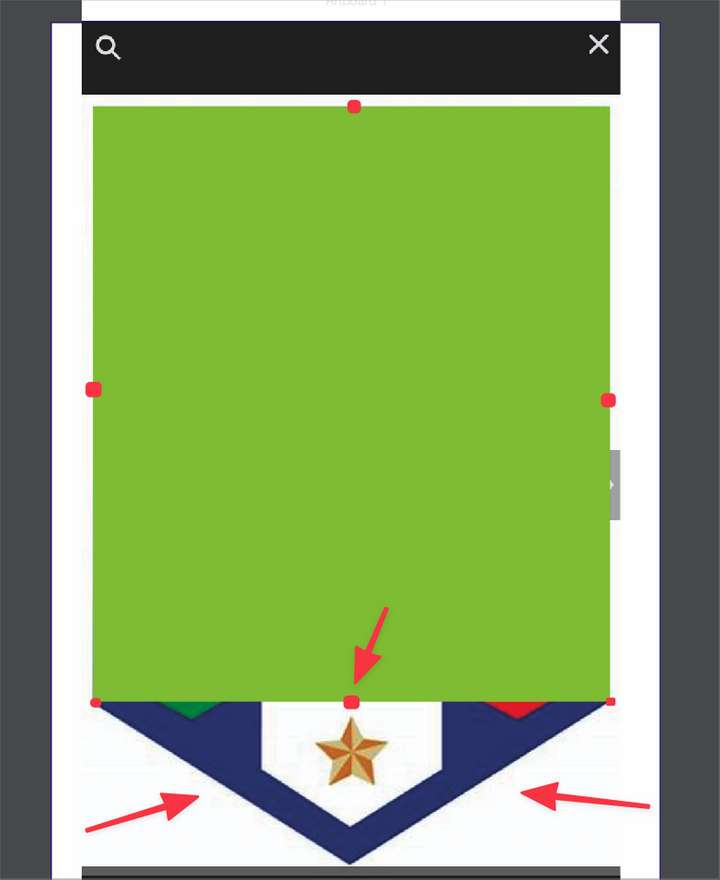
      So for example in the image below, I'd love to have the center of the bottom section marked with a node, so I can just grab it and pull it down to create the bottom section of this shield.
      It would be great if we could set how the shape is divided in that sense - default would be adding four nodes to this green rectangle I have in the example, for a total of eight nodes to work with. maybe an option for 1/2, 1/3, 1/4?
      0_1646611926604_658f7308-9f22-4aa7-944e-a093ffdd6ac6-BLD 2022-03-06 at 19.08.30.png

      🍎 macOS Tahoe 26.2, Mac mini (M1, 2020), Chip Apple M1, Memory 16 GB
      Cintiq 27QHD Display and LG Ultra HD Display

      VectorStylerV 1 Reply Last reply Reply Quote 0
      • VectorStylerV Offline
        VectorStyler @Boldline
        last edited by

        @Boldline I'm not sure how this would generalize for any shape, maybe holding a modifier while hovering over a segment?
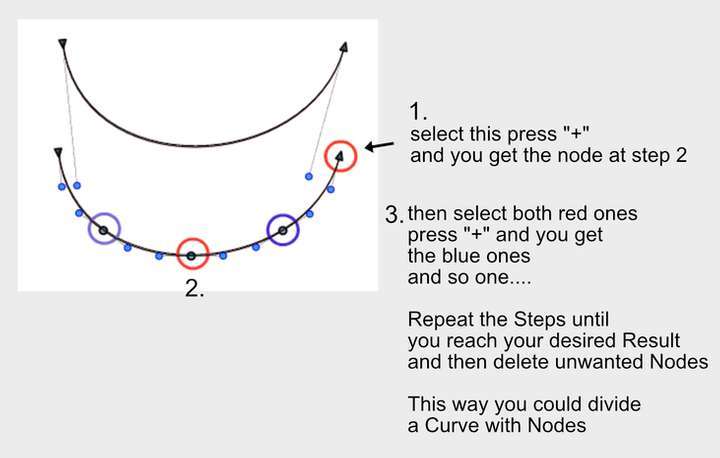
        but adding a node at a center is possible by selecting one of the previous node and pressing the + key.

        b77B BoldlineB 2 Replies Last reply Reply Quote 1
        • S Offline
          Subpath
          last edited by Subpath

          @vectoradmin said: ....but adding a node in the middle is possible by selecting one
          of the previous nodes and pressing +.....

          Hi
          Mentioned this once in another thread, this is a function I used a often in Coreldraw
          and as @vectoradmin said VS has this function too. Works with curves as well.
          Here is the picture:
          0_1646641721607_2384122a-5193-48b9-bf7d-65b912af9d6e-grafik.png

          Win 11
          CPU: AMD Ryzen 5 9600X, 6-core.
          GPU: Nvidia Geforce RTX 5070.

          1 Reply Last reply Reply Quote 1
          • b77B Offline
            b77 @VectorStyler
            last edited by

            @vectoradmin 'Add Extremes' (nodes at the extreme points of curves) would be nice as well.

            MacBook Pro (Intel) running Monterey 12.6.4

            1 Reply Last reply Reply Quote 1
            • BoldlineB Offline
              Boldline @VectorStyler
              last edited by

              @vectoradmin said in Option to add strategic nodes to shape:

              adding a node at a center is possible by selecting one of the previous node and pressing the + key.

              OK this works for me, I had forgotten about this option! This is a simple solution that works and does not complicate things.


              🍎 macOS Tahoe 26.2, Mac mini (M1, 2020), Chip Apple M1, Memory 16 GB
              Cintiq 27QHD Display and LG Ultra HD Display

              1 Reply Last reply Reply Quote 1
              • First post
                Last post