VectorStyler
    • Categories
    • Unread
    • Recent
    • Tags
    • Popular
    • Register
    • Login

    Using 3D to create complex forms in VS

    Scheduled Pinned Locked Moved Features and Ideas
    3 Posts 2 Posters 4.3k Views 1 Watching
    Loading More Posts
    • Oldest to Newest
    • Newest to Oldest
    • Most Votes
    Reply
    • Reply as topic
    Log in to reply
    This topic has been deleted. Only users with topic management privileges can see it.
    • BoldlineB Online
      Boldline
      last edited by Boldline

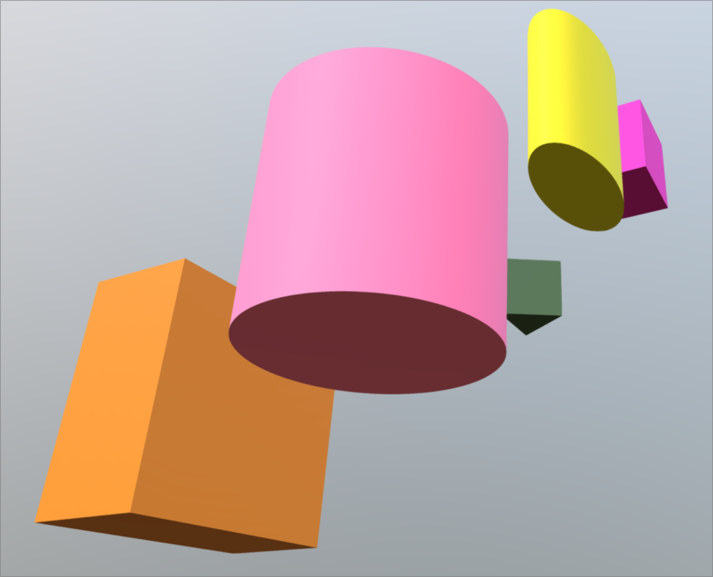
      One of the harder things to create quickly in vector form are shapes like these in the image below, where alignment needs to be perfect. Without turning VS into an outright 3D app, but continuing an older conversation about adding the 3D look to objects, the ability to stretch and pull out an elongated shape would be helpful. More helpful would be the ability to stack shapes and change their direction

      I was thinking about this the other day when I was making a flagpole top piece made up of several rings and spheres and I kept telling myself there needed to be an easier way!
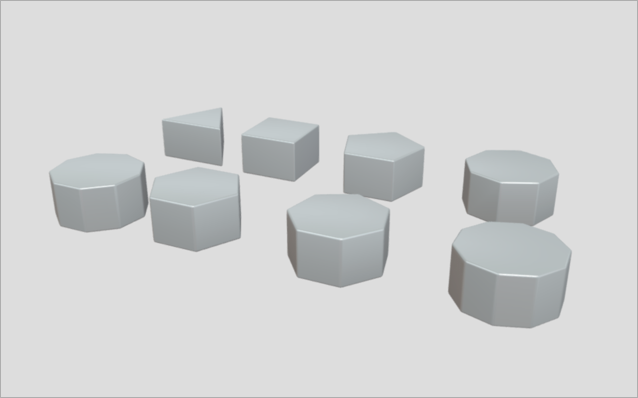
      0_1646613958015_12d8c056-bde5-459b-8ebd-ea64b16ab885-BLD 2022-03-06 at 19.44.28.png
      0_1646663001876_a63b4c13-bbf4-407a-9604-91d3a627744b-BLD 2022-03-07 at 09.23.07.png

      🍎 macOS Tahoe 26.2, Mac mini (M1, 2020), Chip Apple M1, Memory 16 GB
      Cintiq 27QHD Display and LG Ultra HD Display

      VectorStylerV 1 Reply Last reply Reply Quote 1
      • VectorStylerV Offline
        VectorStyler @Boldline
        last edited by

        @Boldline At some point (further down the road), some of these 3D features (extrude for example), will be added, they are in the backlog, but not with a high priority (lots of other things first).

        BoldlineB 1 Reply Last reply Reply Quote 2
        • BoldlineB Online
          Boldline @VectorStyler
          last edited by

          @vectoradmin thanks - I understand that. I figured this was a version 2.0 feature. I just keep sharing things as I think of them and if they help me expand on an initial idea I already shared


          🍎 macOS Tahoe 26.2, Mac mini (M1, 2020), Chip Apple M1, Memory 16 GB
          Cintiq 27QHD Display and LG Ultra HD Display

          1 Reply Last reply Reply Quote 1
          • First post
            Last post