Hand tracing features (3/3) - Panel
-
This is a story not ready for development and I am therefore more than open to suggestions and input

Story template: “As a [persona], I [want to], [so that].”
Story
As a hand tracing artist I would like a dedicated panel for hand tracing with the most commonly used options in the hand tracing workflow making it effortlessly to trace an image.Description
When hand tracing an image several - but not many - features are put to work. To avoid having several panels floating around wasting screen estate a dedicated panel can group these options also making it visible and obvious to the user who VS can do for the user.Forum users: Suggestions for settings? Values? Other buttons?
Acceptance criterias
- There is a separate panel called Tracing (I couldn't think of anything so open to suggestions)
- There is a toggle button called show/hide reference objects
- There is a toggle button called Reference object that set the selected objects as reference objects - or de-selects it as a ref object
- There is a button called tracing effects that activates the tracing filter and displays options
- There is a button called Image trace that activates the image trace panel
-
@Ingolf Lets see the feedback on this. Collecting actions into a dedicated panel is easy to do.
-
@vectoradmin said in Hand tracing features (3/3) - Panel:
@Ingolf Lets see the feedback on this. Collecting actions into a dedicated panel is easy to do.
Yes it really is just a supplement - and we have many panels. It is more or less a brainstorming story.
-
Instead of adding yet another panel, I see the solution to this being found in the future ability to set up custom arrangements of panels for a certain task and swapping over to it and then back to the default arrangement when done.
Part of the issue here is that everyone has their own unique required tools within Vs for the tasks they do frequently. Speaking for myself, when I am using the pen tool to trace a photo or a drawing I scanned in, all I care about are the pen tool, brush tool, stroke tool, etc. I'm not focused on fills or gradients or colors typically at that stage. It sounds like @ingolf utilizes those things as he is tracing with the pen tool and that is a great workflow for him.
The ability to just create several customized panel arrangements means @ingolf gets to pick and choose exactly the panels he wants open for that stage of his work and I can alternatively choose my own custom panels for the way I work.
There could be some default panel arrangements pre-built into VS and then, an easy way to arrange panels and save them with a name we recognize for whatever task is before us.
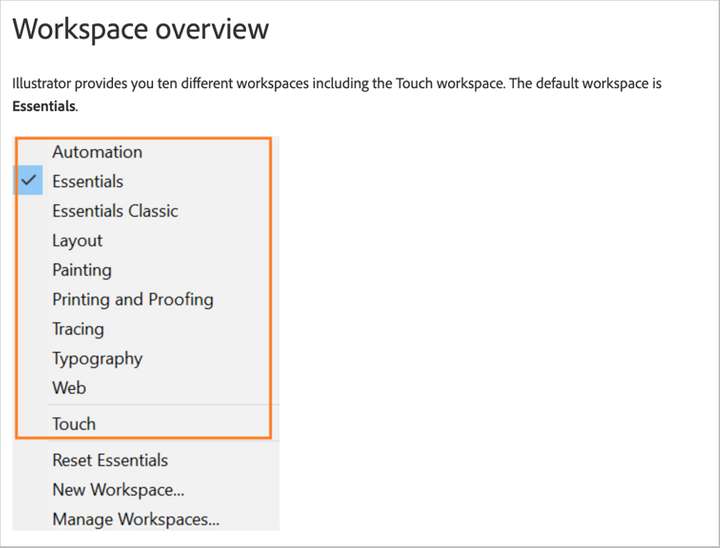
I know Illustrator had a series of default panel arrangements based on showing just the basics (essentials), or making it look like Photoshop, or one for pen work, etc. As I've mentioned in other recent posts advocating for a default panel arrangement and the option to add your own custom ones was that if your screen got "messy" with panels all over through the course of working, it was an easy click to return them to the default, or to an arrangement catering to the type of work to be done next. -
I was looking at the online Illustrator user manual and found this list of panel arrangement position options. This conversation thread aside, I've been requesting panel workspace defaults and the ability to create custom workspace layouts anyway, but @Ingolf, one of the optional layouts is geared toward tracing.