VectorStyler
    • Categories
    • Unread
    • Recent
    • Tags
    • Popular
    • Register
    • Login

    Way to turn of layer preview when selecting?

    Scheduled Pinned Locked Moved Questions and Support
    5 Posts 2 Posters 7.1k Views
    Loading More Posts
    • Oldest to Newest
    • Newest to Oldest
    • Most Votes
    Reply
    • Reply as topic
    Log in to reply
    This topic has been deleted. Only users with topic management privileges can see it.
    • P Offline
      postdes
      last edited by

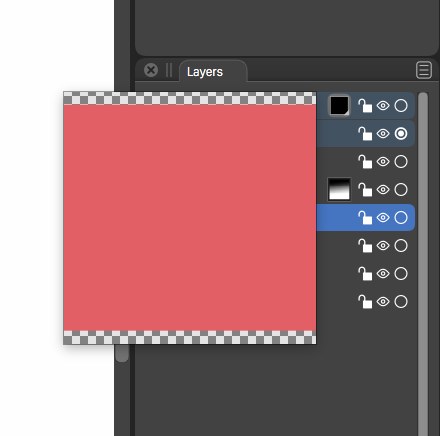
      I have a problem when I want to rearrange layers with the pop-up preview, as it hides the layer stack making it very hard to drag it to another position. I have tried the panel options, but I can not find a setting to turn this hovering preview off. Also tried the options in preferences, but to no result.
      0_1607790714154_Schermafbeelding 2020-12-12 om 17.16.02.png

      edit: It seems when I don't drag the layer preview but rather the layer name, I only get a small preview which does not block the view of the layer panel, so thats better. But it still would be good if I could turn of this large preview as I don't see the benefit of this.

      1 Reply Last reply Reply Quote 0
      • VectorStylerV Offline
        VectorStyler
        last edited by

        No settings for this, I will add one in the layers panel options.

        1 Reply Last reply Reply Quote 1
        • P Offline
          postdes
          last edited by

          Thank you for your quick response!

          1 Reply Last reply Reply Quote 0
          • VectorStylerV Offline
            VectorStyler
            last edited by

            In the new build (193) Layers panel options view contains an option for this.

            1 Reply Last reply Reply Quote 0
            • P Offline
              postdes
              last edited by

              You changed this so quickly! Very impressive, thanks!

              1 Reply Last reply Reply Quote 0
              • First post
                Last post