Disabling automatic transform shape effect?
-
The docs say it's possible, but I can't find where.
-
@Nils Not sure what you refer to, can you send the link to the docs. It is possible to remove or disable any shape effect, using the Shape Effects panel.
-
@Nils Do you mean this setting in Prefs > Editing Options > Create Distortion on Tool Selection, that disables the automatic applying of the shape effect cage when you select it from the toolbox?
-
@b77 No, that's not it.
-
@vectoradmin Here's the link.
Relevant quote near the top:
- Object transformations (scaling, skewing and rotating) are handled as shape effects. Transformations will be applied to images, patterns and gradients by default, but this can be disabled.
-
@Nils In the Appearance panel, select the content (image for example) and use the Transform Content menu item in the panel menu.
-
@vectoradmin For some reason this option is greyed out and enabled for me. Despite it being enabled, the shape effect is being added on transforming.
I've tried converting the shape ( ellipse ) to curves first, didn't help.
-
@Nils The option is active only when a content is selected (a content of an object can be fill, stroke, image, group, etc):
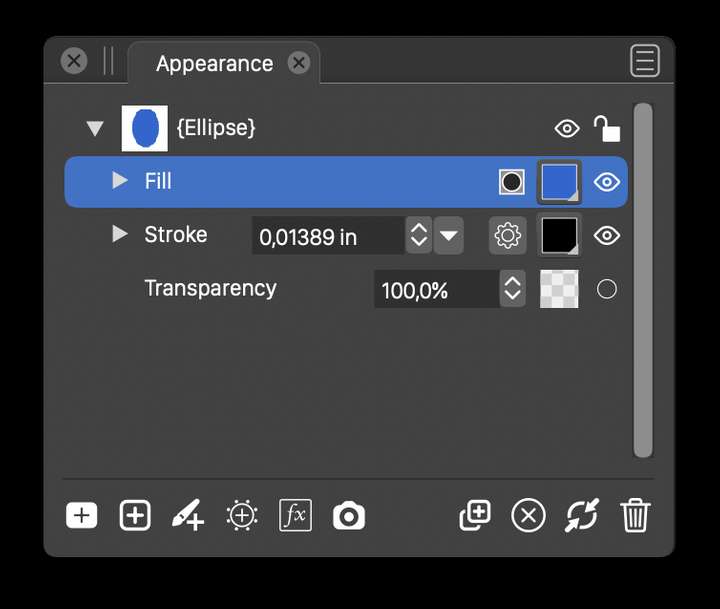
And it is only valid for that content. Shape effects are still added to the object, regardless the transform content state. This does not affect the object shape, only whether its content is transformed
-
@vectoradmin From the documentation I understand that this applies only to gradient, patterns and bitmap image fills (or as fills for strokes). Is that correct?
@Nils So if the shape has one of these fill types, select the Fill content in the Appearance panel and 'Transform Content' should not be greyed out in the panel's menu.
-
@b77 said in Disabling automatic transform shape effect?:
@vectoradmin From the documentation I understand that this applies only to gradient, patterns and bitmap image fills (or as fills for strokes). Is that correct?
Yes
-
@vectoradmin So, this works as you advised. Can this be simplified somehow? Maybe with a persistent setting in the future? I currently need this as a way to avoid the transform displacement bugs ( moving objects inside / outside object / group / layer, applying shape style etc. .. ).
EDIT: Also, is there a way to have this happen without having strokes being scaled? If I do non-uniform scaling this way, this leads to asymmetry in the stroke widths...
-
@Nils I think this is not a good workaround for the transform displacement bug.
The moving inside / outside should be fixed now, if not then that is a bug.
Applying shape style does not work only if the group is inside a group. -
@vectoradmin To clarify, with "does not work" for the nested group you mean that the displacement occurs there aswell, right?
Also, is there a way to avoid the shape effect without having strokes being scaled ( as is the case with "Transform content" enabled ) ? If I do non-uniform scaling this way, this leads to asymmetry in the stroke widths...
-
@Nils said in Disabling automatic transform shape effect?:
@vectoradmin To clarify, with "does not work" for the nested group you mean that the displacement occurs there aswell, right?
yes, the displacement (error) occurs when applying the shape style.
Also, is there a way to avoid the shape effect without having strokes being scaled ( as is the case with "Transform content" enabled ) ? If I do non-uniform scaling this way, this leads to asymmetry in the stroke widths...
The Transform Content only affects the stroke if it was explicitly selected on the stroke content. It will not affect it if it is selected on other things (that is done by Transform Stroke, which in this case should be unchecked).
So I would leave these at default settings (and Transform Stroke is off in Document Setup -> General).For the Apply Shape Style bug: the only workaround is to move the resulting shape to where it should be, and then enter isolation mode (double click on shape) and move the group content back.
-
@vectoradmin said in Disabling automatic transform shape effect?:
The Transform Content only affects the stroke if it was explicitly selected on the stroke content. It will not affect it if it is selected on other things (that is done by Transform Stroke, which in this case should be unchecked).
So I would leave these at default settings (and Transform Stroke is off in Document Setup -> General).Well yes, but remember that I was trying to use this as a workaround for the transform shape effect displacement bugs ( I have just posted a topic with gif to show that it still does occur, will post another for the applying shape ). So in the case of an open path the stroke is the only content to select in order to enable "Transform content" and avoid the shape effect.

