VectorStyler
    • Categories
    • Unread
    • Recent
    • Tags
    • Popular
    • Register
    • Login

    When resizing the textframe I want to resize the very text content as well
    Scheduled Pinned Locked Moved Questions and Support
    6 Posts 2 Posters 6.0k Views 2 Watching
    Loading More Posts
    • Oldest to Newest
    • Newest to Oldest
    • Most Votes
    Reply
    • Reply as topic
    Log in to reply
    This topic has been deleted. Only users with topic management privileges can see it.
    • RaaskotR Offline
      Raaskot
      last edited by Raaskot

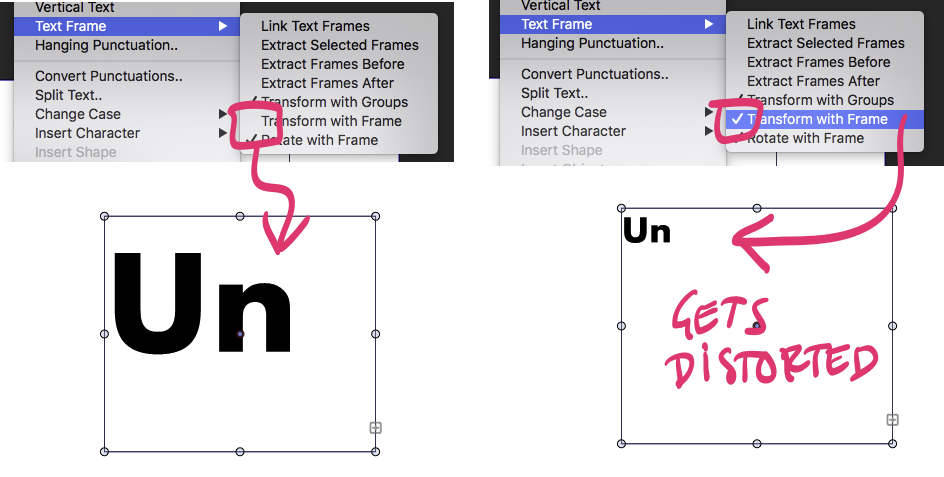
      ... then I tried to select “Text-->Transform with frame”, but the content alters unexpectedly (see image).

      1. What am I doing wrong?
      2. Can I do the "Text-->Transform with frame" operation just with “V” and a modifier key like in other programmes?
      0_1648473303918_faaedb20-4df3-41c4-814e-ca04359b198a-billede.png

      VectorStylerV 1 Reply Last reply Reply Quote 0
      • VectorStylerV Offline
        VectorStyler @Raaskot
        last edited by

        @Raaskot When enabling the "Transform with Frame", the existing transformations (scaling) of the frame will also be applied to the text.
        To avoid this, do a "Convert to Curves" on the text frame (will not affect text, only flattens the existing transforms), and only after that enable the option.

        It looks like the modifier key for this is not working currently (regression), I add this to the backlog.

        1 Reply Last reply Reply Quote 0
        • RaaskotR Offline
          Raaskot
          last edited by

          Having to "Convert to Curves" to do that simple operation appears quite labourous.

          How can I do this nondestructively in VS like in Inkscape (where text editability is maintained)?
          In Adobe Illustrator you can do the trick with the "S" (scale tool). How does that work in VS?

          VectorStylerV 2 Replies Last reply Reply Quote 0
          • VectorStylerV Offline
            VectorStyler @Raaskot
            last edited by

            @Raaskot Whe Converting to Curves a text frame, the text inside remains editable as text, only the frame is converted to curves, flattening any transform applied to it.

            1 Reply Last reply Reply Quote 1
            • VectorStylerV Offline
              VectorStyler @Raaskot
              last edited by VectorStyler

              @Raaskot said in When resizing the textframe I want to resize the very text content as well:

              In Adobe Illustrator you can do the trick with the "S" (scale tool). How does that work in VS?

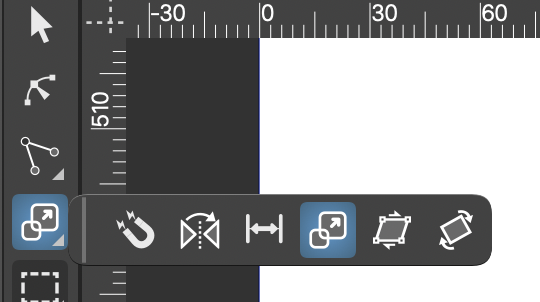
              Correction: the Scale tool (no shortcut) from the toolbox will scale the text frame content.
              0_1648476918786_scaletool.png
              The regression is in the regular transform tool.

              1 Reply Last reply Reply Quote 0
              • RaaskotR Offline
                Raaskot
                last edited by

                Cool! Thanks:-)

                1 Reply Last reply Reply Quote 0
                • First post
                  Last post
