VectorStyler
    • Categories
    • Unread
    • Recent
    • Tags
    • Popular
    • Register
    • Login

    Idea, to add Autotext/Numbering to Repeater

    Scheduled Pinned Locked Moved Features and Ideas
    7 Posts 3 Posters 7.6k Views 3 Watching
    Loading More Posts
    • Oldest to Newest
    • Newest to Oldest
    • Most Votes
    Reply
    • Reply as topic
    Log in to reply
    This topic has been deleted. Only users with topic management privileges can see it.
    • S Offline
      Subpath
      last edited by Subpath

      Personaly, i dont need this, but i think it would be very
      useful for all kinds of Numbering and Text label printing.

      When I last showed Victor the distribution function
      in Repeater, an autotext function from a program
      I used for digital printing came back to my mind.

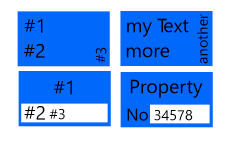
      In the Repeat Funktion of this Program you could enter text lines
      with variables which were then replaced by the text
      from a text file. (per one ore more Lines)

      like so:
      #1

      or so:
      #1
      #2
      #3

      The Textfile:
      SDC Manufacture
      Stamps and Labels
      123455666
      ...

      The Result:
      0_1648722041303_AutoText-3.png

      You could place those Variables on any position
      in a Shape and it could be used to create numbering,
      addresses and label text of all kinds.
      0_1648722104087_AutoText-2.png

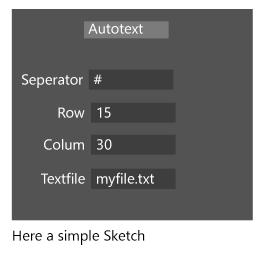
      Here a simple sketch for the Repeater addon
      0_1648722181115_AutoText-1.png

      As for the output, the digital printing program could only
      generate files and not send them directly to the printer
      but that was already a great relief.

      When customers wanted numbering, I created it in a
      text editor (NoteTab Light free) who has its own
      scripting language and then loaded the saved text
      file into the program's autotext function.
      But i think Excel or a Program like this will do it also.

      It could looked like this
      or any numbering you choose

      12.1
      12.2
      12.3
      12.4
      12.5
      12.6
      12.7
      etc.

      Win 11
      CPU: AMD Ryzen 5 9600X, 6-core.
      GPU: Nvidia Geforce RTX 5070.

      VectorStylerV 1 Reply Last reply Reply Quote 2
      • VectorStylerV Offline
        VectorStyler @Subpath
        last edited by

        @Subpath Added this to the backlog. It will done a bit further down the road (with other repeater improvements).

        S b77B 2 Replies Last reply Reply Quote 1
        • S Offline
          Subpath @VectorStyler
          last edited by Subpath

          @vectoradmin

          no problem, just wanted to publish this idea

          Win 11
          CPU: AMD Ryzen 5 9600X, 6-core.
          GPU: Nvidia Geforce RTX 5070.

          1 Reply Last reply Reply Quote 0
          • b77B Offline
            b77 @VectorStyler
            last edited by b77

            @Subpath and @vectoradmin
            This would be more useful if it's implemented in combination with printing, like CDR has done.

            So on an A3 artboard you would have a label/invoice/receipt duplicated four times where the first one (the master label) includes a special text object (an auto-incrementing number), and when the page get printed the special number will auto-increment on each label duplicate and then on every page printed.

            MacBook Pro (Intel) running Monterey 12.6.4

            S 1 Reply Last reply Reply Quote 2
            • S Offline
              Subpath @b77
              last edited by Subpath

              @b77

              I thought in my suggestion that saving the result to a file in VS might be easier
              to implement. Of course I would not have anything against both possibilities

              I also know the CorelDraw function. But I would find the possibility
              to save the result as a file would also be useful. So you could also print
              the Results also with other Programs.

              For example, this Composer program was tightly coupled with the printer
              so you couldn't use Coreldraw for printing. But you could import other
              Vectorgraphics formats.

              Win 11
              CPU: AMD Ryzen 5 9600X, 6-core.
              GPU: Nvidia Geforce RTX 5070.

              b77B 1 Reply Last reply Reply Quote 0
              • b77B Offline
                b77 @Subpath
                last edited by b77

                @Subpath 'Print to File' in the Print dialog should take care of that, so you can keep the source file (.vstyler) small and easy to re-edit if needed. 🙂

                MacBook Pro (Intel) running Monterey 12.6.4

                S 1 Reply Last reply Reply Quote 1
                • S Offline
                  Subpath @b77
                  last edited by

                  @b77

                  That's right, I had forgotten about this possibility.

                  Win 11
                  CPU: AMD Ryzen 5 9600X, 6-core.
                  GPU: Nvidia Geforce RTX 5070.

                  1 Reply Last reply Reply Quote 0
                  • First post
                    Last post