VectorStyler
    • Categories
    • Unread
    • Recent
    • Tags
    • Popular
    • Register
    • Login

    How do I selectively edit the height of some of the text on a path?

    Scheduled Pinned Locked Moved Questions and Support
    9 Posts 4 Posters 8.5k Views 3 Watching
    Loading More Posts
    • Oldest to Newest
    • Newest to Oldest
    • Most Votes
    Reply
    • Reply as topic
    Log in to reply
    This topic has been deleted. Only users with topic management privileges can see it.
    • BoldlineB Online
      Boldline
      last edited by

      Does anyone have any suggestions for how I could increase the height of the middle section of letters in the "Halter & Horses" Ideally I'd like to shrink the ends some and raise the height of the center
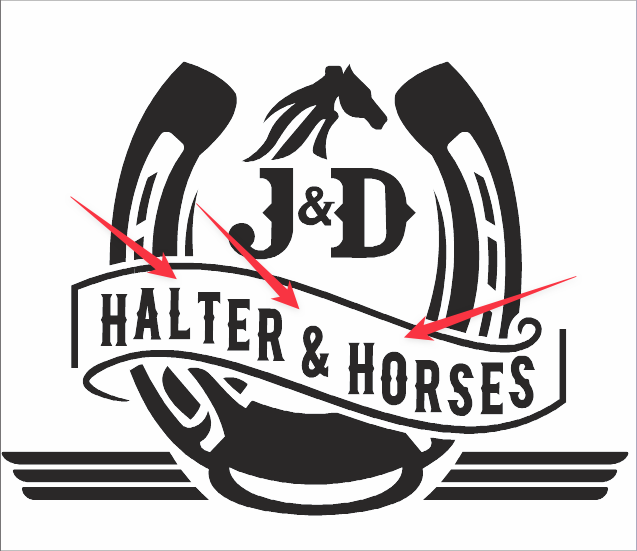
      0_1648824845625_1d4ac86b-1aee-455e-99fe-00d09ebcedbf-BLD 2022-04-01 at 10.49.36.png

      🍎 macOS Tahoe 26.2, Mac mini (M1, 2020), Chip Apple M1, Memory 16 GB
      Cintiq 27QHD Display and LG Ultra HD Display

      b77B VectorStylerV S 4 Replies Last reply Reply Quote 0
      • b77B Offline
        b77 @Boldline
        last edited by b77

        @Boldline That's how I would do it:
        After placing the text on a path, I would convert it to curves then apply a Bulge Warp* effect and drag the middle handles to make it taller in the middle.


        *not Squeeze like I wrote the first time.

        MacBook Pro (Intel) running Monterey 12.6.4

        1 Reply Last reply Reply Quote 2
        • VectorStylerV Offline
          VectorStyler @Boldline
          last edited by VectorStyler

          @Boldline Another way: instead of text on path, use the Bend distortion with variable width profile.
          And then enable the rigid shapes option for the Bend effect.

          EDIT: this will rotate the letters, so probably not going to work.

          b77B 1 Reply Last reply Reply Quote 1
          • b77B Offline
            b77 @VectorStyler
            last edited by b77

            @vectoradmin Your approach would be better than mine because it keeps text editable, but how do you get rid of the rotation of the letters?

            MacBook Pro (Intel) running Monterey 12.6.4

            VectorStylerV 1 Reply Last reply Reply Quote 0
            • VectorStylerV Offline
              VectorStyler @b77
              last edited by

              @b77 said in How do I selectively edit the height of some of the text on a path?:

              @vectoradmin but how do you get rid of the rotation of the letters?

              You cannot, I missed that part.

              b77B 1 Reply Last reply Reply Quote 0
              • b77B Offline
                b77 @VectorStyler
                last edited by

                @vectoradmin Got it. To be used only with italics then. 🙂

                MacBook Pro (Intel) running Monterey 12.6.4

                1 Reply Last reply Reply Quote 0
                • S Offline
                  Subpath @Boldline
                  last edited by Subpath

                  @Boldline

                  As a simple Solution you could also give each Letter
                  in this line a different Size.

                  Or you can also use separate letters with different sizes.

                  Video
                  Each letter a different size

                  Win 11
                  CPU: AMD Ryzen 5 9600X, 6-core.
                  GPU: Nvidia Geforce RTX 5070.

                  1 Reply Last reply Reply Quote 0
                  • b77B Offline
                    b77 @Boldline
                    last edited by b77

                    @Boldline and @Subpath
                    I tested all this again and converting the text to curves is not needed — as long as you select both the text and the path, the Bulge effect (or any other Warp) is assigned correctly.

                    @vectoradmin In my opinion, any shape effect should apply to the entire object, even if you selected just the text.

                    Only if you selected the path it should apply the effect to the path separately.

                    MacBook Pro (Intel) running Monterey 12.6.4

                    S 1 Reply Last reply Reply Quote 0
                    • S Offline
                      Subpath @b77
                      last edited by Subpath

                      @b77
                      .... converting the text to curves is not needed ...
                      Thanks, I already know that. Have been experimenting around with Envelope Shape and others lately.
                      Will post the findings in the tutorial or general section (not sure where yet) in the near future.

                      .... converting the text to curves is not needed ...
                      but could possibly be better in some circumstances for a smoother shape/curve progression

                      Win 11
                      CPU: AMD Ryzen 5 9600X, 6-core.
                      GPU: Nvidia Geforce RTX 5070.

                      1 Reply Last reply Reply Quote 1
                      • First post
                        Last post
