VectorStyler
    • Categories
    • Unread
    • Recent
    • Tags
    • Popular
    • Register
    • Login

    Default built-in 3D Stars?
    Scheduled Pinned Locked Moved Features and Ideas
    23 Posts 6 Posters 37.7k Views 5 Watching
    Loading More Posts
    • Oldest to Newest
    • Newest to Oldest
    • Most Votes
    Reply
    • Reply as topic
    Log in to reply
    This topic has been deleted. Only users with topic management privileges can see it.
    • BoldlineB Offline
      Boldline
      last edited by

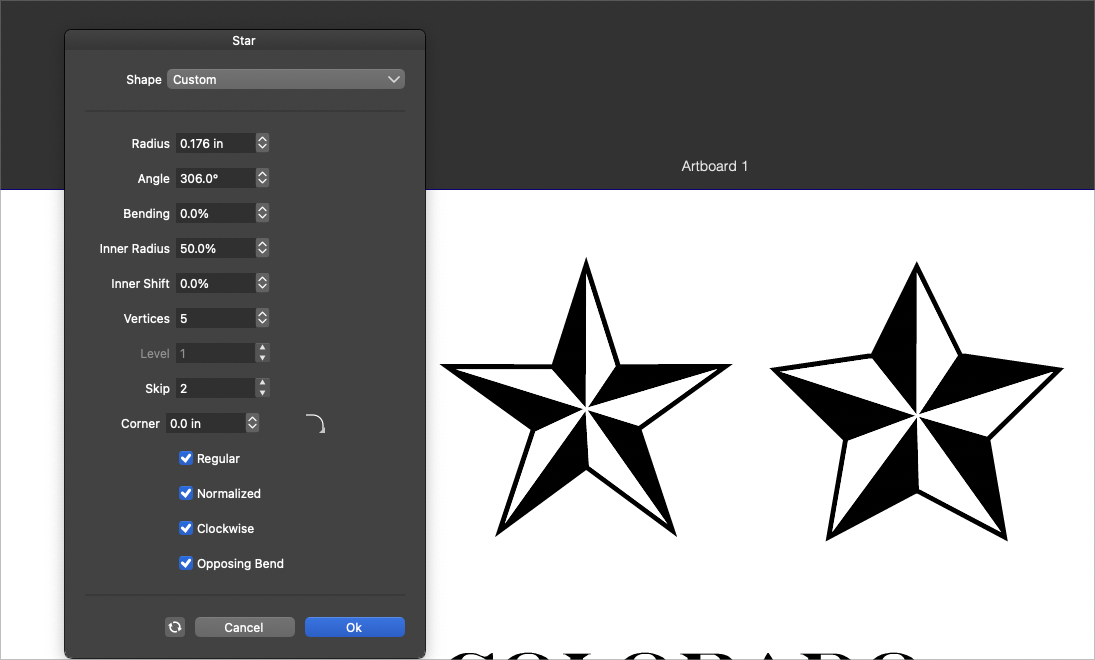
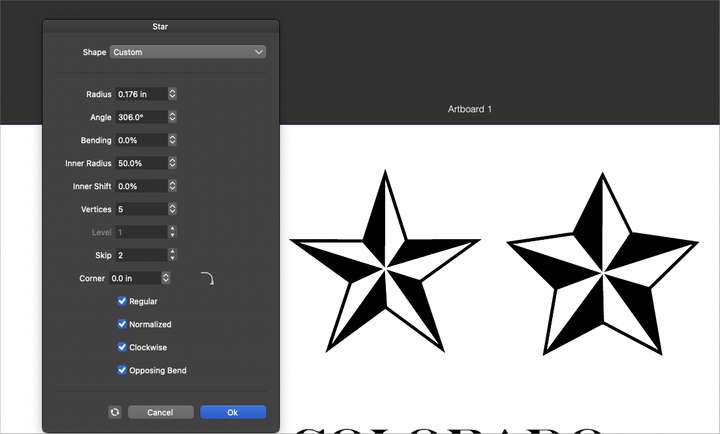
      I needed a 3d star today in my work and it prompted me think about adding that into VS as an option for quick creation in the star panel. both as a regular star and a "bloated" star.
      I know alternatively, a user could make or import a 3d star and save it as a custom preset or style. 3d stars seem to be common enough to consider adding an option for it on a default level in VS
      0_1649432803851_36dcf0a7-5f6f-41ae-a29a-2eb8462457dc-BLD 2022-04-08 at 11.45.37.png

      🍎 macOS Tahoe 26.2, Mac mini (M1, 2020), Chip Apple M1, Memory 16 GB
      Cintiq 27QHD Display and LG Ultra HD Display

      VectorStylerV S 2 Replies Last reply Reply Quote 1
      • VectorStylerV Offline
        VectorStyler @Boldline
        last edited by

        @Boldline I added it to the ideas backlog for the future. I think technically it would involve to options only (enable, and the width of the thin side), so would not make things too difficult.

        1 Reply Last reply Reply Quote 2
        • S Offline
          Subpath @Boldline
          last edited by

          @Boldline

          I have developed a workaround for such cases a while ago.
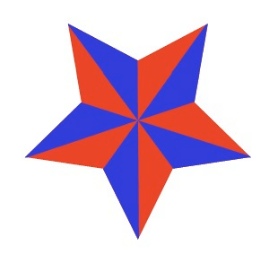
          You need a circle clipped in a star.

          First use a 6-pointed star to get the circle in the middle of the star
          and then change it to a 5-pointed star, or any you like.

          Here is the video
          Star Workaround

          0_1649441597463_Star.png

          Win 11
          CPU: AMD Ryzen 5 9600X, 6-core.
          GPU: Nvidia Geforce RTX 5070.

          BoldlineB 1 Reply Last reply Reply Quote 3
          • BoldlineB Offline
            Boldline @Subpath
            last edited by

            @Subpath very cool! thanks for sharing. I'll still advocate for it being built in to VS in some capacity , but it's really cool what you were able to do to make one

            🍎 macOS Tahoe 26.2, Mac mini (M1, 2020), Chip Apple M1, Memory 16 GB
            Cintiq 27QHD Display and LG Ultra HD Display

            S 1 Reply Last reply Reply Quote 1
            • S Offline
              Subpath @Boldline
              last edited by Subpath

              @Boldline , your welcome

              By the way, I'm also an advocate of something like this.
              I have also already pleaded for a section for polygons.
              Sections for Polygons

              Win 11
              CPU: AMD Ryzen 5 9600X, 6-core.
              GPU: Nvidia Geforce RTX 5070.

              BoldlineB 1 Reply Last reply Reply Quote 1
              • BoldlineB Offline
                Boldline @Subpath
                last edited by

                @Subpath yes there could be some other ways to incorporate that 3D feel into other shapes like the polygons.

                🍎 macOS Tahoe 26.2, Mac mini (M1, 2020), Chip Apple M1, Memory 16 GB
                Cintiq 27QHD Display and LG Ultra HD Display

                1 Reply Last reply Reply Quote 0
                • encartE Offline
                  encart
                  last edited by encart

                  The first idea that came to my mind to create such a star quickly and accurately looks like this. The first one shows an example from AI, because only there I managed to do it as planned.
                  https://recordit.co/OepFHuqCQL
                  Unfortunately, in VS, I was unable to successfully apply the shape tool.
                  https://recordit.co/SKiNQcv8HQ
                  For me in this case it would be natural:

                  • Draw a star
                  • Draw cutting lines
                  • Select everything and cut into pieces with a boolean operation

                  But as I mentioned in another topic, the functions that do this expand the paths and thus there is space in between. Additionally, in the case of concave angles, the lines should have caps. Otherwise there is a problem like here.
                  I wanted to use a knife for this, but snapping is not working for that tool. Hence, there is a lack of accuracy.
                  If there is any proven method for precise cutting I will be grateful. Even on this example.

                  Windows 11 Home 10.0.22621

                  VectorStylerV S 3 Replies Last reply Reply Quote 3
                  • VectorStylerV Offline
                    VectorStyler @encart
                    last edited by

                    @encart Added the shape builder issues to the backlog as a bug.

                    Victor VectorV 1 Reply Last reply Reply Quote 2
                    • S Offline
                      Subpath @encart
                      last edited by

                      @encart

                      As I watched your video, I remembered a way I found
                      out a while ago while experimenting with VS.

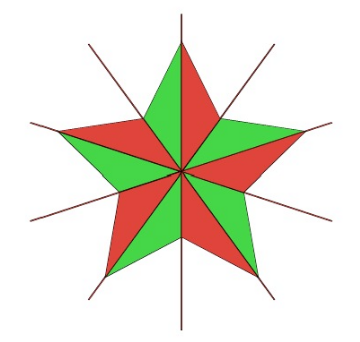
                      Works similar to yours. But I create the lines
                      using the "Square Star" tool. When I do it
                      this way, the "Shape Builder" Tool also works.
                      ( maybe the lines have to overlap ? )

                      Here a Video this way
                      Section Lines with Square Star Tool
                      0_1649514757126_Square Star Tool.png

                      Win 11
                      CPU: AMD Ryzen 5 9600X, 6-core.
                      GPU: Nvidia Geforce RTX 5070.

                      1 Reply Last reply Reply Quote 3
                      • VectorStylerV Offline
                        VectorStyler @encart
                        last edited by

                        @encart said in Default built-in 3D Stars?:

                        Unfortunately, in VS, I was unable to successfully apply the shape tool.

                        If there is a file which could be used to replicate this issue, please send it to me by email. Thanks!

                        encartE 1 Reply Last reply Reply Quote 0
                        • encartE Offline
                          encart @VectorStyler
                          last edited by encart

                          @vectoradmin I sent you the file. Recreated but same result as before.
                          https://recordit.co/4GDGsdxMus
                          @Subpath Tried with overlapping lines, but same result. Works better when lines are expanded and merged into one shape. Imo these problems may be caused by center point.
                          https://recordit.co/IUWXtbxh7U

                          Edit:
                          Another way to make it: https://recordit.co/z3VzXOVjkn

                          Windows 11 Home 10.0.22621

                          1 Reply Last reply Reply Quote 1
                          • S Offline
                            Subpath
                            last edited by

                            If i convert the modified "Square Shape" to curve,
                            the result will be one Shape. Maybe thats why it works.
                            Video1

                            It also works when I drag Line through the Star
                            and copy and rotate the Line
                            Video2

                            Win 11
                            CPU: AMD Ryzen 5 9600X, 6-core.
                            GPU: Nvidia Geforce RTX 5070.

                            VectorStylerV 1 Reply Last reply Reply Quote 2
                            • VectorStylerV Offline
                              VectorStyler @Subpath
                              last edited by

                              @Subpath The last build contains some improvements to the shape builder tool working with open paths (and lines).
                              Using similar steps as @Subpath , but with Snap to Point and the Shape Builder tool: https://recordit.co/WjViOwpZid

                              S 1 Reply Last reply Reply Quote 2
                              • S Offline
                                Subpath @VectorStyler
                                last edited by Subpath

                                @VectorStyler

                                cool, great 👍

                                that offers possibilties for other Projects too 🙂

                                Win 11
                                CPU: AMD Ryzen 5 9600X, 6-core.
                                GPU: Nvidia Geforce RTX 5070.

                                1 Reply Last reply Reply Quote 0
                                • encartE Offline
                                  encart
                                  last edited by

                                  @VectorStyler
                                  Still have problems on Win10.
                                  https://recordit.co/FDXtnHutP3

                                  Windows 11 Home 10.0.22621

                                  VectorStylerV 1 Reply Last reply Reply Quote 0
                                  • VectorStylerV Offline
                                    VectorStyler @encart
                                    last edited by

                                    @encart Send me the file, where the shape builder is not working.

                                    1 Reply Last reply Reply Quote 0
                                    • S Offline
                                      Subpath
                                      last edited by Subpath

                                      @VectorStyler

                                      no problem so far, is working
                                      also under Win 10

                                      But at the very first point there is
                                      no snap and no snap indicator
                                      ( little red circle )

                                      Edited:
                                      The peak of the ShapeBuilder results and the resulting oversize
                                      was, as @Jayanta-Das wrote, because of the stroke applied to
                                      the outside of the shape

                                      Video: see here

                                      .
                                      0_1652532079322_Star-Shape-Builder1.png

                                      Win 11
                                      CPU: AMD Ryzen 5 9600X, 6-core.
                                      GPU: Nvidia Geforce RTX 5070.

                                      J 1 Reply Last reply Reply Quote 0
                                      • J Offline
                                        Jayanta Das @Subpath
                                        last edited by

                                        @Subpath Confirm no issue in Windows 11.
                                        I think the oversized is due to the stroke applied to the outside of the shape.

                                        Mac Mini M4 Pro | 24Gb
                                        WIndows 11 | Intel i5 11Gen
                                        Wacom Intuos Pro

                                        S 1 Reply Last reply Reply Quote 1
                                        • S Offline
                                          Subpath @Jayanta Das
                                          last edited by Subpath

                                          @Jayanta-Das

                                          ...I think the oversized is due to the stroke applied to the outside of the shape...

                                          yes, your right
                                          was probably in sleep mode 😴
                                          Did not realize it

                                          But the very first point did not snap

                                          Win 11
                                          CPU: AMD Ryzen 5 9600X, 6-core.
                                          GPU: Nvidia Geforce RTX 5070.

                                          J 1 Reply Last reply Reply Quote 0
                                          • J Offline
                                            Jayanta Das @Subpath
                                            last edited by

                                            @Subpath

                                            But the very first point did not snap

                                            Yes, didnot snap here also.

                                            Mac Mini M4 Pro | 24Gb
                                            WIndows 11 | Intel i5 11Gen
                                            Wacom Intuos Pro

                                            1 Reply Last reply Reply Quote 0
                                            • First post
                                              Last post