VectorStyler
    • Categories
    • Unread
    • Recent
    • Tags
    • Popular
    • Register
    • Login

    "Export Again" option to save as new exported file instead of copying over?

    Scheduled Pinned Locked Moved Features and Ideas
    8 Posts 3 Posters 7.6k Views 2 Watching
    Loading More Posts
    • Oldest to Newest
    • Newest to Oldest
    • Most Votes
    Reply
    • Reply as topic
    Log in to reply
    This topic has been deleted. Only users with topic management privileges can see it.
    • BoldlineB Online
      Boldline
      last edited by Boldline

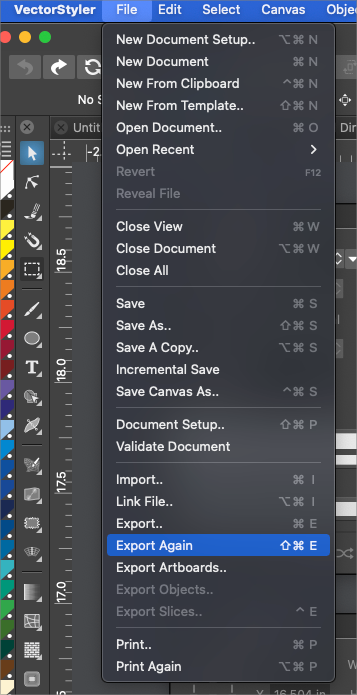
      I had a vector design I needed to export as two distinct png files using different colors in each. I used the export option and everything went well. I then swapped the ink color in the design and clicked on "export again" thinking it would use the same settings as before and create a second file perhaps with the same title and a (1) at the end so it was different than the first.
      Instead I realized it actually saved over the first exported file. I can see both instances being useful - the ability to quickly export a file and then go in and make edits and export again expecting to get multiple variation results or expecting the file to be replaced each time you edit.
      0_1649960664610_3a2ef26b-3fb2-46f2-a8f4-54da4fdd5726-BLD 2022-04-14 at 14.24.10.png

      🍎 macOS Tahoe 26.2, Mac mini (M1, 2020), Chip Apple M1, Memory 16 GB
      Cintiq 27QHD Display and LG Ultra HD Display

      b77B VectorStylerV 2 Replies Last reply Reply Quote 0
      • b77B Offline
        b77 @Boldline
        last edited by b77

        @Boldline If you need versions in different colors, why not duplicate the artboard with the artwork, change the ink color and use 'Export Artboards…' instead.

        MacBook Pro (Intel) running Monterey 12.6.4

        BoldlineB 1 Reply Last reply Reply Quote 0
        • BoldlineB Online
          Boldline @b77
          last edited by

          @b77 ok - good idea. Where is the option to duplicate artboard? I did not see it when I went looking - thanks!

          🍎 macOS Tahoe 26.2, Mac mini (M1, 2020), Chip Apple M1, Memory 16 GB
          Cintiq 27QHD Display and LG Ultra HD Display

          b77B 1 Reply Last reply Reply Quote 0
          • b77B Offline
            b77 @Boldline
            last edited by

            @Boldline Just Option-drag any artboard with the Artboard Editor tool (Shift-O), and also press Shift to constrain the duplication horizontally or vertically.

            MacBook Pro (Intel) running Monterey 12.6.4

            BoldlineB 1 Reply Last reply Reply Quote 1
            • BoldlineB Online
              Boldline @b77
              last edited by

              @b77 Thanks! you learn a new thing every day. Is that shortcut noted in the documentation? I didn't see it when I was going through artboard options

              🍎 macOS Tahoe 26.2, Mac mini (M1, 2020), Chip Apple M1, Memory 16 GB
              Cintiq 27QHD Display and LG Ultra HD Display

              b77B 1 Reply Last reply Reply Quote 0
              • b77B Offline
                b77 @Boldline
                last edited by b77

                @Boldline It's the same method used to duplicate objects. Indeed it's not included in the Shortcuts table. Maybe it should. πŸ‘

                MacBook Pro (Intel) running Monterey 12.6.4

                BoldlineB 1 Reply Last reply Reply Quote 0
                • BoldlineB Online
                  Boldline @b77
                  last edited by Boldline

                  @b77 Now that you mention how it works, it makes sense and I will not forget it, but on my own I would not have equated copying the artboard as the same kind of function as copying an object. So I feel it should be included in the documentation in the shortcuts table section for sure - maybe even the artboard section

                  🍎 macOS Tahoe 26.2, Mac mini (M1, 2020), Chip Apple M1, Memory 16 GB
                  Cintiq 27QHD Display and LG Ultra HD Display

                  1 Reply Last reply Reply Quote 1
                  • VectorStylerV Offline
                    VectorStyler @Boldline
                    last edited by

                    @Boldline said in "Export Again" option to save as new exported file instead of copying over?:

                    Instead I realized it actually saved over the first exported file. I can see both instances being useful - the ability to quickly export a file and then go in and make edits and export again expecting to get multiple variation results or expecting the file to be replaced each time you edit.

                    This could be some kind of "Incremental Export Again" feature. I added this to the backlog.

                    1 Reply Last reply Reply Quote 1
                    • First post
                      Last post
