VectorStyler
    • Categories
    • Unread
    • Recent
    • Tags
    • Popular
    • Register
    • Login

    Show, Find and Replace Color option in VS

    Scheduled Pinned Locked Moved Features and Ideas
    3 Posts 3 Posters 3.9k Views 2 Watching
    Loading More Posts
    • Oldest to Newest
    • Newest to Oldest
    • Most Votes
    Reply
    • Reply as topic
    Log in to reply
    This topic has been deleted. Only users with topic management privileges can see it.
    • BoldlineB Offline
      Boldline
      last edited by

      This idea is already listed in the roadmap in part : "Search, match and replace color using a color palette" It may be assumed, but just to be sure, I'd like to be able to have VS tell me all colors currently in use on the artboard with an alternative option to only show me all colors used on a particular layer.
      When I have a design I'm prepping for output, I'm not always printing it, and while I could go into the print settings and see colors, it would be helpful to be able to click an option and see them listed out so I can easily know if that layer or artboard has two similar colors I'm mistaking as one.
      This would easily tie in with the "Search, match and replace color using a color palette"

      🍎 macOS Tahoe 26.2, Mac mini (M1, 2020), Chip Apple M1, Memory 16 GB
      Cintiq 27QHD Display and LG Ultra HD Display

      b77B VectorStylerV 2 Replies Last reply Reply Quote 1
      • b77B Offline
        b77 @Boldline
        last edited by

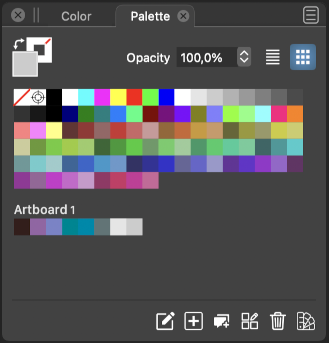
        @Boldline What you describe should happen in the Color Palette panel? Like this?
        0_1649967761552_cp.png

        MacBook Pro (Intel) running Monterey 12.6.4

        1 Reply Last reply Reply Quote 1
        • VectorStylerV Offline
          VectorStyler @Boldline
          last edited by

          @Boldline @b77 yes, something along these lines. The exact use cases and UI is not yet clarified so input is welcome.

          1 Reply Last reply Reply Quote 0
          • First post
            Last post
