Pen tool often gives me an overextended section when I try to click on the last node placed
-
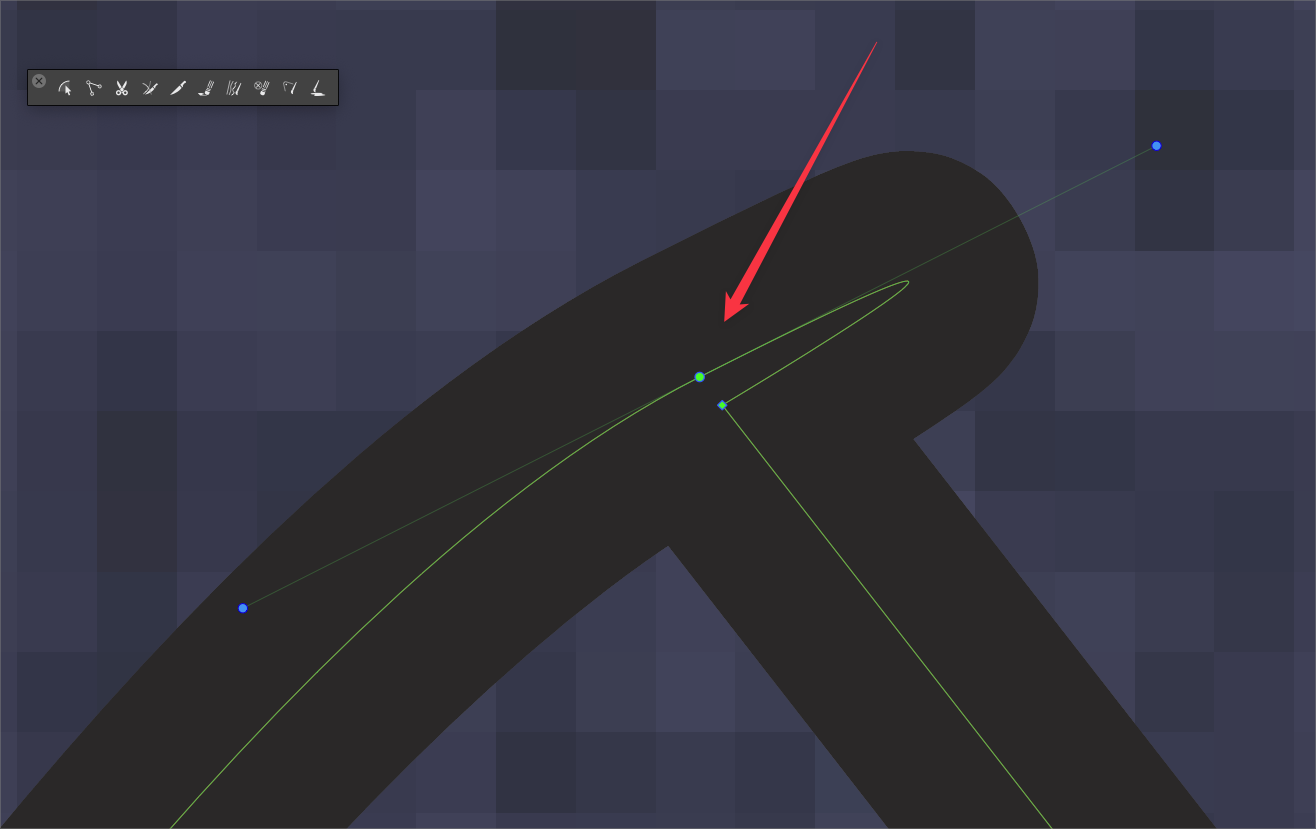
The en tool often gives me an overextended section when I try to click on the last node placed
It seems that unless I am clicking right overtop the node, it places it nearby instead
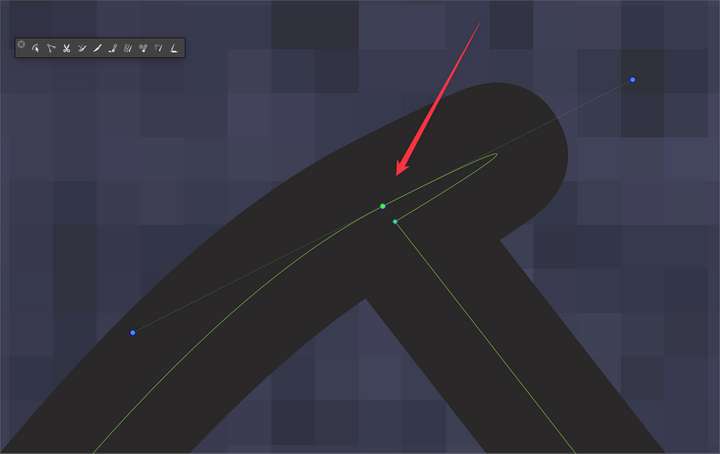
Is here a specific setting I'm missing to help the pen tool snap overtop the node, not just when closing a path?
🍎 macOS Tahoe 26.2, Mac mini (M1, 2020), Chip Apple M1, Memory 16 GB
Cintiq 27QHD Display and LG Ultra HD Display -
@Boldline This can be replicated. I think what happens here is that it tries to close the path.
Was the path open before clicking the last node? -
@Boldline tested this again, and I think it is just a node click tolerance issue, not really a bug. At some small distance it will add a new node instead of selecting the closest node.
This is normal and happens in other apps also. To select the node the cursor must be on the node before clicking. -
The video shows me trying to quickly click on the node last placed in order to create a cusp point change of direction with the path being created. I'm not doing this zoomed way out. Unless I get total accuracy and click directly on that node, it places it right next to it instead.
The issue is I'm trying to quickly draw out a path and don't want to slow down too much in that process.
You asked earlier if it was an open path and it is. I've not seen this happen with other apps, so I'm wondering if I need to explain or show it better. Is there a way to increase the node click tolerance? -
@Boldline said in Pen tool often gives me an overextended section when I try to click on the last node placed:
Is there a way to increase the node click tolerance?
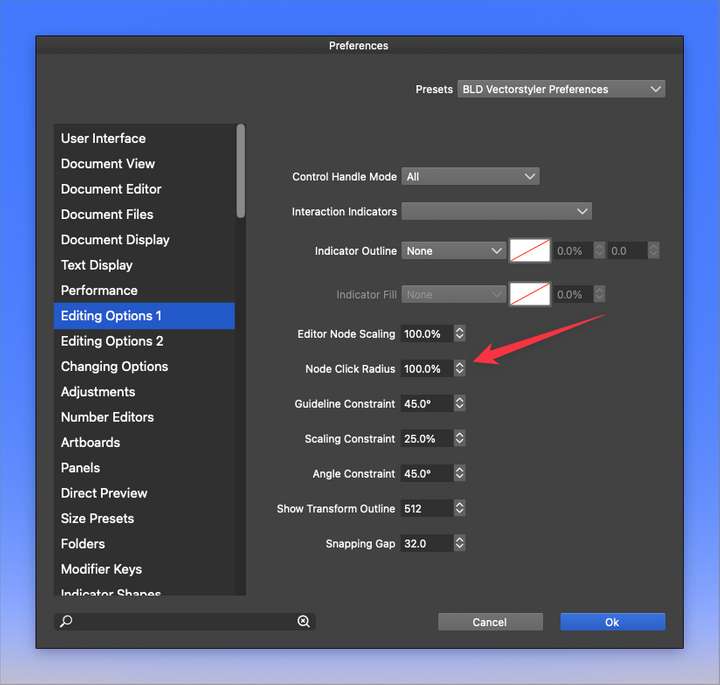
Try with "Node Click Radius" in Preferences -> Editing Options 1
-
@vectoradmin said in Pen tool often gives me an overextended section when I try to click on the last node placed:
This is normal and happens in other apps also. To select the node the cursor must be on the node before clicking.
Few days back we were discussing about the indicator in pen tool like hover over a node, closing node in other other program I think that that would come handy in this issue.
-
@Jayanta-Das I agree, though the snapping power for this needs to be less than what i was the last time it was tried. I think it should only snap overtop the existing node if the pen tool is clicked anywhere on the existing node at all and not beyond it. Last time we tried this, the snapping "gravitational pull" seemed to extend beyond the node itself and attempts to legitimately put a second node close by the initial node pulled it in to the first instead.
-
@vectoradmin said in Pen tool often gives me an overextended section when I try to click on the last node placed:
@Boldline said in Pen tool often gives me an overextended section when I try to click on the last node placed:
Is there a way to increase the node click tolerance?
Try with "Node Click Radius" in Preferences -> Editing Options 1
I already had this set to 100%. I'm assuming lowering the percentage would not help in this case would it?
-
@vectoradmin Here is my attempt to create the same pen tool result in Affinity Designer.
This is an extreme example because not every node would be converted to a cusp in a real design, but it shows that in Affinity, this is handled well. I am going quickly with the stylus using the pen tool and if my cursor clicks on any section of the existing node, it makes a cusp. In VS, it seems I need to click perfectly in the center of the node or else it assumes I want a new node nearby and not a conversion to a cusp node.I noticed in Affinity, if I begin to hover over any part of an existing node, it will change color briefly, signaling that if I click at that time it will count as a click on top of the existing node, making the node a cusp. If VS could be a little more like Affinity in this area, I think it would help
Going back over to VS, there's no visual or snap pull when I move my cursor over an existing node... in this video, I am slowing down and intentionally but not super-specifically trying to click on the center of the existing nodes (not just being totally flippant) and even then it succeeds half the time.
So essentially, in my opinion, adding a temporary visual color change to the existing node when hovered over by the pen tool cursor, and making a magnetic snap area that does not extend beyond the node size itself, so even if we click on an edge of a node, it still registers as a click to create a cusp -
@Boldline No, lowering would reduce the distance between cursor and node position.
I will improve the node hovering indication in the Pen tool, and also improve the selection to hit the closer node.
-
@vectoradmin Thanks! I was editing and adding a couple videos and conclusions to my thread above your last one when you posted your reply. I think we're on the same page. I appreciate it!
-
@vectoradmin said in Pen tool often gives me an overextended section when I try to click on the last node placed:
@Boldline No, lowering would reduce the distance between cursor and node position.
Can this number be raised above 100% currently? I made it 120% wondering if that would help in the meantime, but it does not seem to alter it accordingly.
If the number cannot be altered above 100% currently, could that be added? -
@vectoradmin Further thoughts on this: Even if the amount of snapping pull was equivalent to what we have now when we go to close a path, that might be sufficient. Also, instead of changing the color of the node, maybe using the same small blue circle indicator that already exists in VS?
If the "node click radius" could extend beyond 100%, with 100% representing the node size itself in full, users could fine tune the amount of sensitivity based on their own use practices
I also saw "snapping gap" and wondered if that played a part in this topic. - "setting the snapping tolerance in screen points" - can you elaborate on what does this do?
-
@Boldline said in Pen tool often gives me an overextended section when I try to click on the last node placed:
Also, instead of changing the color of the node, maybe using the same small blue circle indicator that already exists in VS?
It is a tough thread to jump into, so I'll ask just about this question

In this scenario - what would be the result of clicking that node?
-
@Ingolf It converts the node to a cusp so your next point after that does not have a bend in between but a corner instead.
-
@Boldline said in Pen tool often gives me an overextended section when I try to click on the last node placed:
@Ingolf It converts the node to a cusp so your next point after that does not have a bend in between but a corner instead.
Then I would suggest showing a cusp node instead when hovering it - like the boolean features can show a preview when hovering one of the boolean operations icons. I actually didn't know clicking the node would convert it into a cusp - but I would have with such a preview, I think.
-
@Ingolf said in Pen tool often gives me an overextended section when I try to click on the last node placed:
I actually didn't know clicking the node would convert it into a cusp - but I would have with such a preview, I think.
Try it in affinity designer as you create a path with the pen tool. Start a path and make some sections of the path that have a curve to them and then click on the node you just made and then keep going to your next click where the next node should be. The node you clicked on before the second time will be a cusp
This has been the standard behavior in Illustrator as well
-
@Boldline said in Pen tool often gives me an overextended section when I try to click on the last node placed:
@Ingolf said in Pen tool often gives me an overextended section when I try to click on the last node placed:
I actually didn't know clicking the node would convert it into a cusp - but I would have with such a preview, I think.
Try it in affinity designer as you create a path with the pen tool. Start a path and make some sections of the path that have a curve to them and then click on the node you just made and then keep going to your next click where the next node should be. The node you clicked on before the second time will be a cusp
This has been the standard behavior in Illustrator as well
It is a great concept - I never discovered it. Designer shows a line symbol next to the pointer when hovering the last created node, I thought it was as DELETE NODE symbol (looks like a minus sign) so I never clicked. That is why I think showing a cusp node while hovering instead of the actual node is a better idea in this scenario.
-
@Ingolf I'm glad you are discovering it now!
it will no doubt, speed up your workflow in Affinity and in VS. I'm not against the idea of having the node show as a cusp when hovered over - I think I would need to test it out myself i real life to know for sure how I feel. It makes sense, I just wonder if it will be too "busy" and not subtle enough.Right now there's no indication at all when you hover over the most recently placed node in VS to show it could change - so whether it's the same look and snapping pull as when you close a path in VS or something more like what you're suggesting, I think it will help
-
@Boldline said in Pen tool often gives me an overextended section when I try to click on the last node placed:
Right now there's no indication at all when you hover over the most recently placed node in VS to show it could change - so whether it's the same look and snapping pull as when you close a path in VS or something more like what you're suggesting, I think it will help
It don't think it too should use the blue circle symbol that closes a path with the pen tool - then the symbol has several meanings and then you have to click to know. Then we are entering Linux territory and waving goodbye to the usability.
All the colors and symbols are a bit like colors in good old WordPerfect symbolizing something. You had to read the f... manual, memorize them all or start print preview to know for sure what it meant. That is why I like concice feedback from software like showing the cusp symbol. Anyway, the blue circle meaning 'Close shape' should be reserved for indicating close.
Hints in the status bar a'la AD or Inkscape are the second best help (tooltips would drive you nuts) but they too can drown in options with just a limited space to show them, so I getting more and more interested in hints like the node showing what a click with result in directly on the drawing. If alt-clicking it has another effect than just clicking it, this can be displayed when holding alt first, only displaying that hint when relevant.
But sure, something should show that clicking the node does something.


