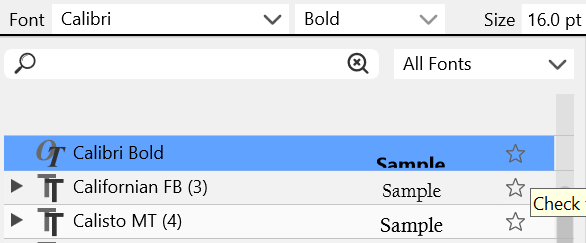
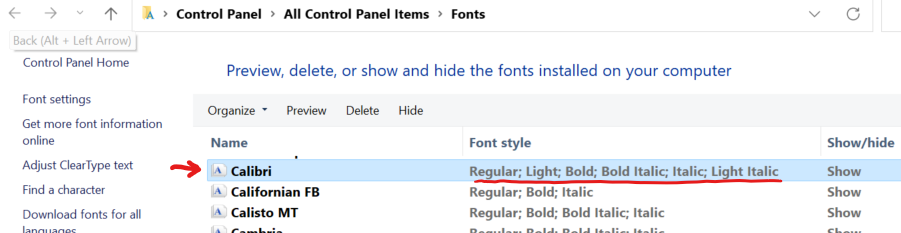
Font Family Font Weights Missing
-
@vectoradmin and @Victor-Vector
All my AI or VS files have their own folder, and inside that folder I have an 'images', 'PDFs', 'approved', and sometimes a 'fonts' folder.
How about when the app opens a file it would scan for any folder with fonts, and load them automatically?
MacBook Pro (Intel) running Monterey 12.6.4
-
@Victor-Vector said in Font Family Font Weights Missing:
I use a font managing software called MainType by High-Logic www.high-logic.com
It has this wonderful feature whereby you can "Load" a font instead of installing a font.Thanks for sharing about this font manager. People ask me for recommendations for font management but since I am almost exclusively mac, I don't have any windows options to suggest. This program looks interesting as they seem to offer a font editor in there as well.
For my macs, I use an awesome program called "Typeface" Like with all font management programs, it scans your font folders wherever you have them and aggregates them in one place without bogging down the system font folder. have used other font managers in the past, but this one is lightweight and does not require you manually load each font into the program. you direct it to the font folder and link it and you're done. It's also not a subscription which is a real winner in my book!I love that VS has a font manager as well because I can load specific fonts in there for easy access
🍎 macOS Tahoe 26.2, Mac mini (M1, 2020), Chip Apple M1, Memory 16 GB
Cintiq 27QHD Display and LG Ultra HD Display -
@vectoradmin said in Font Family Font Weights Missing:
if there are too many fonts (thousands) in the folder (or sub folders) it can take some time while all are scanned.
@vectoradmin I remember we spoke on this topic a little while back when I was trying to link thousands of fonts at one time. While I'm thinking of it - it is possible to add some sort of a visual indicator for people to know the fonts are actively being added? Like a status update bar?
-
@b77 said in Font Family Font Weights Missing:
@vectoradmin and @Victor-Vector
All my AI or VS files have their own folder, and inside that folder I have an 'images', 'PDFs', 'approved', and sometimes a 'fonts' folder.
How about when the app opens a file it would scan for any folder with fonts, and load them automatically?
Great Idea.
I have a similar system: Each job gets a folder and then for subfolders I have a "Source" folder for source material, "Ref" for reference material, and "Output" for what the client gets. I usually put the fonts in the "Source" folder, but VS auto-recognizing a "Fonts" folder would work very well! -
@Victor-Vector said in Font Family Font Weights Missing:
VS auto-recognizing a "Fonts" folder would work very well!
Wouldn't you still have to link that specific font folder to VS? As I had mentioned with the font manager program I use, it automatically has the system fonts loaded because it knows where to find those built-in, but any other folder, I need to connect it to the font manager
🍎 macOS Tahoe 26.2, Mac mini (M1, 2020), Chip Apple M1, Memory 16 GB
Cintiq 27QHD Display and LG Ultra HD Display -
@Boldline said in Font Family Font Weights Missing:
For my macs, I use an awesome program called "Typeface" Like with all font management programs, it scans your font folders wherever you have them and aggregates them in one place without bogging down the system font folder.
...
It's also not a subscription which is a real winner in my book!I have heard good things about Typeface and I really love that it is NOT subscription-based, which is the same for MainType, and probably one of the reasons we are all gathered here

-
@Boldline said in Font Family Font Weights Missing:
Wouldn't you still have to link that specific font folder to VS? As I had mentioned with the font manager program I use, it automatically has the system fonts loaded because it knows where to find those built-in, but any other folder, I need to connect it to the font manager
Oh I was responding to what @b77 said, I assumed he was envisioning an automated aspect to VS where it automatically scanned the root and subfolders of where the .vstyler file was opened, looking for fonts.
That sounded like a cool idea. -
@Victor-Vector @b77 This is kind of a foreign concept to me because if I have fonts for anything, they always get put in my main font collection of folders based on commercial use or non-commercial use, or open source, etc... I don't usually save fonts in my client folders specifically, though I can understand it if the client gives you specific fonts to use for their projects and they are not to be used for your own work otherwise, etc.
Just because the ideas are in my head as if this was a method of storing fonts I would use, what if there was an option you could toggle that automatically scanned the containing folder of any VS file you opened and added any font files found to a temporary folder inside VS's internal font manger?
As an extended thought - what if when you opened an existing VS file, any fonts you had as live text or were listed inside an internal document info file for that project could be automatically and temporary activated by the VS font manager so you didn't have to go find them in your external font manager and activate there necessarily? I would find this last idea very useful indeed. -
I'm not against the app being able to work with any of the font managers that offer font auto-activation.
My idea was that you either…
- received a PDF or AI file to edit, including full-res images and the needed fonts placed in their own subfolders,
or…
- you yourself choose to create a folder with the vector file and subfolders for 'images', 'fonts', etc, because you like things organized and easier to zip and send/backup, or indeed some font doesn't need to be installed in the Fonts folder of the OS, for various reasons (boring rehash you don't really need).
So in both cases when loading the vector file (be it VS native, or PDF, AI, SVG…) if some typeface is not found in the installed fonts of the OS, the app could look for it in any of these subfolders and load it if found, instead of popping the 'Missing Fonts' dialog.
-
@b77 My only concern is the extra work and processing behind the scenes that VS would have to do each and every time a file is opened -
-
@Boldline It should do that only if the fonts needed are not found in the main Fonts folder of the operating system. So it wouldn't do it each time a file is opened.
-
@Victor-Vector Is this problem with the font weights still persists?


