Reset to default panel settings for Character panel
-
I don't know if this is a bug or a missing feature, but I would find it helpful for the Character panel to have a "reset' option so if I edit the settings for one section of text, that can carry over to the next set if I choose, or it can be easily set back to the defaults with one click.
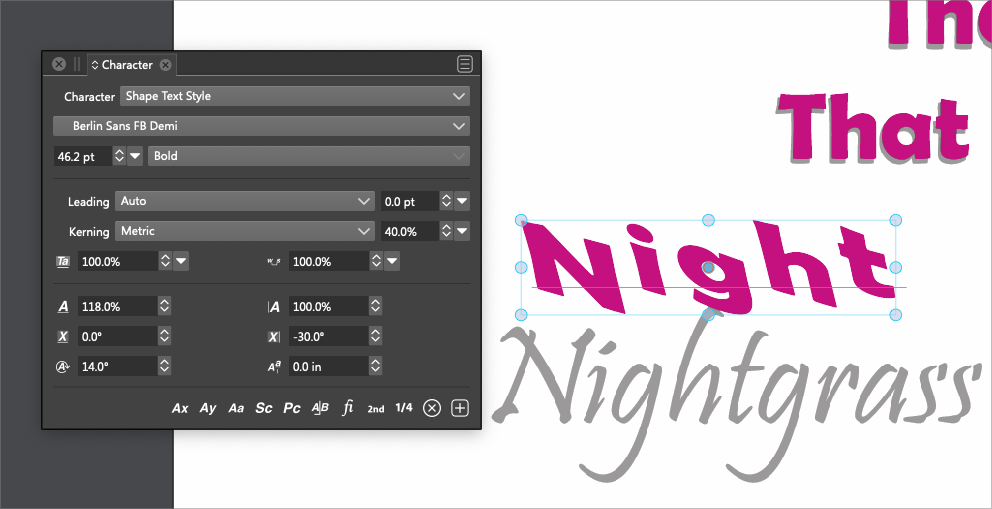
There appears to be a option for this already, but from what I can see it did not do anything to the settings I had previously altered.
You can see the pink text that says "Night"that will go where the word "Nightgrass" currently is (still need to swap the font itself). it's retained the setting from text I had altered above this image and I want to quickly reset the settings in the character panel to accomplish this
-
@Boldline That button (or Clear Character Overrides menu) removes formatting options that are applied to only some (but not all) of the characters.
In this example the skewing was applied on all characters.The only way to restore this to default (other than editing the options) is to select a Style (in this case Shape Text Style), but this will remove all other changes (color, size, font, etc).
Should there be an option to remove all transform changes? (scaling, rotations, offset, skewing)?
-
@VectorStyler I think that would make things easier for the typical user to have a total default reset option as well

