Snapping panel
-
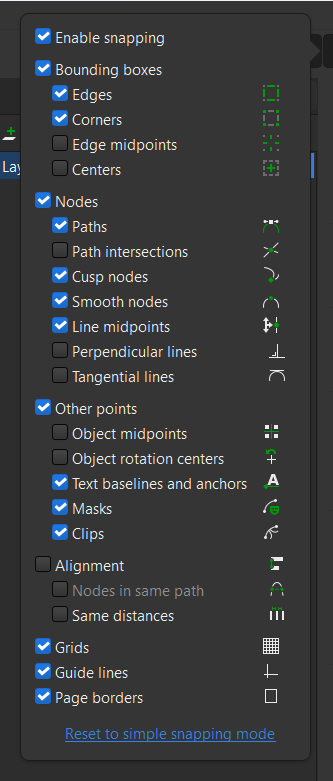
Snapping panel has so much of toggle, and its naming cunfused me quite a lot of time. Still Some of its options I have to check by toggling on/off its function. Would be nice if naming of options and reordering into subgroup for any new users.
This is the screenshot from inkscape, it much easier to understand and also its respective icons represent its function.
Mac Mini M4 Pro | 24Gb
WIndows 11 | Intel i5 11Gen
Wacom Intuos Pro -
@Jayanta-Das said in Snapping panel:
Snapping panel has so much of toggle, and its naming cunfused me quite a lot of time. Still Some of its options I have to check by toggling on/off its function. Would be nice if naming of options and reordering into subgroup for any new users.
This is the screenshot from inkscape, it much easier to understand and also its respective icons represent its function.
I agree with you on a theoretical level, but an icon can only tell you so much. Personally, I would use them to identify a feature I have used before and recognize. That's valuable enough too.
I need great tooltips, which in the example "Snap to artboards" is: "Check to enable snapping to the artboard frame and margins" which goes far beyond what a simple icon can tell.
Of course, one does not exclude the other - a combination is possible.
Note, however, that several of Inkscape's dimmed icons (so as not to distract) are not accessible - the contrast ratio is far, far too low.
-
@Jayanta-Das I have to see how could the VS snapping options be organized. They are different than in Inkscape.
-
I would love to see some visual feedback in snapping for reference this is from inkscape, and more snapping options like in Inkscape.
-
@Jayanta-Das said in Snapping panel:
I would love to see some visual feedback in snapping for reference this is from inkscape, and more snapping options like in Inkscape.
Added this to the features backlog.

