VectorStyler
    • Categories
    • Unread
    • Recent
    • Tags
    • Popular
    • Register
    • Login

    After clicking once with text tool to create temporary highlighted text, pasted text should replace it
    Scheduled Pinned Locked Moved Features and Ideas
    12 Posts 3 Posters 10.0k Views 2 Watching
    Loading More Posts
    • Oldest to Newest
    • Newest to Oldest
    • Most Votes
    Reply
    • Reply as topic
    Log in to reply
    This topic has been deleted. Only users with topic management privileges can see it.
    • BoldlineB Offline
      Boldline
      last edited by

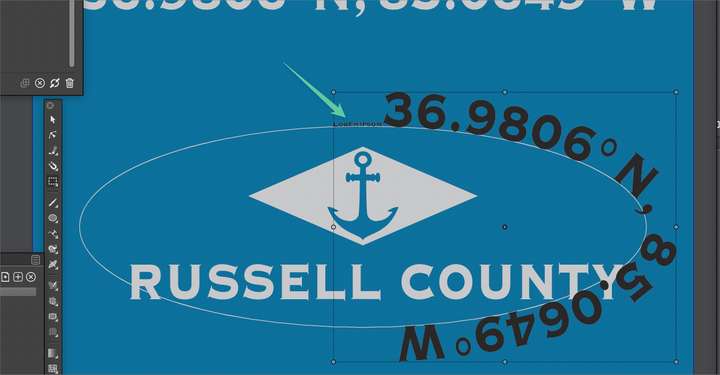
      I noticed this first when i was trying to pasted copied text into a text on a path temporary text selection, but it also has the same issue with regular highlighted filler text. When we click once with the text tool(whether on a path or normal text) it creates the temporary "Lorem Ipsum" text and highlights it automatically. If I already copied prior live text to memory, one would expect then hitting command-v would replace the highlighted "Lorem Ipsum" text with what is in memory - but it does not. instead it pastes it next to it.
      Could this be changed in a future release of VS?
      0_1655741531016_72281986-412b-480a-8401-cecd59bd5f08-BLD 2022-06-20 at 12.10.00.png

      🍎 macOS Tahoe 26.2, Mac mini (M1, 2020), Chip Apple M1, Memory 16 GB
      Cintiq 27QHD Display and LG Ultra HD Display

      VectorStylerV b77B 2 Replies Last reply Reply Quote 1
      • VectorStylerV Offline
        VectorStyler @Boldline
        last edited by

        @Boldline This looks like a bug. Here when I paste over the highlighted text with Command+V, the text is replaced.
        I will try to replicate this.

        BoldlineB 1 Reply Last reply Reply Quote 1
        • BoldlineB Offline
          Boldline @VectorStyler
          last edited by

          @VectorStyler Restarting VS and using a fresh document did not fix it here. Could it be related to my custom preferences? @b77 are you able to replicate the issue on your mac?

          🍎 macOS Tahoe 26.2, Mac mini (M1, 2020), Chip Apple M1, Memory 16 GB
          Cintiq 27QHD Display and LG Ultra HD Display

          VectorStylerV 1 Reply Last reply Reply Quote 0
          • VectorStylerV Offline
            VectorStyler @Boldline
            last edited by

            @Boldline Could be a preferences issue. Try pasting from the menu (not using the shortcut).
            When using the shortcut, pressing the Command+ key will temporarily activate the transform tool, and that may remove the highlight.

            BoldlineB 1 Reply Last reply Reply Quote 0
            • BoldlineB Offline
              Boldline @VectorStyler
              last edited by

              @VectorStyler I tried using the menu instead of the keyboard shortcut this time. I clicked once with the text tool to get the highlighted "lorem itsum" and used the edit>paste. It appends the copied wording to the end of the "Lorem Itsum"
              I also tried "paste inside" and that did not work either....

              🍎 macOS Tahoe 26.2, Mac mini (M1, 2020), Chip Apple M1, Memory 16 GB
              Cintiq 27QHD Display and LG Ultra HD Display

              VectorStylerV 1 Reply Last reply Reply Quote 0
              • VectorStylerV Offline
                VectorStyler @Boldline
                last edited by

                @Boldline Then some settings is the issue, as here (version 1.1.046) seems to work fine.

                BoldlineB 1 Reply Last reply Reply Quote 0
                • BoldlineB Offline
                  Boldline @VectorStyler
                  last edited by

                  @VectorStyler I am using the newest build, (version 1.1.046) as well. I set the preferences back to the default and restarted VS and tried again with the pasting shortcut and also with the edit>paste and it worked correctly both ways.
                  I wish there was an automated way to automatically go through and test preferences to see where an issue is!

                  🍎 macOS Tahoe 26.2, Mac mini (M1, 2020), Chip Apple M1, Memory 16 GB
                  Cintiq 27QHD Display and LG Ultra HD Display

                  VectorStylerV 1 Reply Last reply Reply Quote 1
                  • VectorStylerV Offline
                    VectorStyler @Boldline
                    last edited by

                    @Boldline said in After clicking once with text tool to create temporary highlighted text, pasted text should replace it:

                    I wish there was an automated way to automatically go through and test preferences to see where an issue is!

                    I will need to figure out what causes this, as it looks like a bug.

                    BoldlineB 1 Reply Last reply Reply Quote 0
                    • BoldlineB Offline
                      Boldline @VectorStyler
                      last edited by

                      @VectorStyler Do you want me to send my custom preferences file over to you again?

                      🍎 macOS Tahoe 26.2, Mac mini (M1, 2020), Chip Apple M1, Memory 16 GB
                      Cintiq 27QHD Display and LG Ultra HD Display

                      1 Reply Last reply Reply Quote 0
                      • b77B Offline
                        b77 @Boldline
                        last edited by

                        @Boldline and @VectorStyler This is what happens here: https://recordit.co/Uzqe8vW0Ln — the result is different when I copy the text object then the text itself.

                        MacBook Pro (Intel) running Monterey 12.6.4

                        VectorStylerV 1 Reply Last reply Reply Quote 0
                        • VectorStylerV Offline
                          VectorStyler @b77
                          last edited by

                          @b77 said in After clicking once with text tool to create temporary highlighted text, pasted text should replace it:

                          @Boldline and @VectorStyler This is what happens here: https://recordit.co/Uzqe8vW0Ln — the result is different when I copy the text object then the text itself.

                          Yes, copying the text or copying the object are different (by design).

                          b77B 1 Reply Last reply Reply Quote 0
                          • b77B Offline
                            b77 @VectorStyler
                            last edited by

                            @VectorStyler OK, but indeed the highlighted text doesn't get replaced when pasting some other text.


                            MacBook Pro (Intel) running Monterey 12.6.4

                            1 Reply Last reply Reply Quote 0
                            • First post
                              Last post