VectorStyler
    • Categories
    • Unread
    • Recent
    • Tags
    • Popular
    • Register
    • Login

    Black in CMYK profile is not black

    Scheduled Pinned Locked Moved Questions and Support
    14 Posts 4 Posters 10.7k Views 4 Watching
    Loading More Posts
    • Oldest to Newest
    • Newest to Oldest
    • Most Votes
    Reply
    • Reply as topic
    Log in to reply
    This topic has been deleted. Only users with topic management privileges can see it.
    • b77B Offline
      b77 @Guest
      last edited by

      @plrang Oh, I know what you mean — an option to display plain black as darkest black — and I don't think that is available. The developer might correct me.

      Rich Black means four plates instead of one if you print, so…

      MacBook Pro (Intel) running Monterey 12.6.4

      ? 1 Reply Last reply Reply Quote 0
      • ? Offline
        A Former User @b77
        last edited by

        @b77 OK, generally it is not a big problem, I can partially design in VS and transfer to Affinity. Thank you.

        b77B 1 Reply Last reply Reply Quote 1
        • b77B Offline
          b77 @Guest
          last edited by

          @plrang Appearance of black is important — I'm sure the developer will consider offering this option.

          MacBook Pro (Intel) running Monterey 12.6.4

          1 Reply Last reply Reply Quote 0
          • VectorStylerV Offline
            VectorStyler @Guest
            last edited by

            @plrang What was the CMYK color profile used in Affinity and in VS?

            ? 1 Reply Last reply Reply Quote 0
            • ? Offline
              A Former User @VectorStyler
              last edited by

              @VectorStyler CMYK/8 Web Coated v2 both.

              VectorStylerV 1 Reply Last reply Reply Quote 1
              • VectorStylerV Offline
                VectorStyler @Guest
                last edited by

                @plrang I think VS needs a "Rich Black" option.

                ? 1 Reply Last reply Reply Quote 0
                • ? Offline
                  A Former User @VectorStyler
                  last edited by

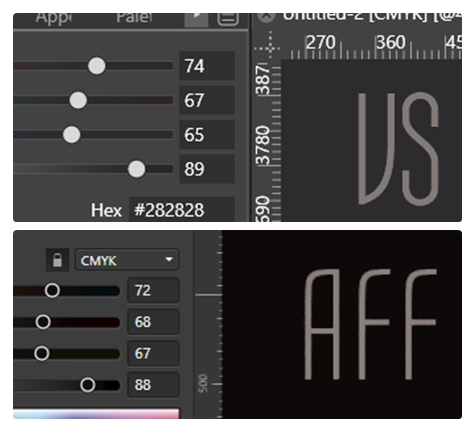
                  @VectorStyler This is how I see it.
                  0_1656154305910_AFF-vs-VS-CMYK.jpg

                  VectorStylerV 1 Reply Last reply Reply Quote 0
                  • VectorStylerV Offline
                    VectorStyler @Guest
                    last edited by

                    @plrang I will try to replicate this with the color profile. What is the Display (RGB) profile used in Affinity and VS?

                    ? 1 Reply Last reply Reply Quote 0
                    • ? Offline
                      A Former User @VectorStyler
                      last edited by

                      @VectorStyler Both use the same sRGB ...966 2.1

                      1 Reply Last reply Reply Quote 1
                      • TorakikiiiT Offline
                        Torakikiii
                        last edited by

                        Please let me add this.
                        It is extremely important that the software (can) only displays rich black but not automatically output it!

                        In a normal prepress workflow you'll want to see when (and where) a normal black has been used especially when mixed with other rich black elements. There are tons of reasons why a pure black element must stay pure black in output.

                        So if you're going to implement this, make sure that display and output of rich blacks are optionals.

                        Thanks!

                        MacBook M1 Pro 10/16 - Monterey

                        VectorStylerV 1 Reply Last reply Reply Quote 1
                        • VectorStylerV Offline
                          VectorStyler @Torakikiii
                          last edited by

                          @Torakikiii said in Black in CMYK profile is not black:

                          make sure that display and output of rich blacks are optionals

                          Will do so.

                          1 Reply Last reply Reply Quote 0
                          • First post
                            Last post