VectorStyler
    • Categories
    • Unread
    • Recent
    • Tags
    • Popular
    • Register
    • Login

    Warp > arching - uses the inner object shape?
    Scheduled Pinned Locked Moved Questions and Support
    6 Posts 2 Posters 5.1k Views 2 Watching
    Loading More Posts
    • Oldest to Newest
    • Newest to Oldest
    • Most Votes
    Reply
    • Reply as topic
    Log in to reply
    This topic has been deleted. Only users with topic management privileges can see it.
    • ? Offline
      A Former User
      last edited by

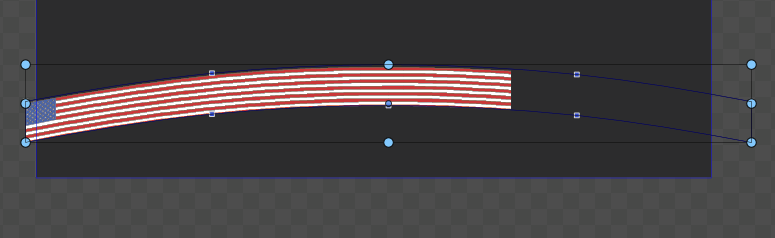
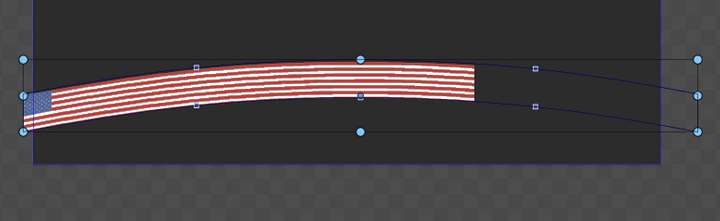
      The flag is nested in a rectangle, the warp is on a rectangle, yet it uses the whole inner object to create the arch.
      How can I make it bend only the clipped part?
      0_1656506875447_0e666f4c-2563-4521-9a3d-dc46ea84a10b-image.png

      VectorStylerV 1 Reply Last reply Reply Quote 0
      • VectorStylerV Offline
        VectorStyler @Guest
        last edited by VectorStyler

        @plrang It is a little bit hidden 🙂 but this can be changed:

        • select the object
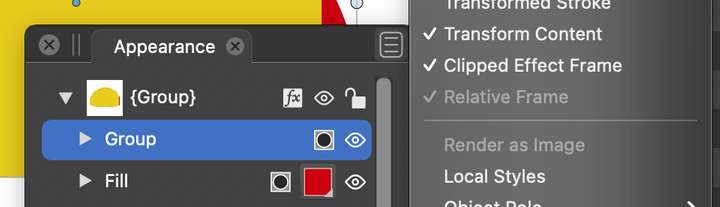
        • in the Appearance panel, select the Group item
        • in the Appearance panel menu enable the "Clipped Effect Frame" option

        Important to know: for most of the shape effects, the behavior outside of the bounding box is undefined and may have unexpected results. This is why by default the effect box will contain all.
        0_1656508030164_clipped.png

        ? 1 Reply Last reply Reply Quote 0
        • ? Offline
          A Former User @VectorStyler
          last edited by

          @VectorStyler Well, works like a charm, yet I would never have found it. Seems like it is unavailable as an option in the layer selector, where I look for layer/group properties. So the pattern is: check also the appearance tab?

          VectorStylerV 1 Reply Last reply Reply Quote 1
          • VectorStylerV Offline
            VectorStyler @Guest
            last edited by

            @plrang Yes, the Appearance panel also has a lot of options around the content of object.
            I will try to move this into the Layers/Object options, the problem is that it is an option of the "Group" content inside the Object.

            ? 1 Reply Last reply Reply Quote 1
            • ? Offline
              A Former User @VectorStyler
              last edited by

              @VectorStyler I see, couldn't that be docked at the bottom of the Object Options panel? Otherwise it (the hierarchy tree) seems redundant. Also there is a 3rd place - the Properties panel, which also includes a Shape panel, Ordering etc.

              VectorStylerV 1 Reply Last reply Reply Quote 1
              • VectorStylerV Offline
                VectorStyler @Guest
                last edited by

                @plrang I will try to add it to the Object/Layer options view.

                1 Reply Last reply Reply Quote 0
                • First post
                  Last post