VectorStyler
    • Categories
    • Unread
    • Recent
    • Tags
    • Popular
    • Register
    • Login

    Scroll / drag to change an option / value

    Scheduled Pinned Locked Moved Features and Ideas
    3 Posts 2 Posters 4.2k Views 2 Watching
    Loading More Posts
    • Oldest to Newest
    • Newest to Oldest
    • Most Votes
    Reply
    • Reply as topic
    Log in to reply
    This topic has been deleted. Only users with topic management privileges can see it.
    • ? Offline
      A Former User
      last edited by A Former User

      All those menus really need a [scroll MMB to change] feature, otherwise it's so annoying to click and select.
      Or maybe is there a hidden setting for that?

      0_1656508956856_be3ecdbd-dbc2-47be-a5c1-f92c46a6d8ba-image.png

      Value changing could be easier if would act as an invisible slider while pressing the LMB in the number field and dragging. That would also make some more room for other items.
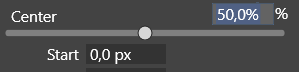
      0_1656509183312_e967e1d6-c40d-4457-ade7-0b1ec76e0b36-image.png

      Check this out [in Blender] : (https://recordit.co/NwFIibIR80)

      VectorStylerV 1 Reply Last reply Reply Quote 2
      • VectorStylerV Offline
        VectorStyler @Guest
        last edited by

        @plrang I added this to the feature backlog. Some of the number fields have scrubby scrolling already.

        Should the drop down lists be scrollable without opening?

        ? 1 Reply Last reply Reply Quote 0
        • ? Offline
          A Former User @VectorStyler
          last edited by A Former User

          @VectorStyler Yes, i'm using that.
          If a panel is scrollable Blender is using CTRL+ mouse scroll , otherwise it's just a scroll.

          1 Reply Last reply Reply Quote 0
          • First post
            Last post