VectorStyler
    • Categories
    • Unread
    • Recent
    • Tags
    • Popular
    • Register
    • Login

    Collider Tool Flipping

    Scheduled Pinned Locked Moved Questions and Support
    24 Posts 5 Posters 33.0k Views 4 Watching
    Loading More Posts
    • Oldest to Newest
    • Newest to Oldest
    • Most Votes
    Reply
    • Reply as topic
    Log in to reply
    This topic has been deleted. Only users with topic management privileges can see it.
    • S Offline
      Subpath @Igull
      last edited by Subpath

      @Igull

      I never really warmed up to the Collider Tool. Can't find a Key to flip.

      But if you take your Shape in the middle, and move it, you can easily
      control which direction it snaps to.
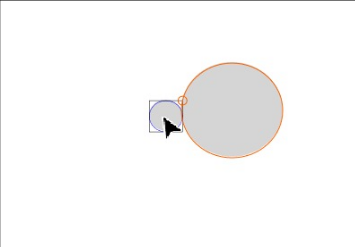
      See this Video here

      0_1656862784162_Collider-Tool.png
      .
      .
      Another Methode would be to use the Alignment to Shape
      (Alignment Panel) for this kind of tasks.
      Here a Thread from Plrang where have i Post some Videos how to this via this way.

      Here the Thread
      (https://www.vectorstyler.com/forum/topic/2161/collision-snapping-not-far-from-perfect)

      Win 11
      CPU: AMD Ryzen 5 9600X, 6-core.
      GPU: Nvidia Geforce RTX 5070.

      IgullI 1 Reply Last reply Reply Quote 0
      • VectorStylerV Offline
        VectorStyler @Igull
        last edited by

        @Igull Press the "space" key to flip path the side

        S IgullI 2 Replies Last reply Reply Quote 0
        • S Offline
          Subpath @VectorStyler
          last edited by

          @VectorStyler

          ... Press the "space" key to flip path the side ...

          I found this very unusual, I would never have suspected that you use the "space bar" for this.

          Win 11
          CPU: AMD Ryzen 5 9600X, 6-core.
          GPU: Nvidia Geforce RTX 5070.

          BoldlineB IgullI 2 Replies Last reply Reply Quote 0
          • BoldlineB Offline
            Boldline @Subpath
            last edited by

            @Subpath this reminds me some of the space bar option with text on a curve to flip the text to the other side of the path

            🍎 macOS Tahoe 26.2, Mac mini (M1, 2020), Chip Apple M1, Memory 16 GB
            Cintiq 27QHD Display and LG Ultra HD Display

            S 1 Reply Last reply Reply Quote 1
            • IgullI Offline
              Igull @Subpath
              last edited by

              @Subpath
              I agree, that's why I didn't find it LOL πŸ™‚
              Neil

              iMac 27" 2015 Catalina 32Gb, MacBook Pro 13" 2016 Monterey 8Gb, Mac Mini M2 2023 8Gb

              S 1 Reply Last reply Reply Quote 1
              • IgullI Offline
                Igull @VectorStyler
                last edited by

                @VectorStyler
                OK, got it, thanks !
                However πŸ™‚ You have to give the spacebar a short tap to get it to change - if you hold the spacebar, it rattles back and forth between the two rather than staying put - I think that needs fixed ?
                I would also suggest that the option key (I guess ALT on in windoze ?) is the modifier and not the spacebar - if that's an issue, then maybe a choice in preferences for folks that like things unnatural LOL πŸ™‚
                Great tool BTW - I just have a whole pile of uses for it !
                Neil

                iMac 27" 2015 Catalina 32Gb, MacBook Pro 13" 2016 Monterey 8Gb, Mac Mini M2 2023 8Gb

                S VectorStylerV 2 Replies Last reply Reply Quote 1
                • S Offline
                  Subpath @Boldline
                  last edited by

                  @Boldline

                  Ok. Didnt know that it was possible to flip Text this way. Then this makes a little more sense. Will note that.

                  I only know Space for moving/panning the canvas in Corel and Shapes could also be copied that Way.

                  Otherwise my first guesses where always the Control, Alt, Shift key.

                  Win 11
                  CPU: AMD Ryzen 5 9600X, 6-core.
                  GPU: Nvidia Geforce RTX 5070.

                  BoldlineB 1 Reply Last reply Reply Quote 0
                  • IgullI Offline
                    Igull @Subpath
                    last edited by

                    @Subpath
                    Thanks for that, I'll take a look.
                    Neil

                    iMac 27" 2015 Catalina 32Gb, MacBook Pro 13" 2016 Monterey 8Gb, Mac Mini M2 2023 8Gb

                    S 1 Reply Last reply Reply Quote 1
                    • S Offline
                      Subpath @Igull
                      last edited by Subpath

                      @Igull

                      ... I agree, that's why I didn't find it LOL ...

                      me too
                      had some plays before with the Collider Tool
                      and stuck also at this point

                      Win 11
                      CPU: AMD Ryzen 5 9600X, 6-core.
                      GPU: Nvidia Geforce RTX 5070.

                      1 Reply Last reply Reply Quote 0
                      • S Offline
                        Subpath @Igull
                        last edited by Subpath

                        @Igull

                        ... Thanks for that, I'll take a look....

                        your welcome

                        Win 11
                        CPU: AMD Ryzen 5 9600X, 6-core.
                        GPU: Nvidia Geforce RTX 5070.

                        1 Reply Last reply Reply Quote 0
                        • S Offline
                          Subpath @Igull
                          last edited by Subpath

                          @Igull said in Collider Tool Flipping:

                          @VectorStyler
                          OK, got it, thanks !
                          However πŸ™‚ You have to give the spacebar a short tap to get it to change - if you hold the spacebar, it rattles back and forth between the two rather than staying put - I think that needs fixed ?
                          I would also suggest that the option key (I guess ALT on in windoze ?) is the modifier and not the spacebar - if that's an issue, then maybe a choice in preferences for folks that like things unnatural LOL πŸ™‚
                          Great tool BTW - I just have a whole pile of uses for it !
                          Neil

                          @Igull

                          Alt (Win) ist already used for Copy Shapes
                          (this is also the case with the Collider Tool)

                          Dont see the Problem in to use Space for this.
                          I see the Problem more on how to be informed
                          that it is this way when you use a Tool.

                          Win 11
                          CPU: AMD Ryzen 5 9600X, 6-core.
                          GPU: Nvidia Geforce RTX 5070.

                          1 Reply Last reply Reply Quote 0
                          • IgullI Offline
                            Igull @Igull
                            last edited by

                            @Igull
                            Just as an aside to all this, I can imagine that there are piles of folks out there shouting about which key should be pressed to modify which object or tool πŸ™‚
                            FWIW, the traditional ones (from early last century that is πŸ™‚ ) are command/option/shift.
                            TBH, it's all a bit like Marmite - you either like it or you don't. As long as everyone's personal preference can be accommodated, then we should all be happy bunnies. VS seems to be about the only app like this that has a huge array of prefs and I for one fully applaud that. Occasionally, that can be a royal PITA of course as you need a prefs search function in there to find what you're looking for πŸ™‚
                            For those that are inclined, perhaps reading some words of the great Jef Raskin on GUI's and such would be enlightening πŸ™‚

                            Neil

                            iMac 27" 2015 Catalina 32Gb, MacBook Pro 13" 2016 Monterey 8Gb, Mac Mini M2 2023 8Gb

                            1 Reply Last reply Reply Quote 0
                            • b77B Offline
                              b77
                              last edited by b77

                              @Igull Option-dragging is traditionally used for duplicating the object.

                              Shift-dragging is already used to constrain the movement of the object horizontally or vertically.

                              Not sure if Ctrl-dragging should be used either, since it is used to display the context menu (at least on the Mac is Ctrl-click, and could be confusing).

                              And… @VectorStyler I think pressing Cmd should do the temporary switch from the Collider tool to Shape Editing (A), just like it does when you are in Select/Transform mode (V) and you press Cmd.

                              ………………………………………

                              Improved search in Preferences should come in version 1.2 β€” see the Roadmap here: https://www.vectorstyler.com/roadmap/

                              MacBook Pro (Intel) running Monterey 12.6.4

                              IgullI 1 Reply Last reply Reply Quote 1
                              • IgullI Offline
                                Igull @b77
                                last edited by

                                @b77 said in Collider Tool Flipping:

                                @Igull Option-dragging is traditionally used for duplicating the object.

                                Yep agreed - but only when dragging.

                                Shift-dragging is already used to constrain the movement of the object horizontally or vertically.

                                Yep agreed.

                                Not sure if Ctrl-dragging should be used either, since it is used to display the context menu (at least on the Mac is Ctrl-click, and could be confusing).

                                Yep agreed too, usually done via the RH mouse button on the mac rather than the actual CTRL key for contextual menus, but not CTRL dragging, can't think that's ever been a thing on mac.

                                And… @VectorStyler I think pressing Cmd should switch from the Collider tool to Shape Editing (A), just like it does when you are in Select/Transform mode (V).

                                LOL, now that IS unnatural LOL, but as I said, add it to a prefs if that's your thing πŸ™‚

                                Improved search in Preferences should come in version 1.2 β€” see the Roadmap here: https://www.vectorstyler.com/roadmap/

                                LOL, I was joking , surely that's not a thing πŸ™‚

                                And as I said, if you don't like it, Preference it - simples !

                                Neil

                                iMac 27" 2015 Catalina 32Gb, MacBook Pro 13" 2016 Monterey 8Gb, Mac Mini M2 2023 8Gb

                                b77B 1 Reply Last reply Reply Quote 0
                                • BoldlineB Offline
                                  Boldline @Subpath
                                  last edited by

                                  @Subpath said in Collider Tool Flipping:

                                  @Boldline

                                  Ok. Didnt know that it was possible to flip Text this way. Then this makes a little more sense. Will note that.

                                  I only know Space for moving/panning the canvas in Corel and Shapes could also be copied that Way.

                                  Otherwise my first guesses where always the Control, Alt, Shift key.

                                  Yes a while back I was asking for ways to flip text on a path to the other side - I'll have to go back and look at it again because I remember @b77 had found a traditional way to access it through a panel option. The developer added the shortcut to tap the spacebar to get the same result and I've been using that since. I felt a little leery of using the spacebar for that at the time because it's traditionally been the hand tool shortcut only in most every other program. You're right, it's not the keyboard shortcut you naturally think of lol. I've gotten used to it though I've also been giving a lot of thought to the "Text on a Path Tool" and how it only seems to have one task assigned to it (moving text along a path) and I was always trying to think of ways to either tie that function in elsewhere and eliminate that tool, or add more functions to it to make it worthy of a full tool. This is where I was thinking flipping text could be added

                                  🍎 macOS Tahoe 26.2, Mac mini (M1, 2020), Chip Apple M1, Memory 16 GB
                                  Cintiq 27QHD Display and LG Ultra HD Display

                                  b77B S 2 Replies Last reply Reply Quote 1
                                  • b77B Offline
                                    b77 @Igull
                                    last edited by b77

                                    @Igull said in Collider Tool Flipping:

                                    @b77 said in Collider Tool Flipping:

                                    And… @VectorStyler I think pressing Cmd should switch from the Collider tool to Shape Editing (A), just like it does when you are in Select/Transform mode (V).

                                    LOL, now that IS unnatural LOL, but as I said, add it to a prefs if that's your thing πŸ™‚

                                    It feels very natural to me β€” I'm used to this from Illustrator β€” and since the Collider tool is like the Transform tool with a magnet attached, keeping it working the same would make more sense.

                                    But hey, I don't insist on this.

                                    Improved search in Preferences should come in version 1.2 β€” see the Roadmap here: https://www.vectorstyler.com/roadmap/

                                    LOL, I was joking , surely that's not a thing πŸ™‚

                                    I don't understand what "surely that's not a thing" means (English is not my first language πŸ˜†), but the app actually has a search field in the Preferences window.

                                    Trouble is that it is limited to pointing to the first match only β€” it doesn't display a dropdown menu from where you can go to this or that section.
                                    And that's supposed to be improved in version 1.2. πŸ™‚

                                    MacBook Pro (Intel) running Monterey 12.6.4

                                    IgullI 1 Reply Last reply Reply Quote 0
                                    • b77B Offline
                                      b77 @Boldline
                                      last edited by b77

                                      @Boldline In the 'Text on Path' panel (Text menu > Panels > Text on Path - Ctrl-F) you can choose from the different options of the Alignment menu:
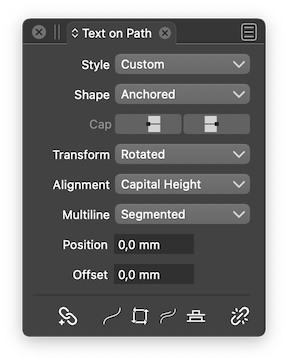
                                      0_1656884292653_ToP.png

                                      You can also select the path and reverse its direction (Ctrl-I), which will move the text on the other side AND at the other end of the path.

                                      MacBook Pro (Intel) running Monterey 12.6.4

                                      1 Reply Last reply Reply Quote 1
                                      • S Offline
                                        Subpath @Boldline
                                        last edited by

                                        @Boldline

                                        The fact that the space bar is used for this doesn't hurt me much.

                                        It was just unusual for me. But once I know I'll use it that way and as you wrote,
                                        text will flip that way too. So it also makes a little more sense to me

                                        Win 11
                                        CPU: AMD Ryzen 5 9600X, 6-core.
                                        GPU: Nvidia Geforce RTX 5070.

                                        1 Reply Last reply Reply Quote 1
                                        • VectorStylerV Offline
                                          VectorStyler @Igull
                                          last edited by

                                          @Igull said in Collider Tool Flipping:

                                          I would also suggest that the option key (I guess ALT on in windoze ?) is the modifier and not the spacebar - if that's an issue, then maybe a choice in preferences

                                          Added the customization to the backlog.

                                          IgullI 1 Reply Last reply Reply Quote 0
                                          • IgullI Offline
                                            Igull @VectorStyler
                                            last edited by

                                            @VectorStyler
                                            Sounds like a plan πŸ™‚

                                            iMac 27" 2015 Catalina 32Gb, MacBook Pro 13" 2016 Monterey 8Gb, Mac Mini M2 2023 8Gb

                                            b77B 1 Reply Last reply Reply Quote 0
                                            • First post
                                              Last post
