"Export" doesn't remember the current preset
-
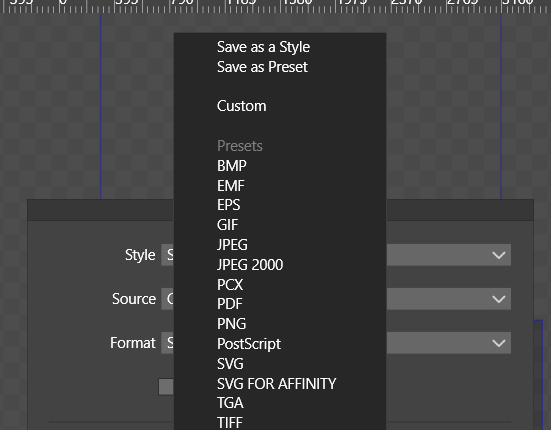
That could be stored per document or per app. Otherwise one has always go and select the right one. I know that Export Again exists, but that way as it is now I can't be sure that the exported file is really what I want.
-
@plrang Is that happening with a saved document?
Because here if it's saved, the app will remember the last selected format/preset from the list even if you chose another one (say, PNG instead of PDF) after you saved the file. -
@b77
Saved at least 100 times. I have a preset SVG FOR AFFINITY.
Maybe VS does remember some of its settings, maybe all, I don't know, but until MY actual preset name doesn't show in the panel as active, while doing another Export, it doesn't look right. -
@plrang Normally, VS will remember all the export settings if the document is saved after exporting.
But it might be that the preset name is not stored. I will fix this. -
@VectorStyler Seems like something is stored, but it doesn't show up as an active one.
Also this thing is so confusing Style, Custom, Preset...
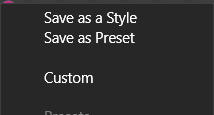
Plus, the SAVE and LOAD hidden in those menus are not user friendly, should be visible in every panel which does the SAVE/LOAD.
-
@plrang Yes, "custom" should not show up as a selectable menu item. It is a label in case of any value is changed.
Styles and Presets: there is a long explanation for this, but basically these are different ways to use stored options (available for most things in VS). Styles are used to keep active link to the stored option, and when they are changed, all used cases are updated. Presets are copied, without links.
Styles / Presets for export settings make sense only when used in context of batch artboard/slice/object exporting.I would not move Save commands out of this menu for all cases (lots of such drop down in the UI) as it would make those views / panels more complex.
-
@VectorStyler I understand, but if I'm not using any styles, just want a simple Export, the interface should show me my Export settings panel. Currently it's all together - options necessary for an export and those not necessary.
So I'd move those Styles to a TAB.
That way you have a room for SAVE/LOAD.
To be honest, S/L in those dropdowns is a non standard solution, 90% of newcomers gonna be confused. and you have a lot of room anyway, the interface is just overloaded. -
I think dialogs should be improved as part of an overall update and an overall improved UI concept. And it needs to be done thoroughly and patiently. Because it's not easy. But you usually get the overview and the good ideas easier when you see the whole thing in a big perspective. We must be careful not to get improvements dripped into an old UI architecture, or to improve an architecture with patchwork solutions when a brand new one might be better in a major upgrade of VS.
For example, I think the "new document" dialog needs to be rethought.
The really big task (besides following UI standards in big and small ways) is to find an elegant way to separate commonly used and very advanced features. That's also the task Inkscape has started on.
VS is an exceptionally powerful and versatile tool, but in several places the advanced features obfuscate the very most used features that most customers will buy the program to use, so it's worth all the time and effort to find the best balance UI wise.


