update 1.1.049
-
Fixed two regressions of 1.1.048:
- the Appearance panel was causing crashes.
- duplicating artboards with content did not work.
-
@VectorStyler Both are fixed here.

-
@VectorStyler A really impressive list of fixes and a number of improvements as well! Just beginning to test and try things out in the list. Already love the ability to shift-click to deselect items individually from a selected group, the repeated step control-R option now is awesome!
-
Thanks also from me for the improvements and fixes.
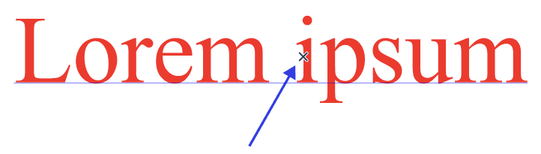
Have one thing that I did not notice before. There is a " X kind of Pointer " on the objects.
Can this be deselected in the preferences ? When where ?
Find it disturbing when I select text.See here
Win 11
CPU: AMD Ryzen 5 9600X, 6-core.
GPU: Nvidia Geforce RTX 5070. -
@Subpath Disable 'Detect Hovering Node' in Preferences > Changing options.
MacBook Pro (Intel) running Monterey 12.6.4
-
@VectorStyler If i understand correctly, this setting allows the user to grab any shape by any of its nodes and snap it to something else with that node when in Transform (V) mode. No need to switch to Shape Editing for that — awesome!
But it seems to have a "weaker" snap with 'Snap to Shapes' than with 'Snap to Points' — maybe just because with 'Snap to Shapes' it doesn't display the confirmation indicator at the snap location like it does with 'Snap to Points'?

/\/\/\/\/\/\/\/\/\/\/\
EDIT: Never mind, 'Snap to Shape' can't display a small circle indicator because it snaps the node along the entire contour of the shape.

-
@Subpath Should it be inactive in case of text object selection?
-
@VectorStyler said in update 1.1.049:
@Subpath Should it be inactive in case of text object selection?
Well, it disturbs me the most with text. So, yes.
-
@b77 said in update 1.1.049:
@Subpath Disable 'Detect Hovering Node' in Preferences > Changing options.
Thank you
-
@VectorStyler
Great set of fixes for me !!! Particularly object node snapping (once the bounding box is removed LOL ) and the ability to not leave a closed object closed when removing a part of the path using the eraser tool ! You have no idea how much time this actually saves me.
Apologies to @Subpath, the wee X is a figment of now being able to snap objects by dragging a node using the transform tool (as long as the node isn't near one of it's bounding box handles - that causes resizing issues - hopefully fixed next time around). You can switch off the X as @Subpath has indicated
I really can't see anything that AI offers me over VS now !Neil
-
No need to apologize, I understand that it is useful.
And as long as there is an option to turn it off, everything is fine.With text it is just quite annoying because
text always has many nodes and with small
font sizes parts are hidden.



