VectorStyler
    • Categories
    • Unread
    • Recent
    • Tags
    • Popular
    • Register
    • Login

    Separation preview?

    Scheduled Pinned Locked Moved Questions and Support
    33 Posts 4 Posters 41.9k Views 3 Watching
    Loading More Posts
    • Oldest to Newest
    • Newest to Oldest
    • Most Votes
    Reply
    • Reply as topic
    Log in to reply
    This topic has been deleted. Only users with topic management privileges can see it.
    • VectorStylerV Offline
      VectorStyler @Dazmondo
      last edited by

      @Dazmondo Looks like it gets confused by the file name given after the Print view is confirmed. This can be replicated here
      Try to avoid periods in the file name, then it should work.

      DazmondoD 1 Reply Last reply Reply Quote 0
      • DazmondoD Offline
        Dazmondo @VectorStyler
        last edited by

        @VectorStyler said in Separation preview?:

        @Dazmondo Looks like it gets confused by the file name given after the Print view is confirmed. This can be replicated here
        Try to avoid periods in the file name, then it should work.

        So sending separations is working for you?

        The periods where originally generated by VS inserting this: 'PEEEE.pdf.ps.pdf.ps.pdf.ps.pdf' which did generate a PDF but when I originally simplified the name to say P1585 to produce an orange sep PDF it didn't generate anything - I'm gonna have to step away from this for a bit and come back at a later date --- Thanks anyway

        VectorStylerV 1 Reply Last reply Reply Quote 0
        • VectorStylerV Offline
          VectorStyler @Dazmondo
          last edited by

          @Dazmondo said in Separation preview?:

          So sending separations is working for you

          Yes I tested with the uploaded file. When printing, I enabled all color channels (with the icons in the first column) and I just gave a simple file name (test1.pdf).
          I got 6 files with the name augmented by the color channel name.

          DazmondoD 1 Reply Last reply Reply Quote 0
          • DazmondoD Offline
            Dazmondo @VectorStyler
            last edited by

            Yes I tested with the uploaded file. When printing, I enabled all color channels (with the icons in the first column) and I just gave a simple file name (test1.pdf).
            I got 6 files with the name augmented by the color channel name.

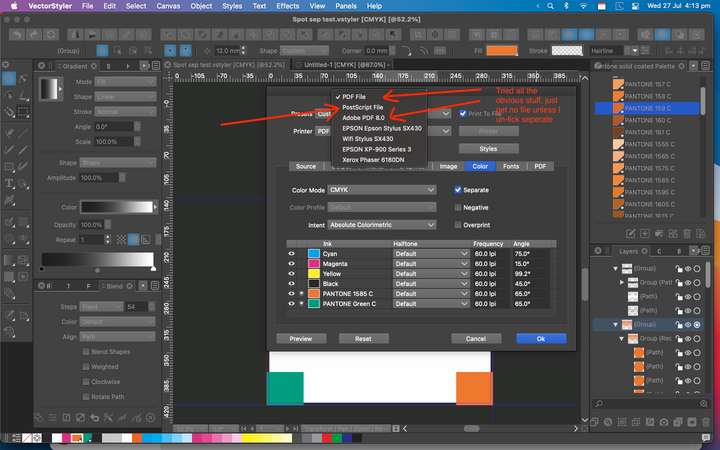
            Wow that would be ideal - just can't trick it into producing a file - is it because I'm saving to desktop? 0_1658935747002_Screen Grab 2022-07-27 at 4.13.50 pm.png
            VectorStylerV 1 Reply Last reply Reply Quote 0
            • VectorStylerV Offline
              VectorStyler @Dazmondo
              last edited by

              @Dazmondo The first option "PDF File" should be working.
              Try disabling "Background Printing" in preferences.

              DazmondoD 1 Reply Last reply Reply Quote 0
              • DazmondoD Offline
                Dazmondo @VectorStyler
                last edited by

                @VectorStyler said in Separation preview?:

                @Dazmondo The first option "PDF File" should be working.
                Try disabling "Background Printing" in preferences.

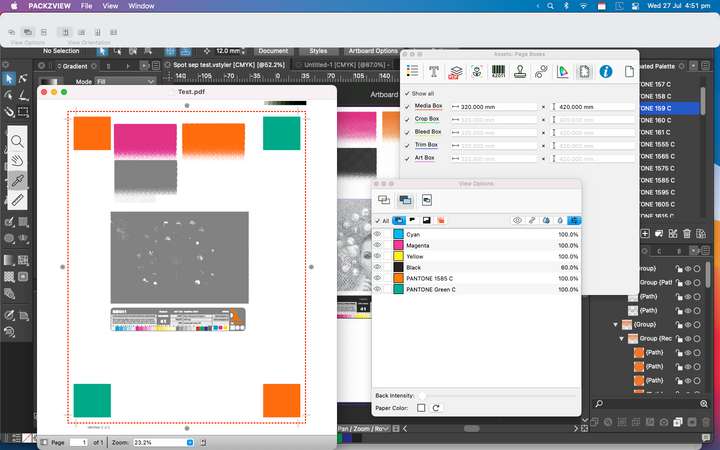
                Tried = no PDF produced so tried unticking seps = great composit PDF with spots intact (see grab) re-tick seps = no output???0_1658937203488_Screen Grab 2022-07-27 at 4.51.41 pm.png
                Would you recommend switching background printing back on?

                VectorStylerV 1 Reply Last reply Reply Quote 0
                • VectorStylerV Offline
                  VectorStyler @Dazmondo
                  last edited by

                  @Dazmondo said in Separation preview?:

                  Would you recommend switching background printing back on?

                  Yes, at least here it does not affect the output.

                  Can you make a recording of the whole thing (with Separate checked). Including the part where the folder and file name for the output is selected.

                  DazmondoD 1 Reply Last reply Reply Quote 0
                  • DazmondoD Offline
                    Dazmondo @VectorStyler
                    last edited by

                    @VectorStyler said in Separation preview?:

                    Can you make a recording of the whole thing (with Separate checked). Including the part where the folder and file name for the output is selected.

                    Vid grab: https://drive.google.com/file/d/1L8GPvPbDlN7sHjvoy_joJTQaFpOX5lY3/view?usp=sharing

                    Note: The Test.pdf file on my desktop is a composite which produce great - also doing a find for TestA.pdf (the seps pdf produced in the vid grab) finds no match

                    Thanks

                    VectorStylerV 1 Reply Last reply Reply Quote 0
                    • VectorStylerV Offline
                      VectorStyler @Dazmondo
                      last edited by

                      @Dazmondo All looks correct in the recording. But! there could be another issue.

                      Do you have it through the App Store?

                      This might be a bug the way file names are generated by VS, and the Mac App Store sandboxing.

                      DazmondoD 1 Reply Last reply Reply Quote 0
                      • DazmondoD Offline
                        Dazmondo @VectorStyler
                        last edited by

                        @VectorStyler said in Separation preview?:

                        Do you have it through the App Store?
                        This might be a bug the way file names are generated by VS, and the Mac App Store sandboxing.

                        Yes boss -- Mac app store version

                        VectorStylerV 1 Reply Last reply Reply Quote 0
                        • VectorStylerV Offline
                          VectorStyler @Dazmondo
                          last edited by

                          @Dazmondo Then that is the issue.

                          VectorStylerV 1 Reply Last reply Reply Quote 0
                          • VectorStylerV Offline
                            VectorStyler @VectorStyler
                            last edited by

                            @VectorStyler You should have a new email with a license for regular VS. If you are willing to try, this one is notarized (Apple) but not sandboxed.

                            DazmondoD 1 Reply Last reply Reply Quote 0
                            • DazmondoD Offline
                              Dazmondo @VectorStyler
                              last edited by

                              @VectorStyler said in Separation preview?:

                              @VectorStyler You should have a new email with a license for regular VS. If you are willing to try, this one is notarized (Apple) but not sandboxed.

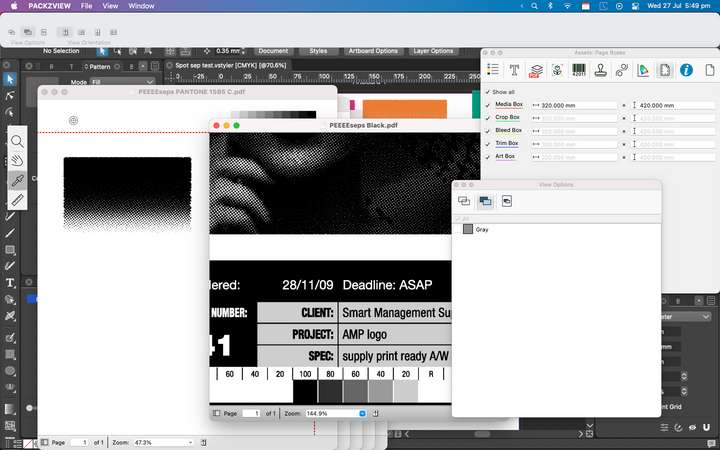
                              Wow you really are a true genius --- 7 separation PDFs produced, now working great👍 👍 👍 0_1658940832084_Screen Grab 2022-07-27 at 5.49.58 pm.png

                              BoldlineB 1 Reply Last reply Reply Quote 3
                              • BoldlineB Offline
                                Boldline @Dazmondo
                                last edited by

                                @Dazmondo Amazing! Awesome job persevering and sticking in there with it all. I want to echo his compliments to you @VectorStyler - you are indeed a genius. I'm impressed so often by what you figure out and solve and how quickly you make it happen

                                🍎 macOS Tahoe 26.2, Mac mini (M1, 2020), Chip Apple M1, Memory 16 GB
                                Cintiq 27QHD Display and LG Ultra HD Display

                                1 Reply Last reply Reply Quote 1
                                • First post
                                  Last post