VectorStyler
    • Categories
    • Unread
    • Recent
    • Tags
    • Popular
    • Register
    • Login

    Double clicking gradient handles should not do anything

    Scheduled Pinned Locked Moved Features and Ideas
    9 Posts 5 Posters 8.1k Views 4 Watching
    Loading More Posts
    • Oldest to Newest
    • Newest to Oldest
    • Most Votes
    Reply
    • Reply as topic
    Log in to reply
    This topic has been deleted. Only users with topic management privileges can see it.
    • IngolfI Offline
      Ingolf
      last edited by Ingolf

      The Illustrator inspired gradient handles - not gradient stops - which I've never liked 🙂 will, when double-clicked, close the gradient editor, and VS switches to the transform tool.

      I don't know if that's desired functionality from anyone, I doubt it. But you never know.

      In any case, it bothers me tremendously, as I constantly forget they have no color function (they can so easily be mistaken for a gradient stop), and if I double-click them by accident, then it's goodbye gradient editor.

      I don't think that's logical functionality. And not to fill VS with all sorts of tricks nobody remembers or uses I think double clicking simply should have no function on these handles. So they don't cause accidents.

      🍏 macOS Sequoia Apple Silicon

      BoldlineB S b77B 3 Replies Last reply Reply Quote 1
      • BoldlineB Offline
        Boldline @Ingolf
        last edited by

        @Ingolf What gradient handles are you referring to? I've been double clicking around on everything that could be construed as a "handle" and nothing is switching to the transform tool. Maybe include a screen shot for blind people like me? lol

        🍎 macOS Tahoe 26.2, Mac mini (M1, 2020), Chip Apple M1, Memory 16 GB
        Cintiq 27QHD Display and LG Ultra HD Display

        1 Reply Last reply Reply Quote 0
        • S Offline
          Subpath @Ingolf
          last edited by Subpath

          @Ingolf

          Edited:
          Deleted my Text, because it refering to something different

          Win 11
          CPU: AMD Ryzen 5 9600X, 6-core.
          GPU: Nvidia Geforce RTX 5070.

          IngolfI 1 Reply Last reply Reply Quote 0
          • b77B Offline
            b77 @Ingolf
            last edited by

            @Ingolf No switching to the Transform tool happens here either.

            MacBook Pro (Intel) running Monterey 12.6.4

            IngolfI 1 Reply Last reply Reply Quote 0
            • IngolfI Offline
              Ingolf @Subpath
              last edited by

              @Subpath said in Double clicking gradient handles should not do anything:

              @Ingolf

              Despite that i would hardly use the double click on a Gradient Node.
              For me the way it works by now, showing the popover Menu, is ok for me i can live with that.

              Here we are only talking about the start and end handle, which only adjusts the size of a gradient. They should not respond to double-clicks at all. 🙂

              🍏 macOS Sequoia Apple Silicon

              S BoldlineB 2 Replies Last reply Reply Quote 1
              • S Offline
                Subpath @Ingolf
                last edited by

                @Ingolf ah ok, then forget my post

                Win 11
                CPU: AMD Ryzen 5 9600X, 6-core.
                GPU: Nvidia Geforce RTX 5070.

                1 Reply Last reply Reply Quote 1
                • BoldlineB Offline
                  Boldline @Ingolf
                  last edited by

                  @Ingolf double clicking is not switching anything to the transform tool here

                  🍎 macOS Tahoe 26.2, Mac mini (M1, 2020), Chip Apple M1, Memory 16 GB
                  Cintiq 27QHD Display and LG Ultra HD Display

                  1 Reply Last reply Reply Quote 0
                  • IngolfI Offline
                    Ingolf @b77
                    last edited by Ingolf

                    @b77 said in Double clicking gradient handles should not do anything:

                    @Ingolf No switching to the Transform tool happens here either.

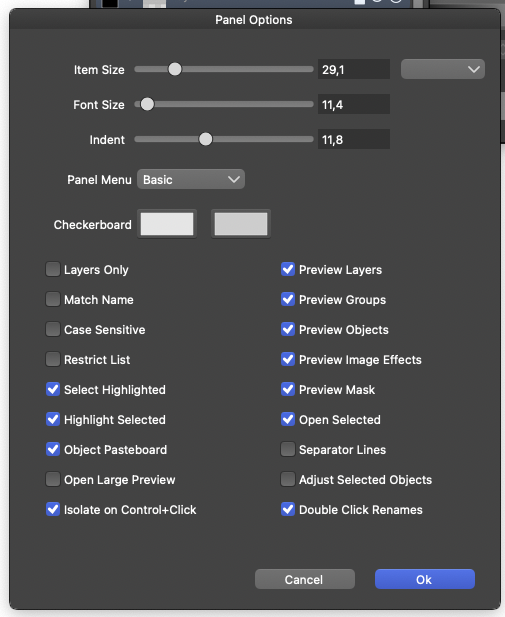
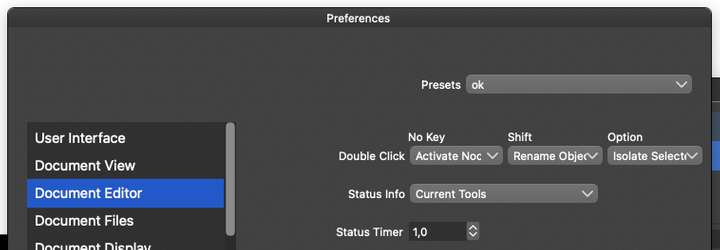
                    Probably related to my "what to do with an object when double clicking" settings.
                    0_1660079863576_2e4bbba7-da11-4202-ba47-b59ed8e447d5-image.png

                    0_1660079887156_0b18d667-61b2-483e-ab12-bbcbd07e197a-image.png

                    Bingo.

                    @VectorStyler When Activate node editor is selected in Double click - No key is selected, the problem happens. If I set it to isolate, it does not. So it is a side effect of that setting.

                    🍏 macOS Sequoia Apple Silicon

                    VectorStylerV 1 Reply Last reply Reply Quote 2
                    • VectorStylerV Offline
                      VectorStyler @Ingolf
                      last edited by

                      @Ingolf said in Double clicking gradient handles should not do anything:

                      When Activate node editor is selected in Double click - No key is selected, the problem happens. If I set it to isolate, it does not. So it is a side effect of that setting.

                      Yes, this could be a side effect. I added this to the backlog.

                      1 Reply Last reply Reply Quote 0
                      • First post
                        Last post