Strange Keyboard Shortcut Issues
-
This is only on the Mac Intel version, not on the Windows version, it seems to be fine (and is emulated on the same mac computer and uses the same VS keyboard shortcuts/workspace etc)
Switching between Transform Tool (V) and Shape Editor Tool (A) works fine, but if I press T for trim or C for the collision tool (my choice) the tools don't change - V & A still work. However, if I press E for eraser - that's OK - and now if I press T, that is also now OK

Seems like there's some kind of toggling issue between them
V T doesn't work
V C doesn't work
V E does workA T doesn't work
A C doesn't work
A E does workIf I press T after an E that's OK - same with C after an E - weird eh :-))
Anyone else having this issue - I've tried resetting prefs/workspaces and a previous keyboard shortcuts file - same issue. I'm away for another glass of wine, maybe that'll help
TIA
Neil
iMac 27" 2015 Catalina 32Gb, MacBook Pro 13" 2016 Monterey 8Gb, Mac Mini M2 2023 8Gb
-
@Igull said in Strange Keyboard Shortcut Issues:
A C doesn't work
I'm on a Mac as well - (M1) and all the toggles work for me aside from the A-C. I have to press "A" again a second time and then press "C" again to get it to toggle correctly. Just pressing "C" repeatedly from the node tool editor does not work
-
@Igull All work here except "A then C"
I open a bug on this one, but it could be a simple keyboard shortcut customization issue. -
@VectorStyler said in Strange Keyboard Shortcut Issues:
@Igull All work here except "A then C"
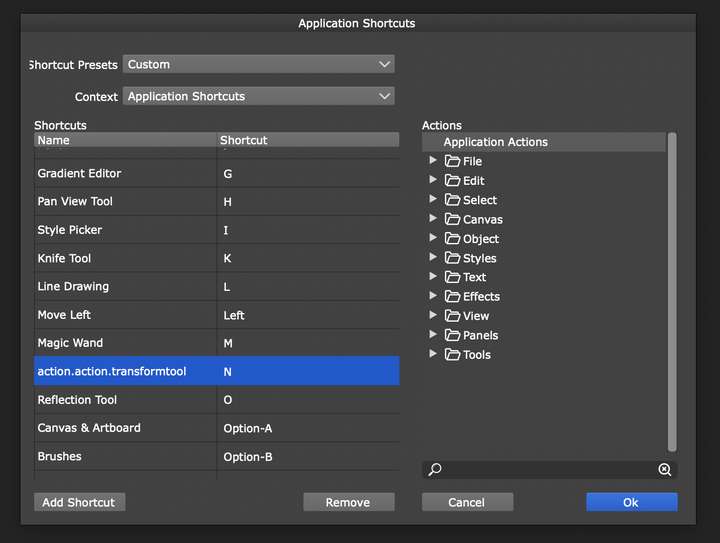
I open a bug on this one, but it could be a simple keyboard shortcut customization issue.I may have accidentally found the issue, within the keyboard shortcuts - application shortcuts context, I found an action.action.transformtool - allocated the letter N so removed it. Problem is now resolved.
I've seen this action.action.xxxxxxx entry style before - and removed them, but didn't see this one.
Perhaps @VectorStyler can enlighten what this is ?
Neil
-
@Igull said in Strange Keyboard Shortcut Issues:
action.action.transformtool
Yes, I found the issue. this will be fixed in the next build


