VectorStyler
    • Categories
    • Unread
    • Recent
    • Tags
    • Popular
    • Register
    • Login

    Three-finger drag, tap-to-click unreliable (macOS)

    Scheduled Pinned Locked Moved VectorStyler 1.1 Bugs
    25 Posts 3 Posters 39.6k Views 3 Watching
    Loading More Posts
    • Oldest to Newest
    • Newest to Oldest
    • Most Votes
    Reply
    • Reply as topic
    Log in to reply
    This topic has been deleted. Only users with topic management privileges can see it.
    • b77B Offline
      b77 @tudor
      last edited by

      @tudor So these are the settings in System Prefs?
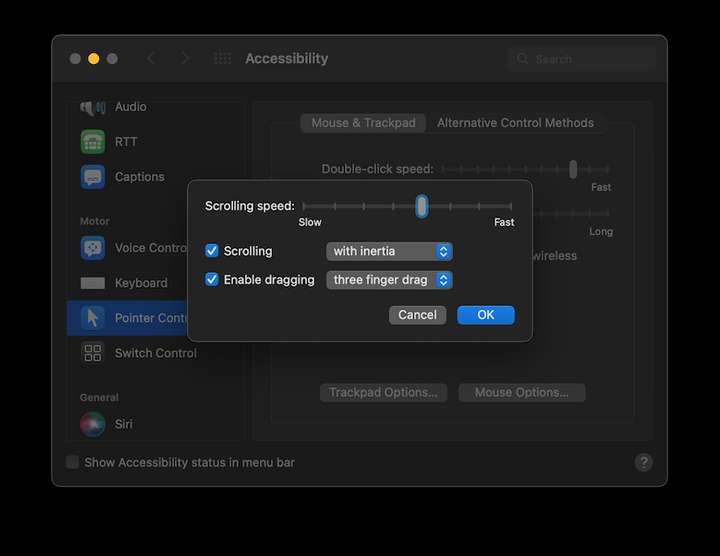
      0_1660659657886_Screenshot 2022-08-16 at 17.17.29.png

      MacBook Pro (Intel) running Monterey 12.6.4

      1 Reply Last reply Reply Quote 0
      • T Offline
        tudor
        last edited by

        Yes, that's correct. And on the Trackpad options, I have Tap-to-click enabled.
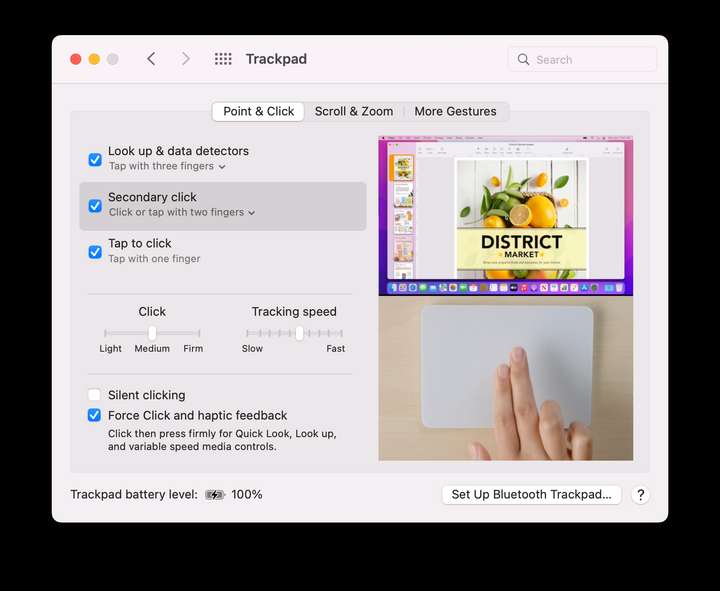
        0_1660659859170_Screen Shot 2022-08-16 at 5.22.51 PM.png

        1 Reply Last reply Reply Quote 0
        • VectorStylerV Offline
          VectorStyler @tudor
          last edited by

          @tudor said in Three-finger drag, tap-to-click unreliable (macOS):

          using three-finger drag to move things around, and I've noticed that Vectorstyler ignores that operation a lot.

          Hi, and welcome to VectorStyler.

          I just did a quick test on an Intel Mac with external Magic Trackpad and it seems to be working.
          I will test on the M1 also and try to replicate the issue.

          Meanwhile, this could be related to some specific example. If you could make a short video of what you are trying to move with the three finger drag, it might help replicating it.

          T 1 Reply Last reply Reply Quote 0
          • T Offline
            tudor @VectorStyler
            last edited by

            @VectorStyler same issue on an Intel Mac mini. I made a screen recording:

            https://www.dropbox.com/s/kofqz9zm0vzlgti/Screen Recording 2022-08-16 at 20.49.30.mov?dl=0

            Two things to notice:

            • I drag the shape without selecting it first.
            • After each attempt to move that star, I tap-clicked once on the artboard to deselect the shape. Maybe that's the cause of the failed dragging attempts?

            (I do this often when working, I guess it's a habit of mine to deselect everything by clicking on the artboard instead of Cmd-Shift-A.)

            b77B 1 Reply Last reply Reply Quote 0
            • b77B Offline
              b77 @tudor
              last edited by

              @tudor I can't replicate the issue here.

              To make sure it's not some conflict with a Preferences setting, you could reset the app to defaults by holding down Command-Shift-Option when starting the app, and see if this fixes it.

              But don't do this before saving the Prefs files:

              • switch to the Finder
              • click the 'Go' menu > Go to Folder…
              • paste this: ~/Library/Application Support/NumericPath/VectorStyler1.0/vector/data/resources
              • press Enter/Return.
              • copy these two files (settings.xml and workspace.xml) somewhere else.

              Then you can reset the app and see if the issue is solved.

              If it's solved, send the .xml files to the developer's email (csraba at this domain).

              MacBook Pro (Intel) running Monterey 12.6.4

              T 1 Reply Last reply Reply Quote 0
              • T Offline
                tudor @b77
                last edited by

                @b77 I reset the app, the issue is still present on both computers.

                I did some more testing, it looks like disabling tap-to-click solves the problem. Of course now I have to press-click on the trackpad, which is something I want to avoid. Tap-to-click is one of the best feature of the trackpads.

                There was a system-wide bug with tap-to-click not registering, which appeared in macOS 12 beta 9 and was fixed by Apple in macOS 12.3 (if I remember well). I guess there are still remnants of that bug affecting Vectorstyler somehow (I don't have this issue in other apps).

                1 Reply Last reply Reply Quote 1
                • VectorStylerV Offline
                  VectorStyler @tudor
                  last edited by

                  @tudor said in Three-finger drag, tap-to-click unreliable (macOS):

                  Vectorstyler ignores that operation a lot

                  I tried to replicate this on a MacMini with Big Sur using an external Magic Trackpad, but it seems to be working here.
                  I tried both single tap for selection, and three finger tap for pick and drag objects around. Both are working at every attempt.

                  If there is more info on how to replicate this, or if there is a recording of missed taps/drags please let me know.

                  T 1 Reply Last reply Reply Quote 0
                  • T Offline
                    tudor @VectorStyler
                    last edited by

                    @VectorStyler said in Three-finger drag, tap-to-click unreliable (macOS):

                    I tried to replicate this on a MacMini with Big Sur

                    You should test it on Monterey. In Big Sur the trackpad worked perfectly. I'm willing to bet that Vectorstyler is somehow still affected by the tap-to-click bug Apple introduced in Monterey beta 9 and was presumably fixed in 12.3.

                    VectorStylerV 1 Reply Last reply Reply Quote 1
                    • VectorStylerV Offline
                      VectorStyler @tudor
                      last edited by

                      @tudor said in Three-finger drag, tap-to-click unreliable (macOS):

                      You should test it on Monterey

                      I will do so!

                      T 1 Reply Last reply Reply Quote 0
                      • T Offline
                        tudor @VectorStyler
                        last edited by

                        @VectorStyler I just tried it on an old Intel MacBook Pro with Big Sur and I can confirm that there are no issues with selecting and moving shapes with the trackpad.

                        VectorStylerV 1 Reply Last reply Reply Quote 1
                        • VectorStylerV Offline
                          VectorStyler @tudor
                          last edited by

                          @tudor Tested on a Monterey 12.5.1 (just updated). No success so far, I will keep looking for this issue.

                          T 1 Reply Last reply Reply Quote 0
                          • T Offline
                            tudor @VectorStyler
                            last edited by

                            @VectorStyler Try this:

                            • Both click-to-tap and three-finger-drag must be enabled.
                            • Never press on the trackpad, don't use the physical clicks.
                            • Draw one shape on an artboard, then deselect it.
                            • Try dragging that shape without selecting it first. Just hover the mouse over it without clicking or tapping, then start dragging with three fingers.
                            • Deselect the shape by tapping-to-click once on the artboard (again, don't press on the trackpad).
                            • Repeat the above steps several times: drag>deselect>drag>deselect>...

                            I have this habit of deselecting all objects by clicking on an empty spot on the artboard. When I do this in Monterey using tap-to-click, I suspect that some of my taps are not registered correctly in VS.

                            VectorStylerV 1 Reply Last reply Reply Quote 2
                            • VectorStylerV Offline
                              VectorStyler @tudor
                              last edited by

                              @tudor What is the Monterey version used?

                              T 1 Reply Last reply Reply Quote 0
                              • T Offline
                                tudor @VectorStyler
                                last edited by

                                @VectorStyler the latest one, 12.5.1, and the one before it.

                                VectorStylerV 1 Reply Last reply Reply Quote 1
                                • VectorStylerV Offline
                                  VectorStyler @tudor
                                  last edited by

                                  @tudor With those exact steps it seems to be replicating. Every now and then a three finger drag is skipped.

                                  Thank you for the precise description 🙂

                                  I will try to fix this ASAP.

                                  1 Reply Last reply Reply Quote 0
                                  • VectorStylerV Offline
                                    VectorStyler @tudor
                                    last edited by

                                    @tudor The three-finger tap issue on Monterey should be fixed in the new build 1.1.054

                                    T 1 Reply Last reply Reply Quote 1
                                    • T Offline
                                      tudor @VectorStyler
                                      last edited by

                                      @VectorStyler wow, that was fast! Thank you so much! 👍

                                      VectorStylerV 1 Reply Last reply Reply Quote 0
                                      • VectorStylerV Offline
                                        VectorStyler @tudor
                                        last edited by

                                        @tudor Let me know if you still encounter the issue, or any other issue 🙂

                                        T 1 Reply Last reply Reply Quote 0
                                        • T Offline
                                          tudor @VectorStyler
                                          last edited by

                                          @VectorStyler this morning I tested the new build on an Intel Mac mini and the bug was gone. Now I've just updated VS on an M1 Mac mini and the bug is still present 😞

                                          VectorStylerV 2 Replies Last reply Reply Quote 0
                                          • VectorStylerV Offline
                                            VectorStyler @tudor
                                            last edited by

                                            @tudor said in Three-finger drag, tap-to-click unreliable (macOS):

                                            Now I've just updated VS on an M1 Mac mini and the bug is still present

                                            I will keep the issue open. I assume that the M1 Mac Mini also runs Monterey 12.5.1

                                            T 1 Reply Last reply Reply Quote 0
                                            • First post
                                              Last post
