VectorStyler
    • Categories
    • Unread
    • Recent
    • Tags
    • Popular
    • Register
    • Login

    Standard and advanced New document setup mode

    Scheduled Pinned Locked Moved Features and Ideas
    17 Posts 7 Posters 15.0k Views 6 Watching
    Loading More Posts
    • Oldest to Newest
    • Newest to Oldest
    • Most Votes
    Reply
    • Reply as topic
    Log in to reply
    This topic has been deleted. Only users with topic management privileges can see it.
    • S Offline
      Subpath @Boldline
      last edited by

      @Boldline, totally agree with that

      Win 11
      CPU: AMD Ryzen 5 9600X, 6-core.
      GPU: Nvidia Geforce RTX 5070.

      1 Reply Last reply Reply Quote 1
      • IngolfI Offline
        Ingolf
        last edited by

        Visual selection is also good, but visual can also end up complicated. My main point is one for simple needs and one for advanced needs, visual or not.

        And yes - one that remembers as well.

        🙂

        🍏 macOS Sequoia Apple Silicon

        BoldlineB 1 Reply Last reply Reply Quote 1
        • VectorStylerV Offline
          VectorStyler @Boldline
          last edited by

          @Boldline said in Standard and advanced New document setup mode:

          did not have to be pulled up every time. 99% of the time I need one setup

          The current plain "New Document" command will reuse the last confirmed document setup.

          1 Reply Last reply Reply Quote 1
          • BoldlineB Offline
            Boldline @Ingolf
            last edited by Boldline

            @Ingolf said in Standard and advanced New document setup mode:

            My main point is one for simple needs and one for advanced needs, visual or not

            I don't think it needs to be super complicated and have two versions - simple and complex - If there were a few pre-made templates available by default with the option to add your own and pull in any of the defaults you like, I would think that would suffice. It would be easy for a new person to quickly grab a common template and veteran users could use pull downs to select more complex ones
            As time goes on after implementation, I'm sure there will be a number of additional templates created by users that will be made available for others to download from this forum or other places

            🍎 macOS Tahoe 26.2, Mac mini (M1, 2020), Chip Apple M1, Memory 16 GB
            Cintiq 27QHD Display and LG Ultra HD Display

            1 Reply Last reply Reply Quote 1
            • IngolfI Offline
              Ingolf @VectorStyler
              last edited by Ingolf

              @VectorStyler said in Standard and advanced New document setup mode:

              @Ingolf There is a plan to have some sort of visual "template" selection model for new document (as in other apps), in the future (besides the advanced mode).
              But it is after 1.2

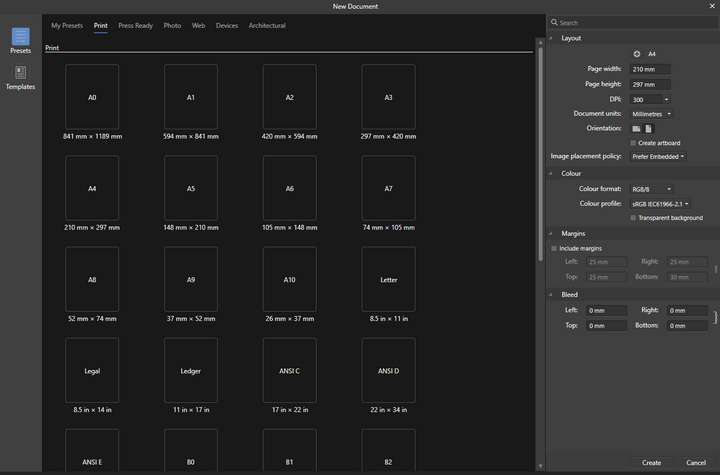
              But be careful where you find inspiration. This model from Serif, created and executed by a simpleton, might be just as good as a detailed list in one or two columns. Actually I would prefer a list.
              0_1661026493326_a5ff7546-6a47-41b6-a427-56704eea73df-image.png

              The company - without specialists and with too few resources - has completely missed the benefits of the visual. And it's not even easy to use. The eye has to search long and hard. Search? None.

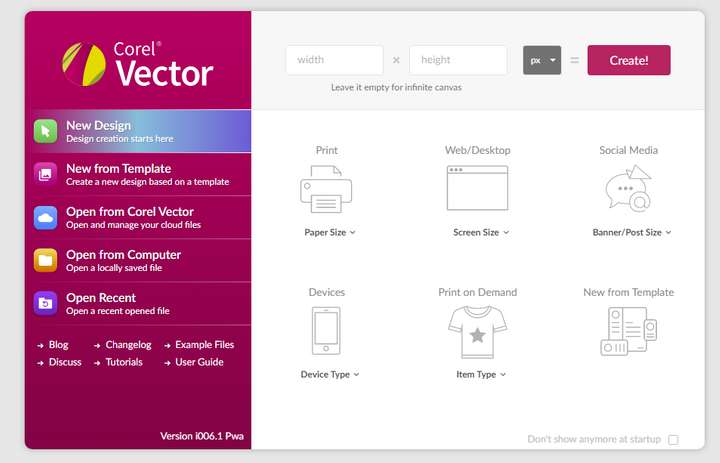
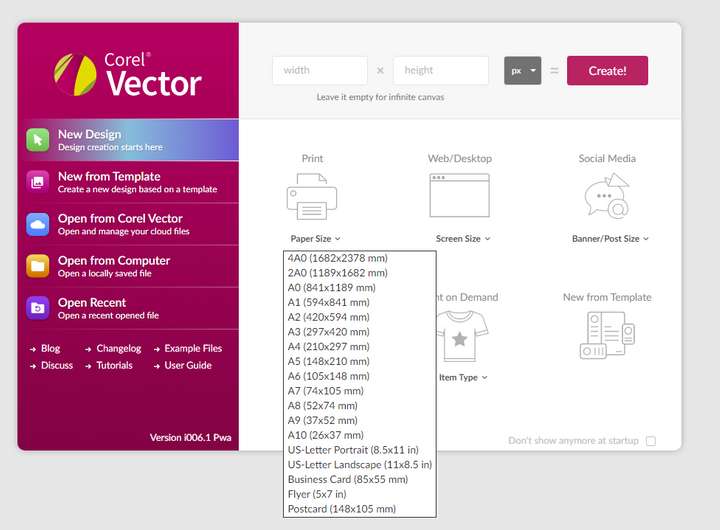
              Corel Vector (before Gravit Designer) uses a more logical visual model, which I don't exactly love myself, but I can actually navigate it easily and quickly, and the symbols are helpful.

              It's made for younger designers, and a different type of designer than the VS average user probably, but the team behind it has grasped the concept and even got templates included in a sensible way, without them getting in the way of all those starting from a blank page:
              0_1661026614557_d81e6e15-6467-483d-acca-2c670b93691e-image.png

              0_1661026635047_696fecce-32df-4561-8ad8-dc18d92ff273-image.png

              0_1661026848577_6919d550-eff0-4875-84d4-cc1233ceef4f-image.png

              🍏 macOS Sequoia Apple Silicon

              IgullI T 2 Replies Last reply Reply Quote 1
              • BoldlineB Offline
                Boldline
                last edited by

                @ingolf I agree the affinity approach with the same icon for every option misses an opportunity. At the same time, the Corel example with the visuals looks really tacky and unappealing- unprofessional. I'm sure a happy medium can be achieved

                🍎 macOS Tahoe 26.2, Mac mini (M1, 2020), Chip Apple M1, Memory 16 GB
                Cintiq 27QHD Display and LG Ultra HD Display

                1 Reply Last reply Reply Quote 0
                • IgullI Offline
                  Igull @Ingolf
                  last edited by

                  @Ingolf said in Standard and advanced New document setup mode:

                  It's made for younger designers,

                  Obviously aimed at folks like myself then, I'm only 18 (in my head, the body is more like 53 higher than that 🙂 )

                  I don't actually mind this type of arrangement where there is a simpler grouping of document types along with a drop-down list. Again, as long as it's all eminently adjustable and you can add your own - why not. The likes of Apple Pages (among many others) also use this kind of arrangement to good use for everyone. It's well to remember that professionals are only amateurs that get paid for their services 🙂

                  Neil

                  iMac 27" 2015 Catalina 32Gb, MacBook Pro 13" 2016 Monterey 8Gb, Mac Mini M2 2023 8Gb

                  1 Reply Last reply Reply Quote 0
                  • T Offline
                    tudor @Ingolf
                    last edited by

                    @Ingolf said in Standard and advanced New document setup mode:

                    This model from Serif, created and executed by a simpleton, might be just as good as a detailed list in one or two columns. Actually I would prefer a list.

                    Affinity's new document panel works very well for me because I find it simple and logical:

                    1. It lets me pick an output intent from the top menu (print, press-ready, web etc.) and it selects the appropriate color and resolution settings automatically (if press > then CMYK @ 300 dpi.; if web > RGB, 72dpi)
                    2. It lets me pick a preset layout size. It does have a search field, BTW.
                    3. Finally it allows me to customize the settings, if necessary.

                    Three quick, easy steps.

                    BoldlineB 1 Reply Last reply Reply Quote 2
                    • IngolfI Offline
                      Ingolf
                      last edited by Ingolf

                      @tudor

                      I'm not saying it doesn't work, but it's a quick piece put together in a hurry to have the same functionality as other programs and some form of access to templates. But it is a poor, incomplete and clumsy copy of the more elegant, simple and focused dialog from Adobe:
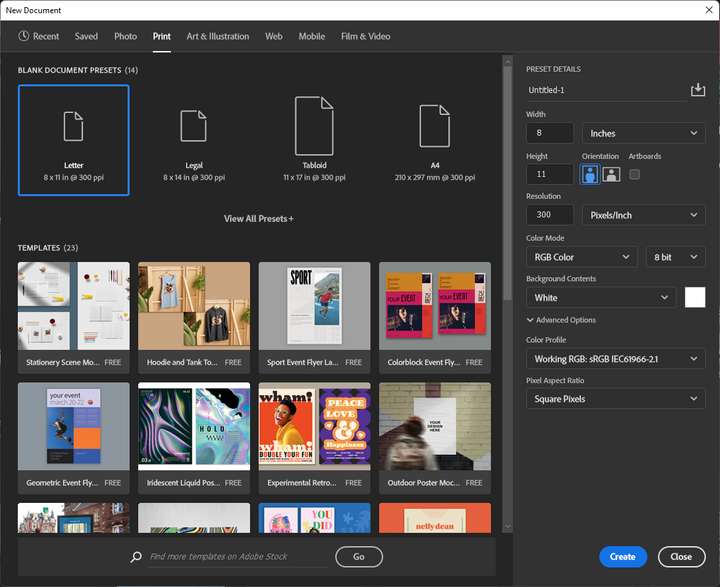
                      0_1661111214343_0f0b60c9-8748-4213-828f-2bab0b72c377-image.png

                      Now that Serif wasn't skilled enough to fill the pane with anything but similar giant icons, they could have provided access to a nice list view as well.

                      🍏 macOS Sequoia Apple Silicon

                      1 Reply Last reply Reply Quote 1
                      • BoldlineB Offline
                        Boldline @tudor
                        last edited by

                        @tudor Those are good points about the Affinity document setup model.

                        Clarifying my earlier comment where I feel they missed the mark is the large repeating rectangle icon for each size - it's the same icon for every size option within each category. that to me just wastes space. the sizing is small in comparison and below the icon
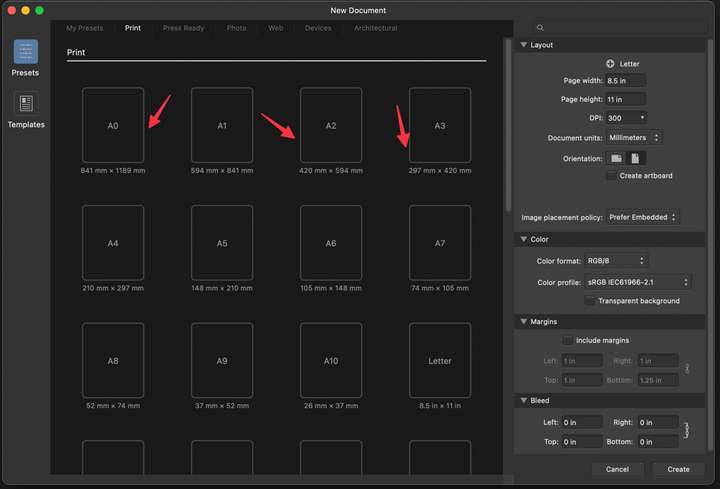
                        0_1661111518269_e47462bb-689b-41de-a6bc-4836717ee80d-CleanShot 2022-08-21 at 15.49.39.png

                        🍎 macOS Tahoe 26.2, Mac mini (M1, 2020), Chip Apple M1, Memory 16 GB
                        Cintiq 27QHD Display and LG Ultra HD Display

                        1 Reply Last reply Reply Quote 1
                        • b77B Offline
                          b77
                          last edited by b77

                          Any post that includes a screenshot gets an upvote from me, even if I might disagree with the post. 🙂

                          MacBook Pro (Intel) running Monterey 12.6.4

                          1 Reply Last reply Reply Quote 2
                          • BoldlineB Offline
                            Boldline
                            last edited by Boldline

                            That's so funny that @Ingolf and I were posting on the same topic at the same time with screenshots lol

                            @b77 so all this time I thought you just really supported my ideas but in reality you just like pretty screen shot pictures? 😛

                            🍎 macOS Tahoe 26.2, Mac mini (M1, 2020), Chip Apple M1, Memory 16 GB
                            Cintiq 27QHD Display and LG Ultra HD Display

                            b77B 1 Reply Last reply Reply Quote 0
                            • b77B Offline
                              b77 @Boldline
                              last edited by

                              @Boldline Yes, I like big screenshots and I cannot lie. 🙂

                              MacBook Pro (Intel) running Monterey 12.6.4

                              1 Reply Last reply Reply Quote 1
                              • First post
                                Last post