<title>
<![CDATA[ Little indicator Sign "°" for Path Sketch Tool to know that a Shape is closed ]]>
</title>
<description>
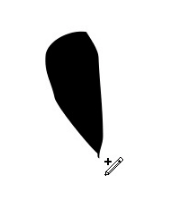
<![CDATA[ <p>I thought a little indicator sign "°" for the Path Sketch tool would be helpful.<br />
So you know and see, that a shape is closed.</p>
<p><a href="https://recordit.co/mBtd9Y9xKW" rel="nofollow">Video Example is from Xara which has a similar Tool</a></p>
<p><img src="/forum/assets/uploads/files/1661342134639-path-sketch-indicator.png" alt="0_1661342035822_Path Sketch Indicator.png" class="img-responsive img-markdown" /></p>
<p>Edited:<br />
i changed the sign</p>
]]>
</description>
<link>https://www.vectorstyler.com/forum//topic/2365/little-indicator-sign-for-path-sketch-tool-to-know-that-a-shape-is-closed</link>
<generator>RSS for Node</generator>
<lastBuildDate>Thu, 05 Jun 2025 09:25:50 GMT</lastBuildDate>
<atom:link href="https://www.vectorstyler.com/forum//topic/2365.rss" rel="self" type="application/rss+xml"/>
<pubDate>Wed, 24 Aug 2022 11:54:04 GMT</pubDate>
<ttl>60</ttl>
<item>
<title>
<![CDATA[ Reply to Little indicator Sign "°" for Path Sketch Tool to know that a Shape is closed on Thu, 25 Aug 2022 10:32:43 GMT ]]>
</title>
<description>
<![CDATA[ <p>I thought a little indicator sign "°" for the Path Sketch tool would be helpful.<br />
So you know and see, that a shape is closed.</p>
<p><a href="https://recordit.co/mBtd9Y9xKW" rel="nofollow">Video Example is from Xara which has a similar Tool</a></p>
<p><img src="/forum/assets/uploads/files/1661342134639-path-sketch-indicator.png" alt="0_1661342035822_Path Sketch Indicator.png" class="img-responsive img-markdown" /></p>
<p>Edited:<br />
i changed the sign</p>
]]>
</description>
<link>https://www.vectorstyler.com/forum//post/13898</link>
<guid isPermaLink="true">https://www.vectorstyler.com/forum//post/13898</guid>
<dc:creator>
...</dc:creator>
<pubDate>Thu, 25 Aug 2022 10:32:43 GMT</pubDate>
</item>
<item>
<title>
<![CDATA[ Reply to Little indicator Sign "°" for Path Sketch Tool to know that a Shape is closed on Invalid Date ]]>
</title>
<description>
<![CDATA[ <p><a class="plugin-mentions-user plugin-mentions-a" href="https://www.vectorstyler.com/forum//uid/138">@Subpath</a> Would this also be needed in the Pencil tool?</p>
]]>
</description>
<link>https://www.vectorstyler.com/forum//post/13903</link>
<guid isPermaLink="true">https://www.vectorstyler.com/forum//post/13903</guid>
<dc:creator>
<![CDATA[ VectorStyler ]]>
</dc:creator>
<pubDate>Invalid Date</pubDate>
</item>
<item>
<title>
<![CDATA[ Reply to Little indicator Sign "°" for Path Sketch Tool to know that a Shape is closed on Wed, 24 Aug 2022 12:42:33 GMT ]]>
</title>
<description>
<![CDATA[ <p>We have the circle indicator in the pen tool that makes some sense when you close a shape. An identical symbol in the pencil tool would also makes sense.</p>
<p>But a + sign? That means add something to something. We are closing a shape.</p>
<p>Doesn't that + sign mean the next click will start a new curve? Not that the shape is closed.</p>
]]>
</description>
<link>https://www.vectorstyler.com/forum//post/13908</link>
<guid isPermaLink="true">https://www.vectorstyler.com/forum//post/13908</guid>
<dc:creator>
...</dc:creator>
<pubDate>Wed, 24 Aug 2022 12:42:33 GMT</pubDate>
</item>
<item>
<title>
<![CDATA[ Reply to Little indicator Sign "°" for Path Sketch Tool to know that a Shape is closed on Invalid Date ]]>
</title>
<description>
<![CDATA[ <p>Here we have Affinity which shows all its pointer symbols in action, there are probably too many and you like to verify by checking the help in the status bar.</p>
<p><img src="https://i.imgur.com/ZGMDoA0.gif" alt="alt text" class="img-responsive img-markdown" /></p>
<p>In Affinity this symbol means "Start on new curve" while a small circle means close curve. I guess that's what it also means in Xara. It's Xara that Serif seems to be in British competition with more than anyone.</p>
<p>But all in all, the symbol richness starts to necessitate the status bar.</p>
]]>
</description>
<link>https://www.vectorstyler.com/forum//post/13909</link>
<guid isPermaLink="true">https://www.vectorstyler.com/forum//post/13909</guid>
<dc:creator>
...</dc:creator>
<pubDate>Invalid Date</pubDate>
</item>
<item>
<title>
<![CDATA[ Reply to Little indicator Sign "°" for Path Sketch Tool to know that a Shape is closed on Invalid Date ]]>
</title>
<description>
<![CDATA[ <p><a class="plugin-mentions-user plugin-mentions-a" href="https://www.vectorstyler.com/forum//uid/68">@Ingolf</a></p>
<p>Do not really understand the cause of the circle<br />
symbol on Pencil Tool. It doesnt show me if the<br />
Shape is close or the Nodes are just close togther.</p>
<p>But i would like to have a visuell Notice that a Shape<br />
is closed. That only appears if a shape is closed.</p>
<p>It doesnt matter also to me which symbol is used<br />
as a indicator.</p>
]]>
</description>
<link>https://www.vectorstyler.com/forum//post/13910</link>
<guid isPermaLink="true">https://www.vectorstyler.com/forum//post/13910</guid>
<dc:creator>
...</dc:creator>
<pubDate>Invalid Date</pubDate>
</item>
<item>
<title>
<![CDATA[ Reply to Little indicator Sign "°" for Path Sketch Tool to know that a Shape is closed on Invalid Date ]]>
</title>
<description>
<![CDATA[ <p><a class="plugin-mentions-user plugin-mentions-a" href="https://www.vectorstyler.com/forum//uid/138">@Subpath</a> said in <a href="/forum/post/13910">Little indicator Sign "+" for Path Sketch Tool to know that a Shape is closed</a>:</p>
<blockquote>
<p><a class="plugin-mentions-user plugin-mentions-a" href="https://www.vectorstyler.com/forum//uid/68">@Ingolf</a></p>
<p>Do not really understand the cause of the circle<br />
symbol on Pencil Tool. It doesnt show me if the<br />
Shape is close or the Nodes are just close togther.</p>
</blockquote>
<p>The circle means that the action will close the shape. As is the case in Affinity. Whether or not a finished shape is closed or not from there should be communicated in a status bar or elsewhere, not in the pointer.</p>
]]>
</description>
<link>https://www.vectorstyler.com/forum//post/13911</link>
<guid isPermaLink="true">https://www.vectorstyler.com/forum//post/13911</guid>
<dc:creator>
...</dc:creator>
<pubDate>Invalid Date</pubDate>
</item>
<item>
<title>
<![CDATA[ Reply to Little indicator Sign "°" for Path Sketch Tool to know that a Shape is closed on Wed, 24 Aug 2022 12:57:45 GMT ]]>
</title>
<description>
<![CDATA[ <p><a class="plugin-mentions-user plugin-mentions-a" href="https://www.vectorstyler.com/forum//uid/68">@Ingolf</a> said in <a href="/forum/post/13909">Little indicator Sign "+" for Path Sketch Tool to know that a Shape is closed</a>:</p>
<blockquote>
<p>I guess that's what it also means in Xara.</p>
</blockquote>
<p>In xara it is just a Indicator if a shape is closed<br />
with the Pen sketch tool. As the Video shows.<br />
There is also a little "~" sign when you cut something with the<br />
Sketch tool in xara.</p>
<p>But as Xara cuttin is different from VS<br />
this "~" is not needed</p>
]]>
</description>
<link>https://www.vectorstyler.com/forum//post/13912</link>
<guid isPermaLink="true">https://www.vectorstyler.com/forum//post/13912</guid>
<dc:creator>
...</dc:creator>
<pubDate>Wed, 24 Aug 2022 12:57:45 GMT</pubDate>
</item>
<item>
<title>
<![CDATA[ Reply to Little indicator Sign "°" for Path Sketch Tool to know that a Shape is closed on Invalid Date ]]>
</title>
<description>
<![CDATA[ <p><a class="plugin-mentions-user plugin-mentions-a" href="https://www.vectorstyler.com/forum//uid/68">@Ingolf</a> said in <a href="/forum/post/13911">Little indicator Sign "+" for Path Sketch Tool to know that a Shape is closed</a>:</p>
<blockquote>
<p>should be communicated in a status bar or elsewhere, not in the pointer.</p>
</blockquote>
<p>sorry did not find this practical.<br />
As i Paint i look on the Tool i paint with<br />
and not on the Status bar. I need a few eyes<br />
more to do that.</p>
]]>
</description>
<link>https://www.vectorstyler.com/forum//post/13913</link>
<guid isPermaLink="true">https://www.vectorstyler.com/forum//post/13913</guid>
<dc:creator>
...</dc:creator>
<pubDate>Invalid Date</pubDate>
</item>
<item>
<title>
<![CDATA[ Reply to Little indicator Sign "°" for Path Sketch Tool to know that a Shape is closed on Invalid Date ]]>
</title>
<description>
<![CDATA[ <p>Ah, I have most programs, Xara including (just to try it, never using it, mistake) and they are partly on the wrong track.</p>
<ul>
<li>in Xara means " draw on from this node" but also "close shape" which is misleading. A circle here or some other symbol should show "hereby you close your shape".</li>
</ul>
<p><img src="https://kaaredyret.dk/imgur/pointersymbol2.gif" alt="alt text" class="img-responsive img-markdown" /></p>
<p>I don't buy bad usability. Neither from Xara, despite their 500 attempts to extend the subscription of their oldware.</p>
]]>
</description>
<link>https://www.vectorstyler.com/forum//post/13914</link>
<guid isPermaLink="true">https://www.vectorstyler.com/forum//post/13914</guid>
<dc:creator>
...</dc:creator>
<pubDate>Invalid Date</pubDate>
</item>
<item>
<title>
<![CDATA[ Reply to Little indicator Sign "°" for Path Sketch Tool to know that a Shape is closed on Wed, 24 Aug 2022 13:03:25 GMT ]]>
</title>
<description>
<![CDATA[ <p><a class="plugin-mentions-user plugin-mentions-a" href="https://www.vectorstyler.com/forum//uid/138">@Subpath</a> OK, but in Xara the '+' sign is displayed on the cursor, right?</p>
<p>If a sign would be displayed where the shape gets closed (over that closing node) it would make more sense.</p>
<p>And since VS already displays a circle when you close a shape with the Pen tool, the same circle could be displayed over the node when a shape gets closed with the Path Sketch tool.</p>
<p>This is what Ingolf is saying, if I'm not mistaken.</p>
]]>
</description>
<link>https://www.vectorstyler.com/forum//post/13915</link>
<guid isPermaLink="true">https://www.vectorstyler.com/forum//post/13915</guid>
<dc:creator>
...</dc:creator>
<pubDate>Wed, 24 Aug 2022 13:03:25 GMT</pubDate>
</item>
<item>
<title>
<![CDATA[ Reply to Little indicator Sign "°" for Path Sketch Tool to know that a Shape is closed on Invalid Date ]]>
</title>
<description>
<![CDATA[ <p><a class="plugin-mentions-user plugin-mentions-a" href="https://www.vectorstyler.com/forum//uid/138">@Subpath</a> said in [Little indicator Sign "+" for Path Sketch Tool to know that a Shape is closed]</p>
<blockquote>
<p>As i Paint i look on the Tool i paint with and not on the Status bar. I need a few eyes more to do that.</p>
</blockquote>
<p>True, but bad design is over-communicating, and since a shape can easily be open on purpose, that's secondary information.</p>
]]>
</description>
<link>https://www.vectorstyler.com/forum//post/13916</link>
<guid isPermaLink="true">https://www.vectorstyler.com/forum//post/13916</guid>
<dc:creator>
...</dc:creator>
<pubDate>Invalid Date</pubDate>
</item>
<item>
<title>
<![CDATA[ Reply to Little indicator Sign "°" for Path Sketch Tool to know that a Shape is closed on Wed, 24 Aug 2022 13:05:45 GMT ]]>
</title>
<description>
<![CDATA[ <p><a class="plugin-mentions-user plugin-mentions-a" href="https://www.vectorstyler.com/forum//uid/1">@VectorStyler</a> said in <a href="/forum/post/13903">Little indicator Sign "+" for Path Sketch Tool to know that a Shape is closed</a>:</p>
<blockquote>
<p><a class="plugin-mentions-user plugin-mentions-a" href="https://www.vectorstyler.com/forum//uid/138">@Subpath</a> Would this also be needed in the Pencil tool?</p>
</blockquote>
<p>Had actually only thought of the Path Sketch tool. Because there often times a shape<br />
was not closed.</p>
<p>If it would also be helpful with the Pencil Tool why not.</p>
<p>Basically I just missed some kind of indicator that would show you that a Shape is closed,<br />
so that you don't have to try it out first.</p>
]]>
</description>
<link>https://www.vectorstyler.com/forum//post/13917</link>
<guid isPermaLink="true">https://www.vectorstyler.com/forum//post/13917</guid>
<dc:creator>
...</dc:creator>
<pubDate>Wed, 24 Aug 2022 13:05:45 GMT</pubDate>
</item>
<item>
<title>
<![CDATA[ Reply to Little indicator Sign "°" for Path Sketch Tool to know that a Shape is closed on Invalid Date ]]>
</title>
<description>
<![CDATA[ <p><a class="plugin-mentions-user plugin-mentions-a" href="https://www.vectorstyler.com/forum//uid/138">@Subpath</a> said in <a href="/forum/post/13917">Little indicator Sign "+" for Path Sketch Tool to know that a Shape is closed</a>:</p>
<blockquote>
<p><a class="plugin-mentions-user plugin-mentions-a" href="https://www.vectorstyler.com/forum//uid/1">@VectorStyler</a> said in [Little indicator Sign "+" for Path Sketch Tool to know that a Shape is closed]<br />
If it would also be helpful with the Pencil Tool why not.</p>
</blockquote>
<p>Because the tool symbols signal an action, not a state of something else.</p>
]]>
</description>
<link>https://www.vectorstyler.com/forum//post/13919</link>
<guid isPermaLink="true">https://www.vectorstyler.com/forum//post/13919</guid>
<dc:creator>
...</dc:creator>
<pubDate>Invalid Date</pubDate>
</item>
<item>
<title>
<![CDATA[ Reply to Little indicator Sign "°" for Path Sketch Tool to know that a Shape is closed on Invalid Date ]]>
</title>
<description>
<![CDATA[ <p><a class="plugin-mentions-user plugin-mentions-a" href="https://www.vectorstyler.com/forum//uid/34">@b77</a></p>
<p>It doesn't matter that much to me which icon is ultimately<br />
used as an indicator.<br />
The "+" symbol was just an example of an indicator.</p>
<p>And the small circle on the Pencil Tool would make more sense to me if it appears<br />
at the moment a shape is closed or shortly before.</p>
]]>
</description>
<link>https://www.vectorstyler.com/forum//post/13920</link>
<guid isPermaLink="true">https://www.vectorstyler.com/forum//post/13920</guid>
<dc:creator>
...</dc:creator>
<pubDate>Invalid Date</pubDate>
</item>
<item>
<title>
<![CDATA[ Reply to Little indicator Sign "°" for Path Sketch Tool to know that a Shape is closed on Wed, 24 Aug 2022 13:25:33 GMT ]]>
</title>
<description>
<![CDATA[ <p><a class="plugin-mentions-user plugin-mentions-a" href="https://www.vectorstyler.com/forum//uid/138">@Subpath</a> OK, got the part about '+' being used just as an example. <img
src="https://www.vectorstyler.com/forum//plugins/nodebb-plugin-emoji/emoji/android/1f44d.png?v=ihasou065rs"
class="not-responsive emoji emoji-android emoji--+1"
title=":+1:"
alt="👍"
/></p>
<p>But with the Path Sketch tool I see no use in adding a sign <em>to its cursor</em> when it gets close to intersecting or self-intersecting.</p>
<p>I do like to see an indicator over the closing node itself and after it's been closed.</p>
<p>And it's the same with the Pencil tool, I would say.</p>
]]>
</description>
<link>https://www.vectorstyler.com/forum//post/13921</link>
<guid isPermaLink="true">https://www.vectorstyler.com/forum//post/13921</guid>
<dc:creator>
...</dc:creator>
<pubDate>Wed, 24 Aug 2022 13:25:33 GMT</pubDate>
</item>
<item>
<title>
<![CDATA[ Reply to Little indicator Sign "°" for Path Sketch Tool to know that a Shape is closed on Wed, 24 Aug 2022 13:35:36 GMT ]]>
</title>
<description>
<![CDATA[ <p><a class="plugin-mentions-user plugin-mentions-a" href="https://www.vectorstyler.com/forum//uid/1">@VectorStyler</a></p>
<p>For your Eyes also <img
src="https://www.vectorstyler.com/forum//plugins/nodebb-plugin-emoji/emoji/android/1f642.png?v=ihasou065rs"
class="not-responsive emoji emoji-android emoji--slightly_smiling_face"
title=":)"
alt="🙂"
/><br />
It doesnt matter to me which Symbol for this Indicator<br />
would be used. That "+" Sign was just an Example.</p>
<p>And two questions</p>
<p>1<br />
Should the small circle at the pencil symbol represent a snap radius.<br />
If this were so you could we adjust this snap radius<br />
(larger/smaller) ?</p>
<p>2<br />
A thought of mine was that this circle should maybe only appear<br />
when a shape is about to be closed.<br />
( corelated with the snap radius)</p>
]]>
</description>
<link>https://www.vectorstyler.com/forum//post/13922</link>
<guid isPermaLink="true">https://www.vectorstyler.com/forum//post/13922</guid>
<dc:creator>
...</dc:creator>
<pubDate>Wed, 24 Aug 2022 13:35:36 GMT</pubDate>
</item>
<item>
<title>
<![CDATA[ Reply to Little indicator Sign "°" for Path Sketch Tool to know that a Shape is closed on Wed, 24 Aug 2022 13:36:11 GMT ]]>
</title>
<description>
<![CDATA[ <p><a class="plugin-mentions-user plugin-mentions-a" href="https://www.vectorstyler.com/forum//uid/34">@b77</a> said in <a href="/forum/post/13921">Little indicator Sign "+" for Path Sketch Tool to know that a Shape is closed</a>:</p>
<blockquote>
<p>adding a sign to its cursor when it gets close to intersecting or self-intersecting</p>
</blockquote>
<p>Do not really understand what do you mean with that.<br />
.<br />
.<br />
The Reason for my Request was, when that i draw with Path Sketch Tool<br />
and would like to get a closed Shape, i often missed the Point where the Shape is closed.<br />
Is often a kind of trial and error.</p>
<p>So i though of an Indicator as a help.<br />
And as i saw the little Circle on the Pencil Tool<br />
i though a kind of a snap radius (adjustable)<br />
could also be nice</p>
]]>
</description>
<link>https://www.vectorstyler.com/forum//post/13923</link>
<guid isPermaLink="true">https://www.vectorstyler.com/forum//post/13923</guid>
<dc:creator>
...</dc:creator>
<pubDate>Wed, 24 Aug 2022 13:36:11 GMT</pubDate>
</item>
<item>
<title>
<![CDATA[ Reply to Little indicator Sign "°" for Path Sketch Tool to know that a Shape is closed on Wed, 24 Aug 2022 14:11:41 GMT ]]>
</title>
<description>
<![CDATA[ <p><a class="plugin-mentions-user plugin-mentions-a" href="https://www.vectorstyler.com/forum//uid/138">@Subpath</a> said in <a href="/forum/post/13923">Little indicator Sign "+" for Path Sketch Tool to know that a Shape is closed</a>:</p>
<blockquote>
<p>The Reason for my Request was, when that i draw with Path Sketch Tool<br />
and would like to get a closed Shape, i often missed the Point where the Shape is closed.<br />
Is often a kind of trial and error.</p>
<p>So i though of an Indicator as a help.<br />
And as i saw the little Circle on the Pencil Tool<br />
i though a kind of a snap radius (adjustable)<br />
could also be nice</p>
</blockquote>
<p>So when the path you draw gets real close to the other endpoint, the app should auto-nudge the last node over the other and close the shape?</p>
]]>
</description>
<link>https://www.vectorstyler.com/forum//post/13925</link>
<guid isPermaLink="true">https://www.vectorstyler.com/forum//post/13925</guid>
<dc:creator>
...</dc:creator>
<pubDate>Wed, 24 Aug 2022 14:11:41 GMT</pubDate>
</item>
<item>
<title>
<![CDATA[ Reply to Little indicator Sign "°" for Path Sketch Tool to know that a Shape is closed on Wed, 24 Aug 2022 14:50:58 GMT ]]>
</title>
<description>
<![CDATA[ <p>This is how it works in the pen tool in Vecstorstyler. Is it not what you need? With a possible option whether or not it should snap and at what distance?</p>
<p>(The yellow circle indicates my clicks, that is from the GIF software)</p>
<p><img src="https://i.imgur.com/K2rSutM.gif" alt="Pen GIF" class="img-responsive img-markdown" /></p>
]]>
</description>
<link>https://www.vectorstyler.com/forum//post/13927</link>
<guid isPermaLink="true">https://www.vectorstyler.com/forum//post/13927</guid>
<dc:creator>
...</dc:creator>
<pubDate>Wed, 24 Aug 2022 14:50:58 GMT</pubDate>
</item>
<item>
<title>
<![CDATA[ Reply to Little indicator Sign "°" for Path Sketch Tool to know that a Shape is closed on Wed, 24 Aug 2022 15:23:09 GMT ]]>
</title>
<description>
<![CDATA[ <p><a class="plugin-mentions-user plugin-mentions-a" href="https://www.vectorstyler.com/forum//uid/68">@Ingolf</a></p>
<p>Is, in my eyes, not comparable with the Pen Tool.<br />
Because when you draw with the Path Sketch or the Pencil tool<br />
you often draw a little faster. So you need a somewhat bigger snap radius.<br />
.<br />
.<br />
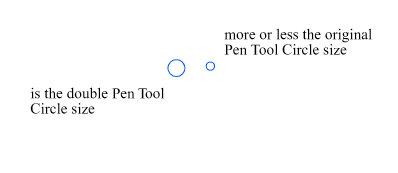
<a class="plugin-mentions-user plugin-mentions-a" href="https://www.vectorstyler.com/forum//uid/34">@b77</a><br />
I don't know what speaks against an (adjustable) snap radius.<br />
Made a Pic where the Circle is the double Size of the Circle<br />
used by now, but could also be a little smaller.<br />
So i think an adjust option would be nice.</p>
<p><img src="/forum/assets/uploads/files/1661354465057-snap-circle-size.png" alt="0_1661354365724_Snap Circle size.png" class="img-responsive img-markdown" /></p>
]]>
</description>
<link>https://www.vectorstyler.com/forum//post/13928</link>
<guid isPermaLink="true">https://www.vectorstyler.com/forum//post/13928</guid>
<dc:creator>
...</dc:creator>
<pubDate>Wed, 24 Aug 2022 15:23:09 GMT</pubDate>
</item>
<item>
<title>
<![CDATA[ Reply to Little indicator Sign "°" for Path Sketch Tool to know that a Shape is closed on Wed, 24 Aug 2022 15:41:16 GMT ]]>
</title>
<description>
<![CDATA[ <p><a class="plugin-mentions-user plugin-mentions-a" href="https://www.vectorstyler.com/forum//uid/34">@b77</a> said in <a href="/forum/post/13925">Little indicator Sign "+" for Path Sketch Tool to know that a Shape is closed</a>:</p>
<blockquote>
<p>So when the path you draw gets real close to the other endpoint, the app should auto-nudge the last node over the other and close the shape?</p>
</blockquote>
<p>in principle, yes<br />
this is the extended version of my original idea.</p>
<p>Originally I just wanted an indicator that a Shape is closed.</p>
]]>
</description>
<link>https://www.vectorstyler.com/forum//post/13929</link>
<guid isPermaLink="true">https://www.vectorstyler.com/forum//post/13929</guid>
<dc:creator>
...</dc:creator>
<pubDate>Wed, 24 Aug 2022 15:41:16 GMT</pubDate>
</item>
<item>
<title>
<![CDATA[ Reply to Little indicator Sign "°" for Path Sketch Tool to know that a Shape is closed on Invalid Date ]]>
</title>
<description>
<![CDATA[ <p><a class="plugin-mentions-user plugin-mentions-a" href="https://www.vectorstyler.com/forum//uid/138">@Subpath</a> said in <a href="/forum/post/13928">Little indicator Sign "+" for Path Sketch Tool to know that a Shape is closed</a>:</p>
<blockquote>
<p><a class="plugin-mentions-user plugin-mentions-a" href="https://www.vectorstyler.com/forum//uid/68">@Ingolf</a></p>
<p>Is, in my eyes, not comparable with the Pen Tool.<br />
Because when you draw with the Path Sketch or the Pencil tool<br />
you often draw a little faster. So you need a somewhat bigger snap radius.<br />
.<br />
.<br />
<a class="plugin-mentions-user plugin-mentions-a" href="https://www.vectorstyler.com/forum//uid/34">@b77</a><br />
I don't know what speaks against an (adjustable) snap radius.<br />
Made a Pic where the Circle is the double Size of the Circle<br />
used by now, but could also be a little smaller.<br />
So i think an adjust option would be nice.</p>
</blockquote>
<p>I requested it in the pen tool so I understand now and agree. A "Snap when closing" (with better tooltip) and a snap radius setting in a context sensitive toolbar would make perfect sense to me. Even shorter label would be fine.</p>
]]>
</description>
<link>https://www.vectorstyler.com/forum//post/13930</link>
<guid isPermaLink="true">https://www.vectorstyler.com/forum//post/13930</guid>
<dc:creator>
...</dc:creator>
<pubDate>Invalid Date</pubDate>
</item>
<item>
<title>
<![CDATA[ Reply to Little indicator Sign "°" for Path Sketch Tool to know that a Shape is closed on Invalid Date ]]>
</title>
<description>
<![CDATA[ <p><a class="plugin-mentions-user plugin-mentions-a" href="https://www.vectorstyler.com/forum//uid/138">@Subpath</a> Nothing against a 'close' indicator and snap radius either. <img
src="https://www.vectorstyler.com/forum//plugins/nodebb-plugin-emoji/emoji/android/1f44d.png?v=ihasou065rs"
class="not-responsive emoji emoji-android emoji--+1"
title=":+1:"
alt="👍"
/><br />
It's just that your first screen capture from Xara showed the indicator on the cursor, not on the shape where it should be IMO.</p>
]]>
</description>
<link>https://www.vectorstyler.com/forum//post/13931</link>
<guid isPermaLink="true">https://www.vectorstyler.com/forum//post/13931</guid>
<dc:creator>
...</dc:creator>
<pubDate>Invalid Date</pubDate>
</item>
<item>
<title>
<![CDATA[ Reply to Little indicator Sign "°" for Path Sketch Tool to know that a Shape is closed on Wed, 24 Aug 2022 16:16:09 GMT ]]>
</title>
<description>
<![CDATA[ <p><a class="plugin-mentions-user plugin-mentions-a" href="https://www.vectorstyler.com/forum//uid/138">@Subpath</a> Btw, the Path Sketch tool allows you to redraw the last stroke if you press Option/Alt.</p>
]]>
</description>
<link>https://www.vectorstyler.com/forum//post/13932</link>
<guid isPermaLink="true">https://www.vectorstyler.com/forum//post/13932</guid>
<dc:creator>
...</dc:creator>
<pubDate>Wed, 24 Aug 2022 16:16:09 GMT</pubDate>
</item>
<item>
<title>
<![CDATA[ Reply to Little indicator Sign "°" for Path Sketch Tool to know that a Shape is closed on Invalid Date ]]>
</title>
<description>
<![CDATA[ <p><a class="plugin-mentions-user plugin-mentions-a" href="https://www.vectorstyler.com/forum//uid/34">@b77</a> said in <a href="/forum/post/13932">Little indicator Sign "+" for Path Sketch Tool to know that a Shape is closed</a>:</p>
<blockquote>
<p><a class="plugin-mentions-user plugin-mentions-a" href="https://www.vectorstyler.com/forum//uid/138">@Subpath</a> Btw, the Path Sketch tool allows you to redraw the last stroke if you press Option/Alt.</p>
</blockquote>
<p>interesting, could you tell me a little more in detail<br />
how this work ? Could not figure it out by myself.</p>
]]>
</description>
<link>https://www.vectorstyler.com/forum//post/13933</link>
<guid isPermaLink="true">https://www.vectorstyler.com/forum//post/13933</guid>
<dc:creator>
...</dc:creator>
<pubDate>Invalid Date</pubDate>
</item>
<item>
<title>
<![CDATA[ Reply to Little indicator Sign "°" for Path Sketch Tool to know that a Shape is closed on Wed, 24 Aug 2022 16:25:00 GMT ]]>
</title>
<description>
<![CDATA[ <p><a class="plugin-mentions-user plugin-mentions-a" href="https://www.vectorstyler.com/forum//uid/138">@Subpath</a> After you draw a stroke and it's not exactly what you want (let's say, it didn't intersect the object you wanted or it didn't self-intersect), <em>hold down</em> Option/Alt and draw it again.</p>
]]>
</description>
<link>https://www.vectorstyler.com/forum//post/13934</link>
<guid isPermaLink="true">https://www.vectorstyler.com/forum//post/13934</guid>
<dc:creator>
...</dc:creator>
<pubDate>Wed, 24 Aug 2022 16:25:00 GMT</pubDate>
</item>