VectorStyler
    • Categories
    • Unread
    • Recent
    • Tags
    • Popular
    • Register
    • Login

    What are the steps to edit cursor right-click menu?

    Scheduled Pinned Locked Moved Questions and Support
    6 Posts 3 Posters 5.8k Views 2 Watching
    Loading More Posts
    • Oldest to Newest
    • Newest to Oldest
    • Most Votes
    Reply
    • Reply as topic
    Log in to reply
    This topic has been deleted. Only users with topic management privileges can see it.
    • BoldlineB Online
      Boldline
      last edited by

      Probably a very simple question but what is the way to edit the right-click submenu from the cursor?
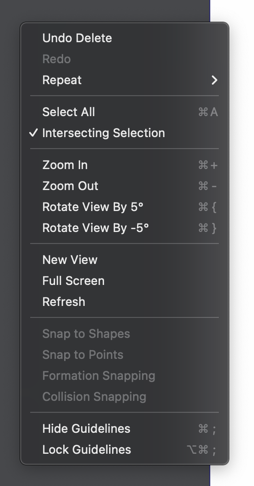
      0_1661778862141_f2e6f2ff-5e09-4975-b970-4083085aad7f-CleanShot 2022-08-29 at 09.14.14.png

      🍎 macOS Tahoe 26.2, Mac mini (M1, 2020), Chip Apple M1, Memory 16 GB
      Cintiq 27QHD Display and LG Ultra HD Display

      VectorStylerV 1 Reply Last reply Reply Quote 0
      • VectorStylerV Offline
        VectorStyler @Boldline
        last edited by

        @Boldline Yes, on Mac: VectorStyler -> Contextual Menu. Same as menu customization.

        BoldlineB 1 Reply Last reply Reply Quote 1
        • BoldlineB Online
          Boldline @VectorStyler
          last edited by

          @VectorStyler Thanks - couldn't the name for this get confused with people thinking they can edit the contextual menu that shows itself based on the tool selected? When I saw that option, " contextual menu" I assumed that gave me options to edit what showed up based on the tool selected in the temporary menu right above the view window

          🍎 macOS Tahoe 26.2, Mac mini (M1, 2020), Chip Apple M1, Memory 16 GB
          Cintiq 27QHD Display and LG Ultra HD Display

          S 1 Reply Last reply Reply Quote 1
          • S Offline
            Subpath @Boldline
            last edited by Subpath

            @Boldline said in What are the steps to edit cursor right-click menu?:

            couldn't the name for this get confused with people thinking they can edit the contextual menu that shows itself based on the tool selected?

            this was happened to me

            at first I thought it was for Context Menu
            (right mouse button menu)

            then I was unsure because of the many options
            and I thought it could be for Context Toolbar

            other Name dont know
            maybe right mouse contex Menu ?

            Win 11
            CPU: AMD Ryzen 5 9600X, 6-core.
            GPU: Nvidia Geforce RTX 5070.

            BoldlineB 1 Reply Last reply Reply Quote 2
            • BoldlineB Online
              Boldline @Subpath
              last edited by Boldline

              @Subpath Yeah - I can see how the right mouse click menu is a "contextual menu" as the items in there change based on what is happening in the file at the time of the click. I agree with you that there needs to be some way to distinguish this menu from the other contextual menu in the long run because if i remember correctly, there will eventually be some customization offered to the other menu as well.

              I REALLY love the customization options VS provides - it really helps me to expedite my workflow and cater the program the way I want it set up.
              Swapping in and out the options for the right-click menu was super easy

              🍎 macOS Tahoe 26.2, Mac mini (M1, 2020), Chip Apple M1, Memory 16 GB
              Cintiq 27QHD Display and LG Ultra HD Display

              S 1 Reply Last reply Reply Quote 2
              • S Offline
                Subpath @Boldline
                last edited by

                @Boldline

                yes, customization is one of the things I appreciate so much about VS.
                I can't have enough of them. 🙂

                Win 11
                CPU: AMD Ryzen 5 9600X, 6-core.
                GPU: Nvidia Geforce RTX 5070.

                1 Reply Last reply Reply Quote 0
                • First post
                  Last post
