Is this selection box intentional?
-
I was curious if this selection box in the lower left corner of the triangle I made is normal and if so, what does it represent?
Here is a video showing the steps. When i make a shape and convert to curves, then add a center point and delete the edge nodes at the top, and then select the shape, I get an extra selection box at the bottom left side - is this because it's the starting node?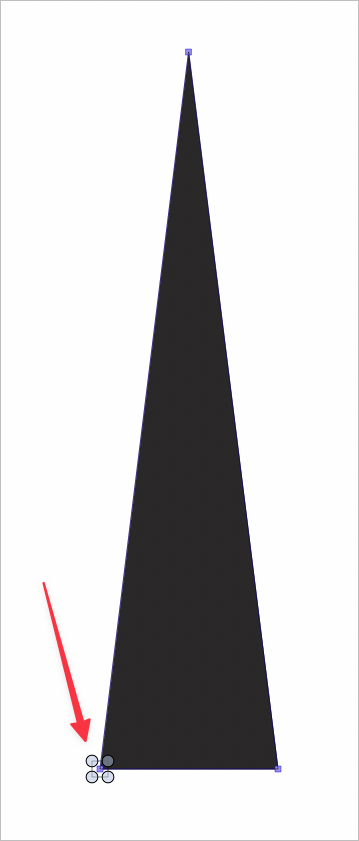
🍎 macOS Tahoe 26.2, Mac mini (M1, 2020), Chip Apple M1, Memory 16 GB
Cintiq 27QHD Display and LG Ultra HD Display -
@Boldline Yes, this means a single node is selected with the transform tool.
Selecting the node with the node tool and then changing to the transform tool can result in this type of selection. -
@Boldline If a single node remains selected, it could be a bug. I will try to replicate this.
-
@VectorStyler said in Is this selection box intentional?:
@Boldline If a single node remains selected, it could be a bug. I will try to replicate this.
There seems to be an extra node at the end of the process each time, but what's odd is nothing extra seems to remain after deselecting. I tried three times in this video - it seems to matter if you double click to create a center point or not - if you do, the extra node seems to be there temporarily. if you don't add an extra node in the center, it will look correct. I tried with a couple different shapes.
Further study update:
With any existing shape if I add a node (double click on path for example) and then delete another and then switch to the transform tool, the extra selection of a node appears. It does remain permanently, but it is a little distracting and confusing lol -
@Boldline I can replicate this issue and it seems to be a bug, it should have the whole shape bounding box. It will be fixed in the next build.

