VectorStyler
    • Categories
    • Unread
    • Recent
    • Tags
    • Popular
    • Register
    • Login

    Image Effects

    Scheduled Pinned Locked Moved VectorStyler 1.1 Bugs
    27 Posts 3 Posters 39.5k Views 3 Watching
    Loading More Posts
    • Oldest to Newest
    • Newest to Oldest
    • Most Votes
    Reply
    • Reply as topic
    Log in to reply
    This topic has been deleted. Only users with topic management privileges can see it.
    • VectorStylerV Offline
      VectorStyler @Ingolf
      last edited by

      @Ingolf said in Image Effects:

      But I believe I have seen such issues many times in VS for a year not just this document

      This could be also caused by the Metal or OpenCL driver or how VS uses it, which can be different per system.
      One thing to try is to set the Compute Engine in the Preferences -> Performance tab to Software and try to replicate this error.
      In this way at least we can narrow it down if its is a GPU issue or not.

      1 Reply Last reply Reply Quote 0
      • IngolfI Offline
        Ingolf
        last edited by

        Pretty sure now that it doesn't occur on Windows (software).

        Think I narrowed it down on macOS:

        • With metal - metal in prefs I reproduced it instantly
        • Restarted VS
        • I set software - software
        • Restarted VS
        • No issues
        • Set only compute engine to Metal, display mode to software
        • Restarted VS
        • Again reproduced it instantly
        • Reversed that setting to Display metal, compute enging software
        • Restarted VS
        • No issues

        So compute engine set to Metal on macOS seems to be a good place to look for the root cause.

        🍏 macOS Sequoia Apple Silicon

        VectorStylerV 1 Reply Last reply Reply Quote 2
        • VectorStylerV Offline
          VectorStyler @Ingolf
          last edited by

          @Ingolf Got it. I will try to replicate this on Monterey.

          1 Reply Last reply Reply Quote 0
          • IngolfI Offline
            Ingolf
            last edited by

            Saw this on Montery and now Ventura.

            🍏 macOS Sequoia Apple Silicon

            1 Reply Last reply Reply Quote 1
            • J Offline
              Jayanta Das @VectorStyler
              last edited by

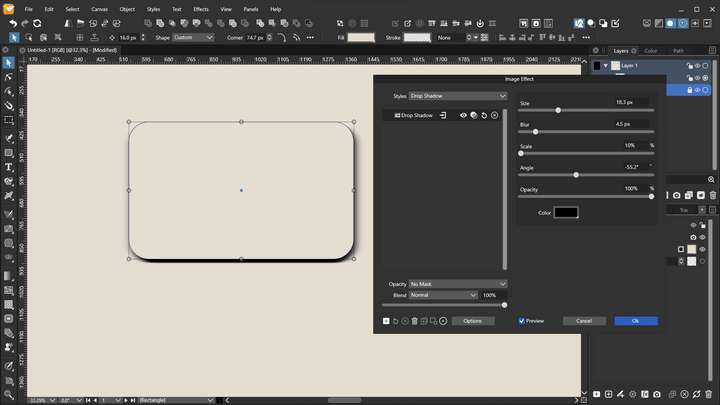
              The effect of the Angle is very small, as it controls the direction of the blur, not the direction of the glow.

              @VectorStyler Is the angle in drop shadow also for controlling the direction of blur and not the angle of light/shadow?
              0_1669210101409_Screenshot_20221123_185803.png

              Mac Mini M4 Pro | 24Gb
              WIndows 11 | Intel i5 11Gen
              Wacom Intuos Pro

              VectorStylerV 1 Reply Last reply Reply Quote 0
              • VectorStylerV Offline
                VectorStyler @Jayanta Das
                last edited by

                @Jayanta-Das No, the angle of drop shadow is the direction of the shadow.

                J 1 Reply Last reply Reply Quote 0
                • J Offline
                  Jayanta Das @VectorStyler
                  last edited by

                  @VectorStyler What I am doing to do in create button pressed and normal state like the image below:
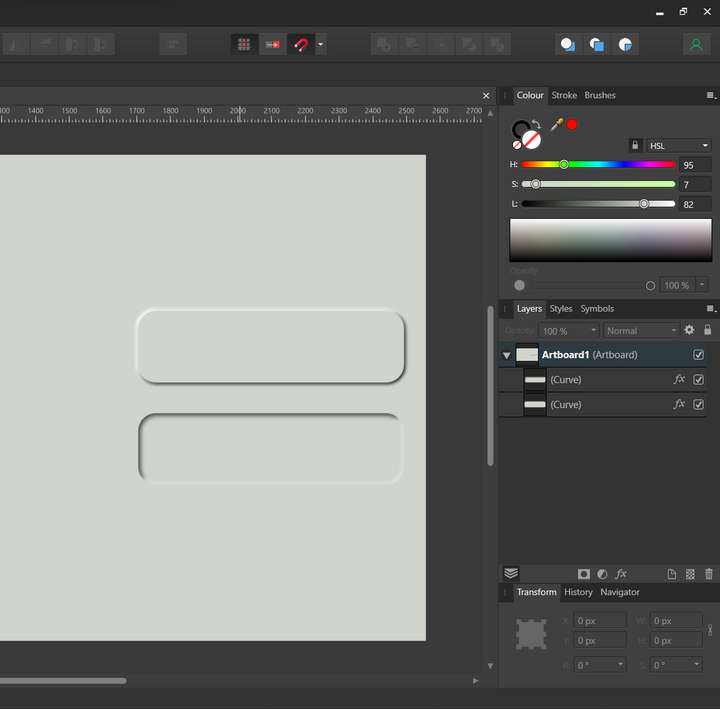
                  0_1669215414795_Screenshot_20221123_202515.png

                  But when I apply outer shadow and increase blur it bleed to all direction.
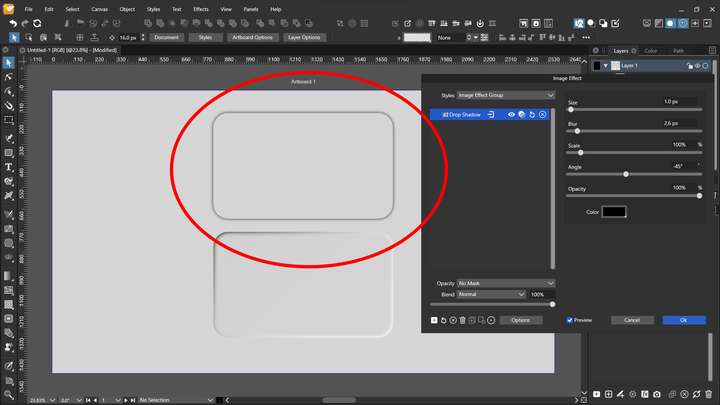
                  0_1669216997515_Screenshot_20221123_204821.png

                  I found the there is no offset of control of shadow like this.

                  Mac Mini M4 Pro | 24Gb
                  WIndows 11 | Intel i5 11Gen
                  Wacom Intuos Pro

                  VectorStylerV 2 Replies Last reply Reply Quote 0
                  • VectorStylerV Offline
                    VectorStyler @Jayanta Das
                    last edited by

                    @Jayanta-Das I'm not sure that it applies to this case, but in Drop Shadow there is the Size field that controls the offset.

                    1 Reply Last reply Reply Quote 0
                    • VectorStylerV Offline
                      VectorStyler @Jayanta Das
                      last edited by

                      @Jayanta-Das As for the other images, I think these look more like using Emboss.

                      J 1 Reply Last reply Reply Quote 0
                      • J Offline
                        Jayanta Das @VectorStyler
                        last edited by Jayanta Das

                        @VectorStyler Emboss effect applied within the shape. I am trying to get neumorphic style button where shadow and lights are applied to outside of the shape
                        Edit: When the button is in pressed state effects are applied inside the shape and in normal state effects are applied outside of the shape.

                        Mac Mini M4 Pro | 24Gb
                        WIndows 11 | Intel i5 11Gen
                        Wacom Intuos Pro

                        1 Reply Last reply Reply Quote 1
                        • J Offline
                          Jayanta Das
                          last edited by

                          @VectorStyler If you could add offset control in shadow and glow it would be a great addition.

                          Mac Mini M4 Pro | 24Gb
                          WIndows 11 | Intel i5 11Gen
                          Wacom Intuos Pro

                          VectorStylerV 1 Reply Last reply Reply Quote 0
                          • VectorStylerV Offline
                            VectorStyler @Jayanta Das
                            last edited by

                            @Jayanta-Das said in Image Effects:

                            If you could add offset control in shadow and glow it would be a great addition.

                            I think, technically this is not difficult, but how a glow with offset would look like?

                            J 1 Reply Last reply Reply Quote 0
                            • J Offline
                              Jayanta Das @VectorStyler
                              last edited by

                              @VectorStyler Sorry I mean Offset to shadow and angle to control the direction of glow.

                              Mac Mini M4 Pro | 24Gb
                              WIndows 11 | Intel i5 11Gen
                              Wacom Intuos Pro

                              1 Reply Last reply Reply Quote 1
                              • First post
                                Last post