VectorStyler
    • Categories
    • Unread
    • Recent
    • Tags
    • Popular
    • Register
    • Login

    Screen visibility Mode
    Scheduled Pinned Locked Moved Features and Ideas
    3 Posts 2 Posters 3.3k Views 1 Watching
    Loading More Posts
    • Oldest to Newest
    • Newest to Oldest
    • Most Votes
    Reply
    • Reply as topic
    Log in to reply
    This topic has been deleted. Only users with topic management privileges can see it.
    • BoldlineB Online
      Boldline
      last edited by

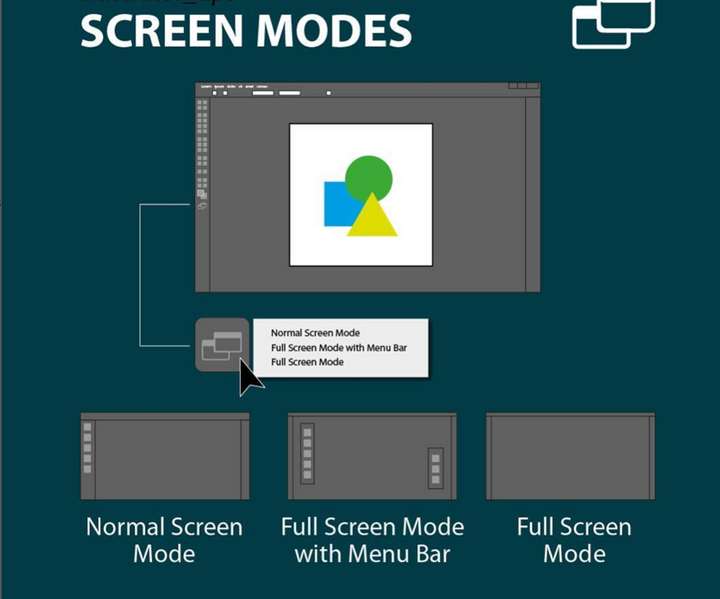
      This would come in handy for times we are doing a lot of one repeated task - like using the pen tool to trace a path or editing nodes all along a set of paths
      Different ipad apps have this option to hide away all panels and such until needed again - freeing up a lot of screen real estate and making it easier to focus on a task at hand
      0_1669271436612_e25c182b-9b0d-4d85-8a57-f27ccbd9e287-CleanShot 2022-11-24 at 01.28.29.png

      🍎 macOS Tahoe 26.2, Mac mini (M1, 2020), Chip Apple M1, Memory 16 GB
      Cintiq 27QHD Display and LG Ultra HD Display

      VectorStylerV 1 Reply Last reply Reply Quote 1
      • VectorStylerV Offline
        VectorStyler @Boldline
        last edited by

        @Boldline Added to the backlog.

        BoldlineB 1 Reply Last reply Reply Quote 1
        • BoldlineB Online
          Boldline @VectorStyler
          last edited by Boldline

          @VectorStyler Terrific! this would really be handy. In my head I was thinking it could be toggled easily by a button on the upper right corner. that way it could be easy to access. Ideally, keyboard shortcuts alone would not return it to all panels in view state. once we have three-four keyboard shortcut ability, that could be added there is space is an issue on the main UI


          🍎 macOS Tahoe 26.2, Mac mini (M1, 2020), Chip Apple M1, Memory 16 GB
          Cintiq 27QHD Display and LG Ultra HD Display

          1 Reply Last reply Reply Quote 0
          • First post
            Last post