VectorStyler
    • Categories
    • Unread
    • Recent
    • Tags
    • Popular
    • Register
    • Login

    Align to Shape does not work as expected

    Scheduled Pinned Locked Moved Questions and Support
    5 Posts 2 Posters 4.5k Views 2 Watching
    Loading More Posts
    • Oldest to Newest
    • Newest to Oldest
    • Most Votes
    Reply
    • Reply as topic
    Log in to reply
    This topic has been deleted. Only users with topic management privileges can see it.
    • S Offline
      Subpath
      last edited by Subpath

      I do not know the cause, what happened here
      seems to me like a bug.

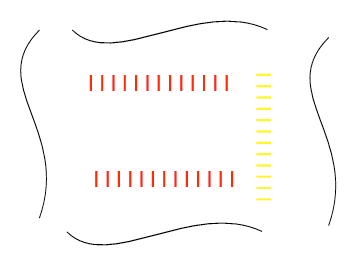
      There is no transformation involved
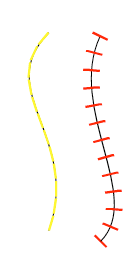
      I made the strokes in the direction I wanted them to go

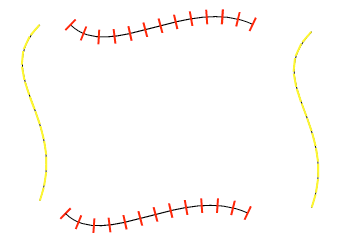
      But if I align them from left to right or right to left
      strokes will always be rotated

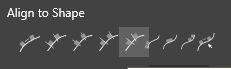
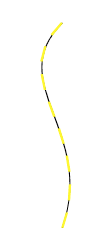
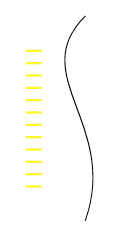
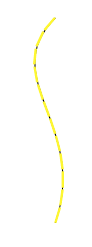
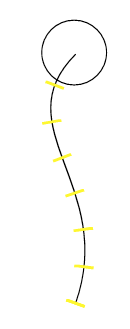
      i used this one to align the Strokes
      0_1669798780330_Align-question-4.png

      0_1669798614175_Bildschirminhalt erfassen-1.png
      .
      0_1669798479310_Align-question-1.png
      .
      .
      the result should look like the right one
      0_1669798535421_Bildschirminhalt erfassen-3.png

      Win 11
      CPU: AMD Ryzen 5 9600X, 6-core.
      GPU: Nvidia Geforce RTX 5070.

      VectorStylerV 1 Reply Last reply Reply Quote 0
      • VectorStylerV Offline
        VectorStyler @Subpath
        last edited by

        @Subpath When aligning to path, the objects are rotated to the path direction. This rotation is relative to the base axis.
        In this case all the yellow lines are horizontal, so they will appear as they are along the path.
        Rotate all the yellow lines by 90 degree (to be the same as the red ones) and try with that.

        S 1 Reply Last reply Reply Quote 0
        • S Offline
          Subpath @VectorStyler
          last edited by

          @VectorStyler

          does not work this way

          0_1669800706044_assen-2.png
          .
          .
          0_1669800737356_sen-3.png

          nor this way

          0_1669800863872_ssen-4.png
          .
          .
          0_1669800878320_sen-5.png

          Win 11
          CPU: AMD Ryzen 5 9600X, 6-core.
          GPU: Nvidia Geforce RTX 5070.

          VectorStylerV 1 Reply Last reply Reply Quote 0
          • VectorStylerV Offline
            VectorStyler @Subpath
            last edited by

            @Subpath Try convert to curves on the yellow lines.

            S 1 Reply Last reply Reply Quote 0
            • S Offline
              Subpath @VectorStyler
              last edited by Subpath

              @VectorStyler

              works after convert to curve
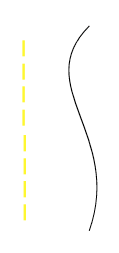
              put i miss this Part here

              0_1669801828053_missing-part.png

              Win 11
              CPU: AMD Ryzen 5 9600X, 6-core.
              GPU: Nvidia Geforce RTX 5070.

              1 Reply Last reply Reply Quote 1
              • First post
                Last post